
UPDATED:
21st April, 2014
YOUTUBE is caching now using LUSCA and storeurl.pl method. Tested and so far working Good, only dailymotion remains now.
==========================================================================
You can also try this. (for automated installation of squid in Ubuntu).
▼
As we all know that Mikrotik web proxy is a basic proxy package , suitable for basic caching , but its not possible to do the caching of Dynamic Contents, youtube videos and many other contents. To accomplish this task you have to add SQUID proxy server , and route all http traffic from mikrotik to squid, then configure squid 2.7 stable9 with storeurl URL rewrite.
I wrote an easy guide regarding squid compilation via its source package and its configuration for caching video and other contents. It’s working good till date, and caching most of the videos including youtube, and many others. I have listed few web sites that are caching good.
Usually, this sort of caching is possible with commercial products only, like an addon of squid name CACHEVIDEO, or hardware products, But with some R&D , hit and trials, & some working configs examples, the caching worked. Please be aware that i have not reinvented the wheel, the method is out there since few years, but with some modifications and updates, its now working very good. I am still working on it to improve it. This config have few junk entries that are outdated or not required any more. You should do some research on it, like few directives on refresh patterns that are not supported in 2.7
This guide is actually its a collection of squid and storeurl configuration guides, picked up from multiple public and shared resources.Its not 100% perfect, but it does it job at some acceptable level :), and above all, ITS FREE 😉 and we all love Free items 😀 don’t we?
/ zaib
Blow is a quick reference guide for Squid 2.7 stable9 installation on Ubuntu ver 10.4 (or 12) with youtube & few other contents caching support. (or any linux flavor with Squid 2.7, because storeurl method is supported in squid 2.7 only ).
.
Following web sites are tested and working good 🙂
- General web sites for downloads → like filehippo & many others
- APPLE application downloads → like .ipsw or http://www.felixbruns.de/iPod/firmware/
- http://www.youtube.com → Videos Tested
- http://www.tune.pk → Videos Tested [most of videos comes from youtube]
- http://www.apniisp.com → Audio & Videos Tested
- http://www.facebook.com → Videos Tested [https not supported ***]
- http://www.vimeo.com → Videos Tested
- www.blip.tv → Videos Tested
- http://www.aol.com → Videos Tested
- http://www.msn.com → Videos Tested
- http://www.dailymotion.com → Partial Working
- http://www.metacafe.com → Videos Tested
- some pron sites 😦 → please block all porn sites Using open dns or other mechanism
- http://www.tube?.com → Videos Tested
- http://www.youjiz?.com/ → Videos Tested
- http://www.?videos.com → Videos Tested
- http://www.pr0nhu?.com → Videos Tested
- and many others
.
If this method helps you, please post your comment.
.
Ok here we start . . .
Lets start.
First update UBUNTU and install some support tools for squid compilation by
apt-get update
apt-get install -y gcc build-essential sharutils ccze libzip-dev automake1.9
.
Now we have to download and compile SQUID 2.7 STABLE9
mkdir /temp
cd /temp
wget https://mikrotik-squid.googlecode.com/files/squid-2.7.STABLE9%2Bpatch.tar.gz
tar xvf squid-2.7.STABLE9+patch.tar.gz
cd squid-2.7.STABLE9
.
Now we have to compile SQUID , You can add/remove your required configure options.
./configure --prefix=/usr --exec_prefix=/usr --bindir=/usr/sbin --sbindir=/usr/sbin --libexecdir=/usr/lib/squid --sysconfdir=/etc/squid \
--localstatedir=/var/spool/squid --datadir=/usr/share/squid --enable-async-io=24 --with-aufs-threads=24 --with-pthreads --enable-storeio=aufs \
--enable-linux-netfilter --enable-arp-acl --enable-epoll --enable-removal-policies=heap,lru --with-aio --with-dl --enable-snmp \
--enable-delay-pools --enable-htcp --enable-cache-digests --disable-unlinkd --enable-large-cache-files --with-large-files \
--enable-err-languages=English --enable-default-err-language=English --with-maxfd=65536
Or if you want 64bit, try below
./configure \
--prefix=/usr \
--exec_prefix=/usr \
--bindir=/usr/sbin \
--sbindir=/usr/sbin \
--libexecdir=/usr/lib/squid \
--sysconfdir=/etc/squid \
--localstatedir=/var/spool/squid \
--datadir=/usr/share/squid \
--enable-async-io=24 \
--with-aufs-threads=24 \
--with-pthreads \
--enable-storeio=aufs \
--enable-linux-netfilter \
--enable-arp-acl \
--enable-epoll \
--enable-removal-policies=heap,lru \
--with-aio --with-dl \
--enable-snmp \
--enable-delay-pools \
--enable-htcp \
--enable-cache-digests \
--disable-unlinkd \
--enable-large-cache-files \
--with-large-files \
--enable-err-languages=English \
--enable-default-err-language=English --with-maxfd=65536 \
--enable-carp \
--enable-follow-x-forwarded-for \
--with-maxfd=65536  \
'amd64-debian-linux' 'build_alias=amd64-debian-linux' 'host_alias=amd64-debian-linux' 'target_alias=amd64-debian-linux' 'CFLAGS=-Wall -g -O2' 'LDFLAGS=-Wl,-Bsymbolic-functions' 'CPPFLAGS='
Now issue make and make install commands
[To understand what configure, make and make install does, read following,
http://www.codecoffee.com/tipsforlinux/articles/27.html]
make
make install
Create Log folders (if not exists) and assign write permissions to proxy user
mkdir /var/log/squid
chown proxy:proxy /var/log/squid
↓
Now its time to Edit squid configuration files. open Squid Configuration file by
nano /etc/squid/squid.conf
.
Remove all previous lines , means empty the file, and paste all following lines . . .
# Last Updated : 09th FEBRAURY, 2014 / Syed Jahanzaib
# SQUID 2.7 Stable9 Configuration FILE with updated STOREURL.PL  [jz]
# Tested with Ubuntu 10.4 & 12.4 with compiled version of Squid 2.7 STABLE.9 [jz]
# Various contents copied from multiple public shared sources, personnel configs, hits and trial, VC etc
# It do have lot of junk / un-necessary entries, so remove them if not required.
# Syed Jahanzaib / https://aacable.wordpress.com
# Email: aacable@hotamil.com

# PORT and Transparent Option [jz]
http_port 8080 transparent
server_http11 on

# PID File location, we can use it for various functions later, like for squid status (JZ)
pid_filename /var/run/squid.pid

# Cache Directory , modify it according to your system. [jz]
# but first create directory in root by mkdir /cache1
# and then issue this command  chown proxy:proxy /cache1
# [for ubuntu user is proxy, in Fedora user is SQUID]
# I have set 200 GB for caching reserved just for caching ,
# adjust it according to your need.
# My recommendation is to have one cache_dir per drive. /zaib

# Using 10 GB in this example per drive
store_dir_select_algorithm round-robin

cache_dir aufs /cache-1 10240 16 256

# Cache Replacement Policies [jz]
cache_replacement_policy heap GDSF
memory_replacement_policy heap GDSF

# If you want to enable DATE time n SQUID Logs,use following [jz]
emulate_httpd_log on
logformat squid %tl %6tr %>a %Ss/%03Hs %<st %rm %ru %un %Sh/%<A %mt
log_fqdn off

# How much days to keep users access web logs [jz]
# You need to rotate your log files with a cron job. For example:
# 0 0 * * * /usr/local/squid/bin/squid -k rotate
logfile_rotate 14
debug_options ALL,1

# Squid Logs Section
# access_log none # To disable Squid access log, enable this option

cache_access_log /var/log/squid/access.log
cache_log /var/log/squid/cache.log
#referer_log /var/log/squid/referer.log
cache_store_log /var/log/squid/store.log
#mime_table /etc/squid/mime.conf
log_mime_hdrs off

# I used DNSAMSQ service for fast dns resolving
# so install by using "apt-get install dnsmasq" first / zaib
dns_nameservers 8.8.8.8

ftp_user anonymous@
ftp_list_width 32
ftp_passive on
ftp_sanitycheck on

#ACL Section
acl all src 0.0.0.0/0.0.0.0 # Allow All, you may want to change this to allow your ip series only
acl localhost src 127.0.0.1/255.255.255.255
acl to_localhost dst 127.0.0.0/8

###### cache manager section start, You can remote it if not required ####
# install following
# apt-get install squid-cgi
# add following entry in /etc/squid/cachemgr.conf
# localhost:8080
# then you can access it via http://squid_ip/cgi-bin/cachemgr.cgi

acl manager url_regex -i ^cache_object:// /squid-internal-mgr/
acl managerAdmin src 10.0.0.1 # Change it to your management pc ip
cache_mgr zaib@zaib.com
cachemgr_passwd zaib all
http_access allow manager localhost
http_access allow manager managerAdmin
http_access deny manager
#http_access allow localhost
####### CACHGEMGR END #########

acl SSL_ports port 443 563 # https, snews
acl SSL_ports port 873 # rsync
acl Safe_ports port 80 # http
acl Safe_ports port 21 # ftp
acl Safe_ports port 53 # dns
acl Safe_ports port 443 563 # https, snews
acl Safe_ports port 70 # gopher
acl Safe_ports port 210 # wais
acl Safe_ports port 1025-65535 # unregistered ports
acl Safe_ports port 280 # http-mgmt
acl Safe_ports port 488 # gss-http
acl Safe_ports port 591 # filemaker
acl Safe_ports port 777 # multiling http
acl Safe_ports port 631 # cups
acl Safe_ports port 873 # rsync
acl Safe_ports port 901 # SWAT
acl purge method PURGE
acl CONNECT method CONNECT
http_access allow purge localhost
http_access deny purge
http_access deny !Safe_ports
http_access deny CONNECT !SSL_ports
http_access allow localhost
http_access allow all
http_reply_access allow all
icp_access allow all

#===============================
# Administrative Parameters [jz]
#===============================

# I used UBUNTU so user is proxy, in FEDORA you may use use squid [jz]
cache_effective_user proxy
cache_effective_group proxy
cache_mgr SYED_JAHANZAIB
visible_hostname aacable@hotmai.com
unique_hostname aacable@hotmai.com

#=================
# ACCELERATOR [jz]
#=================
half_closed_clients off
quick_abort_min 0 KB
quick_abort_max 0 KB
vary_ignore_expire on
reload_into_ims on
log_fqdn off
memory_pools off
cache_swap_low 90
cache_swap_high 95
max_filedescriptors 65536
fqdncache_size 16384
retry_on_error on
offline_mode off
pipeline_prefetch on
check_hostnames off
client_db on
#range_offset_limit 128 KB
max_stale 1 week
read_ahead_gap 1 KB
forwarded_for off
minimum_expiry_time 1960 seconds
collapsed_forwarding on
cache_vary on
update_headers off
vary_ignore_expire on
incoming_rate 9
ignore_ims_on_miss off

# If you want to hide your proxy machine from being detected at various site use following [jz]
via off

#==========================
# Squid Memory Tunning [jz]
#==========================
# If you have 4GB memory in Squid box, we will use formula of 1/3
# You can adjust it according to your need. IF squid is taking too much of RAM
# Then decrease it to 512 MB or even less.

cache_mem 1024 MB
minimum_object_size 0 bytes
maximum_object_size 1 GB

# Lower it down if your squid taking to much memory, e.g: 512 KB or even less
maximum_object_size_in_memory 512 KB

#============================================================$
# SNMP , if you want to generate graphs for SQUID via MRTG [jz]
#============================================================$
#acl snmppublic snmp_community gl
#snmp_port 3401
#snmp_access allow snmppublic all
#snmp_access allow all

#===========================================================================
# ZPH (for 2.7) , To enable cache content to be delivered at full lan speed,
# OR To bypass the queue at MT for cached contents / zaib
#===========================================================================
tcp_outgoing_tos 0x30 all
zph_mode tos
zph_local 0x30
zph_parent 0
zph_option 136

# ++++++++++++++++++++++++++++++++++++++++++++++++
# +++++++++++ REFRESH PATTERNS SECTION +++++++++++
# ++++++++++++++++++++++++++++++++++++++++++++++++

#===================================
# youtube Caching Configuration
#===================================

strip_query_terms off
acl yutub url_regex -i .*youtube\.com\/.*$
acl yutub url_regex -i .*youtu\.be\/.*$
logformat squid1 %{Referer}>h %ru
access_log /var/log/squid/yt.log squid1 yutub
acl redirec urlpath_regex -i .*&redirect_counter=1&cms_redirect=yes
acl redirec urlpath_regex -i .*&ir=1&rr=12
acl reddeny url_regex -i c\.youtube\.com\/videoplayback.*redirect_counter=1.*$
acl reddeny url_regex -i c\.youtube\.com\/videoplayback.*cms_redirect=yes.*$
acl reddeny url_regex -i c\.youtube\.com\/videoplayback.*\&ir=1.*$
acl reddeny url_regex -i c\.youtube\.com\/videoplayback.*\&rr=12.*$
storeurl_access deny reddeny

#--------------------------------------------------------#
# REFRESH PATTERN UPDATED: 27th September, 2013
#--------------------------------------------------------#
refresh_pattern ^http\:\/\/*\.facebook\.com\/ 10080 80% 43200 reload-into-ims
refresh_pattern ^http\:\/\/*\.kaskus\.us\/ 10080 80% 43200 reload-into-ims
refresh_pattern ^http\:\/\/*\.google\.co\*.*/ 10080 90% 43200 reload-into-ims
refresh_pattern ^http\:\/\/*\.yahoo\.co*\.*/ 10080 90% 43200 reload-into-ims
refresh_pattern ^http\:\/\/.*\.windowsupdate\.microsoft\.com\/ 10080 80% 43200 reload-into-ims
refresh_pattern ^http\:\/\/office\.microsoft\.com\/ 10080 80% 43200 reload-into-ims
refresh_pattern ^http\:\/\/windowsupdate\.microsoft\.com\/ 10080 80% 43200 reload-into-ims
refresh_pattern ^http\:\/\/w?xpsp[0-9]\.microsoft\.com\/ 10080 80% 43200 reload-into-ims
refresh_pattern ^http\:\/\/w2ksp[0-9]\.microsoft\.com\/ 10080 80% 43200 reload-into-ims
refresh_pattern ^http\:\/\/download\.microsoft\.com\/ 10080 80% 43200 reload-into-ims
refresh_pattern ^http\:\/\/download\.macromedia\.com\/ 10080 80% 43200 reload-into-ims
refresh_pattern ^ftp\:\/\/ftp\.nai\.com/ 10080 80% 43200 reload-into-ims
refresh_pattern ^http\:\/\/ftp\.software\.ibm\.com\/ 10080 80% 43200 reload-into-ims
refresh_pattern ^http\:\/\/*\.google\.co\*.*/ 10080 90% 43200 reload-into-ims
refresh_pattern ^http\:\/\/*\.yahoo\.co*\.*/ 10080 90% 43200 reload-into-ims
refresh_pattern ^http://*.apps.facebook.*/.* 720 80% 4320
refresh_pattern ^http://*.profile.ak.fbcdn.net/.* 720 80% 4320
refresh_pattern ^http://*.creative.ak.fbcdn.net/.* 720 80% 4320
refresh_pattern ^http://*.static.ak.fbcdn.net/.* 720 80% 4320
refresh_pattern ^http://*.facebook.poker.zynga.com/.* 720 80% 4320
refresh_pattern ^http://*.statics.poker.static.zynga.com/.* 720 80% 4320
refresh_pattern ^http://*.zynga.*/.* 720 80% 4320
refresh_pattern ^http://*.texas_holdem.*/.* 720 80% 4320
refresh_pattern ^http://*.google.*/.* 720 80% 4320
refresh_pattern ^http://*.indowebster.*/.* 720 80% 4320
refresh_pattern ^http://*.4shared.*/.* 720 80% 4320
refresh_pattern ^http://*.yahoo.com/.* 720 80% 4320
refresh_pattern ^http://*.yimg.*/.* 720 80% 4320
refresh_pattern ^http://*.boleh.*/.* 720 80% 4320
refresh_pattern ^http://*.kompas.*/.* 180 80% 4320
refresh_pattern ^http://*.google-analytics.*/.* 720 80% 4320

refresh_pattern ^http://(.*?)/get_video\? 10080 90% 999999 override-expire ignore-no-cache ignore-private
refresh_pattern ^http://(.*?)/videoplayback\? 10080 90% 999999 override-expire ignore-no-cache ignore-private
refresh_pattern -i (get_video\?|videoplayback\?id|videoplayback.*id) 161280 50000% 525948 override-expire ignore-reload

# compressed
refresh_pattern -i \.gz$ 10080 90% 999999 override-expire override-lastmod reload-into-ims ignore-reload
refresh_pattern -i \.cab$ 10080 90% 999999 override-expire override-lastmod reload-into-ims ignore-reload
refresh_pattern -i \.bzip2$ 10080 90% 999999 override-expire override-lastmod reload-into-ims ignore-reload
refresh_pattern -i \.bz2$ 10080 90% 999999 override-expire override-lastmod reload-into-ims ignore-reload
refresh_pattern -i \.gz2$ 10080 90% 999999 override-expire override-lastmod reload-into-ims ignore-reload
refresh_pattern -i \.tgz$ 10080 90% 999999 override-expire override-lastmod reload-into-ims ignore-reload
refresh_pattern -i \.tar.gz$ 10080 90% 999999 override-expire override-lastmod reload-into-ims ignore-reload
refresh_pattern -i \.zip$ 10080 90% 999999 override-expire override-lastmod reload-into-ims ignore-reload
refresh_pattern -i \.rar$ 1008000 90% 99999999 override-expire override-lastmod reload-into-ims ignore-reload
refresh_pattern -i \.tar$ 10080 90% 999999 override-expire override-lastmod reload-into-ims ignore-reload
refresh_pattern -i \.ace$ 10080 90% 999999 override-expire override-lastmod reload-into-ims ignore-reload
refresh_pattern -i \.7z$ 10080 90% 999999 override-expire override-lastmod reload-into-ims ignore-reload

# documents
refresh_pattern -i \.xls$ 10080 90% 999999 override-expire override-lastmod reload-into-ims ignore-reload
refresh_pattern -i \.doc$ 10080 90% 999999 override-expire override-lastmod reload-into-ims ignore-reload
refresh_pattern -i \.xlsx$ 10080 90% 999999 override-expire override-lastmod reload-into-ims ignore-reload
refresh_pattern -i \.docx$ 10080 90% 999999 override-expire override-lastmod reload-into-ims ignore-reload
refresh_pattern -i \.pdf$ 10080 90% 999999 override-expire override-lastmod reload-into-ims ignore-reload
refresh_pattern -i \.ppt$ 10080 90% 999999 override-expire override-lastmod reload-into-ims ignore-reload
refresh_pattern -i \.pptx$ 10080 90% 999999 override-expire override-lastmod reload-into-ims ignore-reload
refresh_pattern -i \.rtf\?$ 10080 90% 999999 override-expire override-lastmod reload-into-ims ignore-reload

# multimedia
refresh_pattern -i \.mid$ 10080 90% 999999 override-expire override-lastmod reload-into-ims ignore-reload
refresh_pattern -i \.wav$ 10080 90% 999999 override-expire override-lastmod reload-into-ims ignore-reload
refresh_pattern -i \.viv$ 10080 90% 999999 override-expire override-lastmod reload-into-ims ignore-reload
refresh_pattern -i \.mpg$ 10080 90% 999999 override-expire override-lastmod reload-into-ims ignore-reload
refresh_pattern -i \.mov$ 10080 90% 999999 override-expire override-lastmod reload-into-ims ignore-reload
refresh_pattern -i \.avi$ 10080 90% 999999 override-expire override-lastmod reload-into-ims ignore-reload
refresh_pattern -i \.asf$ 10080 90% 999999 override-expire override-lastmod reload-into-ims ignore-reload
refresh_pattern -i \.qt$ 10080 90% 999999 override-expire override-lastmod reload-into-ims ignore-reload
refresh_pattern -i \.rm$ 10080 90% 999999 override-expire override-lastmod reload-into-ims ignore-reload
refresh_pattern -i \.rmvb$ 10080 90% 999999 override-expire override-lastmod reload-into-ims ignore-reload
refresh_pattern -i \.mpeg$ 10080 90% 999999 override-expire override-lastmod reload-into-ims ignore-reload
refresh_pattern -i \.wmp$ 10080 90% 999999 override-expire override-lastmod reload-into-ims ignore-reload
refresh_pattern -i \.3gp$ 10080 90% 999999 override-expire override-lastmod reload-into-ims ignore-reload
refresh_pattern -i \.mp3$ 10080 90% 999999 override-expire override-lastmod reload-into-ims ignore-reload
refresh_pattern -i \.mp4$ 10080 90% 999999 override-expire override-lastmod reload-into-ims ignore-reload

# web content
refresh_pattern -i \.js$ 10080 90% 999999 override-expire override-lastmod reload-into-ims ignore-reload
refresh_pattern -i \.psf$ 10080 90% 999999 override-expire override-lastmod reload-into-ims ignore-reload
refresh_pattern -i \.html$ 10080 90% 999999 override-expire override-lastmod reload-into-ims ignore-reload
refresh_pattern -i \.htm$ 10080 90% 999999 override-expire override-lastmod reload-into-ims ignore-reload
refresh_pattern -i \.css$ 10080 90% 999999 override-expire override-lastmod reload-into-ims ignore-reload
refresh_pattern -i \.swf$ 10080 90% 999999 override-expire override-lastmod reload-into-ims ignore-reload
refresh_pattern -i \.js\?$ 10080 90% 999999 override-expire override-lastmod reload-into-ims ignore-reload
refresh_pattern -i \.css\?$ 10080 90% 999999 override-expire override-lastmod reload-into-ims ignore-reload
refresh_pattern -i \.xml$ 10080 90% 999999 override-expire override-lastmod reload-into-ims ignore-reload

# images
refresh_pattern -i \.gif$ 10080 90% 999999 override-expire override-lastmod reload-into-ims ignore-reload
refresh_pattern -i \.jpg$ 10080 90% 999999 override-expire override-lastmod reload-into-ims ignore-reload
refresh_pattern -i \.png$ 10080 90% 999999 override-expire override-lastmod reload-into-ims ignore-reload
refresh_pattern -i \.jpeg$ 10080 90% 999999 override-expire override-lastmod reload-into-ims ignore-reload
refresh_pattern -i \.bmp$ 10080 90% 999999 override-expire override-lastmod reload-into-ims ignore-reload
refresh_pattern -i \.psd$ 10080 90% 999999 override-expire override-lastmod reload-into-ims ignore-reload
refresh_pattern -i \.ad$ 10080 90% 999999 override-expire override-lastmod reload-into-ims ignore-reload
refresh_pattern -i \.gif\?$ 10080 90% 999999 override-expire override-lastmod reload-into-ims ignore-reload
refresh_pattern -i \.jpg\?$ 10080 90% 999999 override-expire override-lastmod reload-into-ims ignore-reload
refresh_pattern -i \.png\?$ 10080 90% 999999 override-expire override-lastmod reload-into-ims ignore-reload
refresh_pattern -i \.jpeg\?$ 10080 90% 999999 override-expire override-lastmod reload-into-ims ignore-reload
refresh_pattern -i \.psd\?$ 10080 90% 999999 override-expire override-lastmod reload-into-ims ignore-reload

# application
refresh_pattern -i \.deb$ 10080 90% 999999 override-expire override-lastmod reload-into-ims ignore-reload
refresh_pattern -i \.rpm$ 10080 90% 999999 override-expire override-lastmod reload-into-ims ignore-reload
refresh_pattern -i \.msi$ 10080 90% 999999 override-expire override-lastmod reload-into-ims ignore-reload
refresh_pattern -i \.exe$ 10080 90% 999999 override-expire override-lastmod reload-into-ims ignore-reload
refresh_pattern -i \.dmg$ 10080 90% 999999 override-expire override-lastmod reload-into-ims ignore-reload

# misc
refresh_pattern -i \.dat$ 10080 90% 999999 override-expire override-lastmod reload-into-ims ignore-reload
refresh_pattern -i \.qtm$ 10080 90% 999999 override-expire override-lastmod reload-into-ims ignore-reload

# itunes
refresh_pattern -i \.m4p$ 10080 90% 999999 override-expire override-lastmod reload-into-ims ignore-reload
refresh_pattern -i \.mpa$ 10080 90% 999999 override-expire override-lastmod reload-into-ims ignore-reload

# JUNK : O ~
refresh_pattern ^ftp: 1440 20% 10080
refresh_pattern -i \.(avi|wav|mid|mp?|mpeg|mov|3gp|wm?|swf|flv|x-flv|css|js|axd)$ 10080 95% 302400 override-expire override-lastmod reload-into-ims ignore-reload ignore-no-cache ignore-private ignore-auth
refresh_pattern -i \.(gif|png|jp?g|ico|bmp)$ 4320 95% 10080 override-expire override-lastmod reload-into-ims ignore-reload ignore-no-cache ignore-private ignore-auth
refresh_pattern -i \.(rpm|cab|exe|msi|msu|zip|tar|gz|tgz|rar|bin|7z|doc|xls|ppt|pdf)$ 4320 90% 10080 override-expire override-lastmod reload-into-ims
refresh_pattern -i (/cgi-bin/|\?) 0 0% 0
refresh_pattern . 360 90% 302400 override-lastmod reload-into-ims

########################################################################
## MORE REFRESH PATTERN SETTINGS (including video cache config too)
########################################################################

acl dontrewrite url_regex (get_video|video\?v=|videoplayback\?id|videoplayback.*id).*begin\=[1-9][0-9]* \.php\? \.asp\? \.aspx\? threadless.*\.jpg\?r=
acl store_rewrite_list urlpath_regex \/(get_video|videoplayback\?id|videoplayback.*id) \.(jp(e?g|e|2)|gif|png|tiff?|bmp|ico|flv|wmv|3gp|mp(4|3)|exe|msi|zip|on2|mar|swf)\?
acl store_rewrite_list urlpath_regex \/(get_video\?|videodownload\?|videoplayback.*id|watch\?)
acl store_rewrite_list urlpath_regex \.(3gp|mp(3|4)|flv|(m|f)4v|on2|fid|avi|mov|wm(a|v)|(mp(e?g|a|e|1|2))|mk(a|v)|jp(e?g|e|2)|gif|png|tiff?|bmp|tga|svg|ico|swf|exe|ms(i|u|p)|cab|psf|mar|bin|z(ip|[0-9]{2})|r(ar|[0-9]{2})|7z)\?
acl store_rewrite_list_domain url_regex ^http:\/\/([a-zA-Z-]+[0-9-]+)\.[A-Za-z]*\.[A-Za-z]*
acl store_rewrite_list_domain url_regex (([a-z]{1,2}[0-9]{1,3})|([0-9]{1,3}[a-z]{1,2}))\.[a-z]*[0-9]?\.[a-z]{3}
acl store_rewrite_list_path urlpath_regex \.(jp(e?g|e|2)|gif|png|tiff?|bmp|ico|flv|avc|zip|mp3|3gp|rar|on2|mar|exe)$
acl store_rewrite_list_domain_CDN url_regex streamate.doublepimp.com.*\.js\? .fbcdn.net \.rapidshare\.com.*\/[0-9]*\/.*\/[^\/]* ^http:\/\/(www\.ziddu\.com.*\.[^\/]{3,4})\/(.*) \.doubleclick\.net.* yield$
acl store_rewrite_list_domain_CDN url_regex (cbk|mt|khm|mlt|tbn)[0-9]?.google\.co(m|\.uk|\.id)
acl store_rewrite_list_domain_CDN url_regex ^http://(.*?)/windowsupdate\?
acl store_rewrite_list_domain_CDN url_regex photos-[a-z].ak.fbcdn.net
acl store_rewrite_list_domain_CDN url_regex ^http:\/\/([a-z])[0-9]?(\.gstatic\.com|\.wikimapia\.org)
acl store_rewrite_list_domain_CDN url_regex ^http:\/\/download[0-9]{3}.avast.com/iavs5x/
acl store_rewrite_list_domain_CDN url_regex ^http:\/\/dnl-[0-9]{2}.geo.kaspersky.com
acl store_rewrite_list_domain_CDN url_regex ^http:\/\/[1-4].bp.blogspot.com
acl store_rewrite_list_domain url_regex ^http:\/\/([a-zA-Z-]+[0-9-]+)\.[A-Za-z]*\.[A-Za-z]*
acl store_rewrite_list_domain url_regex (([a-z]{1,2}[0-9]{1,3})|([0-9]{1,3}[a-z]{1,2}))\.[a-z]*[0-9]?\.[a-z]{3}
acl store_rewrite_list_path urlpath_regex \.fid\?.*\&start= \.(jp(e?g|e|2)|gif|png|tiff?|bmp|ico|psf|flv|avc|zip|mp3|3gp|rar|on2|mar|exe)$
acl store_rewrite_list_domain_CDN url_regex \.rapidshare\.com.*\/[0-9]*\/.*\/[^\/]* ^http:\/\/(www\.ziddu\.com.*\.[^\/]{3,4})\/(.*) \.doubleclick\.net.*
acl store_rewrite_list_domain_CDN url_regex ^http:\/\/[.a-z0-9]*\.photobucket\.com.*\.[a-z]{3}$ quantserve\.com
acl store_rewrite_list_domain_CDN url_regex ^http:\/\/[a-z]+[0-9]\.google\.co(m|\.id)
acl store_rewrite_list_domain_CDN url_regex ^http:\/\/\.www[0-9][0-9]\.indowebster\.com\/(.*)(rar|zip|flv|wm(a|v)|3gp|psf|mp(4|3)|exe|msi|avi|(mp(e?g|a|e|1|2|3|4))|cab|exe)

# Videos Config / jz
acl videocache_allow_url url_regex -i \.googlevideo\.com\/videoplayback \.googlevideo\.com\/videoplay \.googlevideo\.com\/get_video\?
acl videocache_allow_url url_regex -i \.google\.com\/videoplayback \.google\.com\/videoplay \.google\.com\/get_video\?
acl videocache_allow_url url_regex -i \.google\.[a-z][a-z]\/videoplayback \.google\.[a-z][a-z]\/videoplay \.google\.[a-z][a-z]\/get_video\?
acl videocache_allow_url url_regex -i proxy[a-z0-9\-][a-z0-9][a-z0-9][a-z0-9]?\.dailymotion\.com\/
acl videocache_allow_url url_regex -i \.vimeo\.com\/(.*)\.(flv|mp4)
acl videocache_allow_url url_regex -i va\.wrzuta\.pl\/wa[0-9][0-9][0-9][0-9]?
acl videocache_allow_url url_regex -i \.youporn\.com\/(.*)\.flv
acl videocache_allow_url url_regex -i \.msn\.com\.edgesuite\.net\/(.*)\.flv
acl videocache_allow_url url_regex -i \.tube8\.com\/(.*)\.(flv|3gp)
acl videocache_allow_url url_regex -i \.mais\.uol\.com\.br\/(.*)\.flv
acl videocache_allow_url url_regex -i \.blip\.tv\/(.*)\.(flv|avi|mov|mp3|m4v|mp4|wmv|rm|ram|m4v)
acl videocache_allow_url url_regex -i \.apniisp\.com\/(.*)\.(flv|avi|mov|mp3|m4v|mp4|wmv|rm|ram|m4v)
acl videocache_allow_url url_regex -i \.break\.com\/(.*)\.(flv|mp4)
acl videocache_allow_url url_regex -i redtube\.com\/(.*)\.flv
acl videocache_allow_url url_regex -i vid\.akm\.dailymotion\.com\/
acl videocache_allow_url url_regex -i [a-z0-9][0-9a-z][0-9a-z]?[0-9a-z]?[0-9a-z]?\.xtube\.com\/(.*)flv
acl videocache_allow_url url_regex -i bitcast\.vimeo\.com\/vimeo\/videos\/
acl videocache_allow_url url_regex -i va\.wrzuta\.pl\/wa[0-9][0-9][0-9][0-9]?
acl videocache_allow_url url_regex -i \.files\.youporn\.com\/(.*)\/flv\/
acl videocache_allow_url url_regex -i \.msn\.com\.edgesuite\.net\/(.*)\.flv
acl videocache_allow_url url_regex -i media[a-z0-9]?[a-z0-9]?[a-z0-9]?\.tube8\.com\/ mobile[a-z0-9]?[a-z0-9]?[a-z0-9]?\.tube8\.com\/ www\.tube8\.com\/(.*)\/
acl videocache_allow_url url_regex -i \.mais\.uol\.com\.br\/(.*)\.flv
acl videocache_allow_url url_regex -i \.video[a-z0-9]?[a-z0-9]?\.blip\.tv\/(.*)\.(flv|avi|mov|mp3|m4v|mp4|wmv|rm|ram)
acl videocache_allow_url url_regex -i video\.break\.com\/(.*)\.(flv|mp4)
acl videocache_allow_url url_regex -i \.xvideos\.com\/videos\/flv\/(.*)\/(.*)\.(flv|mp4)
acl videocache_allow_url url_regex -i stream\.aol\.com\/(.*)/[a-zA-Z0-9]+\/(.*)\.(flv|mp4)
acl videocache_allow_url url_regex -i videos\.5min\.com\/(.*)/[0-9_]+\.(mp4|flv)
acl videocache_allow_url url_regex -i msn\.com\/(.*)\.(flv|mp4|avi|mkv|mp3|rm|rmvb|m4v|mov|wmv|3gp|mpg|mpeg)
acl videocache_allow_url url_regex -i msn\.(.*)\.(com|net)\/(.*)\.(flv|mp4|avi|mkv|mp3|rm|rmvb|m4v|mov|wmv|3gp|mpg|mpeg)
acl videocache_allow_url url_regex -i msnbc\.(.*)\.(com|net)\/(.*)\.(flv|mp4|avi|mkv|mp3|rm|rmvb|m4v|mov|wmv|3gp|mpg|mpeg)
acl videocache_allow_url url_regex -i \.blip\.tv\/(.*)\.(flv|mp4|avi|mkv|mp3|rm|rmvb|m4v|mov|wmv|3gp|mpg|mpeg)
acl videocache_deny_url  url_regex -i \.blip\.tv\/(.*)filename
acl videocache_allow_url url_regex -i \.break\.com\/(.*)\.(flv|mp4|avi|mkv|mp3|rm|rmvb|m4v|mov|wmv|3gp|mpg|mpeg)
acl videocache_allow_url url_regex -i cdn\.turner\.com\/(.*)/(.*)\.(flv)
acl videocache_allow_url url_regex -i \.dailymotion\.com\/video\/[a-z0-9]{5,9}_?(.*)
acl videocache_allow_url url_regex -i proxy[a-z0-9\-]?[a-z0-9]?[a-z0-9]?[a-z0-9]?\.dailymotion\.com\/(.*)\.(flv|on2|mp4|avi|mkv|mp3|rm|rmvb|m4v|mov|wmv|3gp|mpg|mpeg)
acl videocache_allow_url url_regex -i vid\.akm\.dailymotion\.com\/(.*)\.(flv|on2|mp4|avi|mkv|mp3|rm|rmvb|m4v|mov|wmv|3gp|mpg|mpeg)
acl videocache_allow_url url_regex -i vid\.ec\.dmcdn\.net\/(.*)\.(flv|on2|mp4|avi|mkv|mp3|rm|rmvb|m4v|mov|wmv|3gp|mpg|mpeg)
acl videocache_allow_url url_regex -i video\.(.*)\.fbcdn\.net\/(.*)/[0-9_]+\.(mp4|flv|avi|mkv|m4v|mov|wmv|3gp|mpg|mpeg)
acl videocache_allow_url url_regex -i \.mccont\.com\/ItemFiles\/(.*)?\.(flv|mp4|avi|mkv|mp3|rm|rmvb|m4v|mov|wmv|3gp|mpg|mpeg)
acl videocache_allow_url url_regex -i (.*)\.myspacecdn\.com\/(.*)\/[a-zA-Z0-9]+\/vid\.(flv|mp4|avi|mkv|mp3|rm|rmvb|m4v|mov|wmv|3gp|mpg|mpeg)
acl videocache_allow_url url_regex -i (.*)\.myspacecdn\.(.*)\.footprint\.net\/(.*)\/[a-zA-Z0-9]+\/vid\.(flv|mp4|avi|mkv|mp3|rm|rmvb|m4v|mov|wmv|3gp|mpg|mpeg)
acl videocache_allow_url url_regex -i \.vimeo\.com\/(.*)\.(flv|mp4|avi|mkv|mp3|rm|rmvb|m4v|mov|wmv|3gp|mpg|mpeg)
acl videocache_allow_url url_regex -i \.amazonaws\.com\/(.*)\.vimeo\.com(.*)\.(flv|mp4|avi|mkv|mp3|rm|rmvb|m4v|mov|wmv|3gp|mpg|mpeg)
acl videocache_allow_url url_regex -i v\.imwx\.com\/v\/wxcom\/[a-zA-Z0-9]+\.(flv|mp4|avi|mkv|mp3|rm|rmvb|m4v|mov|wmv|3gp|mpg|mpeg)\?(.*)videoId=[0-9]+&
acl videocache_allow_url url_regex -i c\.wrzuta\.pl\/wv[0-9]+\/[a-z0-9]+/[0-9]+/
acl videocache_allow_url url_regex -i c\.wrzuta\.pl\/wa[0-9]+\/[a-z0-9]+
acl videocache_allow_url url_regex -i cdn[a-z0-9]?[a-z0-9]?[a-z0-9]?\.public\.extremetube\.phncdn\.com\/(.*)\/[a-zA-Z0-9_-]+\.(flv|mp4|avi|mkv|mp3|rm|rmvb|m4v|mov|wmv|3gp|mpg|mpeg)
acl videocache_allow_url url_regex -i vs[a-z0-9]?[a-z0-9]?[a-z0-9]?\.hardsextube\.com\/(.*)\/(.*)\.(flv|mp4|avi|mkv|mp3|rm|rmvb|m4v|mov|wmv|3gp|mpg|mpeg)
acl videocache_deny_url  url_regex -i \.hardsextube\.com\/videothumbs
acl videocache_allow_url url_regex -i cdn[a-z0-9]?[a-z0-9]?[a-z0-9]?\.public\.keezmovies\.phncdn\.com\/(.*)\/[0-9a-zA-Z_\-]+\.(flv|mp4|avi|mkv|mp3|rm|rmvb|m4v|mov|wmv|3gp|mpg|mpeg)
acl videocache_allow_url url_regex -i cdn[a-z0-9]?[a-z0-9]?[a-z0-9]?\.public\.keezmovies\.com\/(.*)\/[0-9a-zA-Z_\-]+\.(flv|mp4|avi|mkv|mp3|rm|rmvb|m4v|mov|wmv|3gp|mpg|mpeg)
acl videocache_allow_url url_regex -i nyc-v[a-z0-9]?[a-z0-9]?[a-z0-9]?\.pornhub\.com\/(.*)/videos/[0-9]{3}/[0-9]{3}/[0-9]{3}/[0-9]+\.(flv|mp4|avi|mkv|mp3|rm|rmvb|m4v|mov|wmv|3gp|mpg|mpeg)
acl videocache_allow_url url_regex -i \.video\.pornhub\.phncdn\.com\/videos/(.*)/[0-9]+\.(flv|mp4|avi|mkv|mp3|rm|rmvb|m4v|mov|wmv|3gp|mpg|mpeg)
acl videocache_allow_url url_regex -i video(.*)\.redtubefiles\.com\/(.*)\.(flv|mp4|avi|mkv|mp3|rm|rmvb|m4v|mov|wmv|3gp|mpg|mpeg)
acl videocache_allow_url url_regex -i \.slutload-media\.com\/(.*)\/[a-zA-Z0-9_.-]+\.(flv|mp4|avi|mkv|mp3|rm|rmvb|m4v|mov|wmv|3gp|mpg|mpeg)
acl videocache_allow_url url_regex -i cdn[a-z0-9]?[a-z0-9]?[a-z0-9]?\.public\.spankwire\.com\/(.*)\/(.*)\.(flv|mp4|avi|mkv|mp3|rm|rmvb|m4v|mov|wmv|3gp|mpg|mpeg)
acl videocache_allow_url url_regex -i cdn[a-z0-9]?[a-z0-9]?[a-z0-9]?\.public\.spankwire\.phncdn\.com\/(.*)\/(.*)\.(flv|mp4|avi|mkv|mp3|rm|rmvb|m4v|mov|wmv|3gp|mpg|mpeg)
acl videocache_allow_url url_regex -i \.tube8\.com\/(.*)\.(flv|mp4|avi|mkv|mp3|rm|rmvb|m4v|mov|wmv|3gp|mpg|mpeg)
acl videocache_allow_url url_regex -i \.xtube\.com\/(.*)\.(flv|mp4|avi|mkv|mp3|rm|rmvb|m4v|mov|wmv|3gp|mpg|mpeg)
acl videocache_deny_url  url_regex -i \.xtube\.com\/(.*)(Thumb|videowall)
acl videocache_allow_url url_regex -i \.xvideos\.com\/videos\/flv\/(.*)\/(.*)\.(flv|mp4)
acl videocache_allow_url url_regex -i \.public\.youporn\.phncdn\.com\/(.*)\/[a-zA-Z0-9_-]+\/(.*)\.(flv|mp4|avi|mkv|mp3|rm|rmvb|m4v|mov|wmv|3gp|mpg|mpeg)
acl videocache_allow_dom dstdomain .mccont.com .metacafe.com .redtube.com .dailymotion.com .fbcdn.net
acl videocache_deny_dom  dstdomain .download.youporn.com .static.blip.tv
acl dontrewrite url_regex redbot\.org (get_video|videoplayback\?id|videoplayback.*id).*begin\=[1-9][0-9]*

acl getmethod method GET
storeurl_access deny !getmethod
storeurl_access deny dontrewrite
storeurl_access allow videocache_allow_url
storeurl_access allow videocache_allow_dom
storeurl_access allow store_rewrite_list_domain_CDN
storeurl_access allow store_rewrite_list
storeurl_access allow store_rewrite_list_domain store_rewrite_list_path
storeurl_access deny all

# Load SOTREURL.PL REWRITE PROGRAM
storeurl_rewrite_program /etc/squid/storeurl.pl
storeurl_rewrite_children 15
storeurl_rewrite_concurrency 999

acl store_rewrite_list urlpath_regex -i \/(get_video\?|videodownload\?|videoplayback.*id)
acl store_rewrite_list urlpath_regex -i \.flv$ \.mp3$ \.mov$ \.mp4$ \.swf$ \
storeurl_access allow store_rewrite_list
storeurl_access deny all
Now save squid.conf & Exit.
>
>
>
STOREURL.PL
Now create storeurl.pl which will be used to pull youtube video from thecache.
touch /etc/squid/storeurl.pl
chmod +x /etc/squid/storeurl.pl
Now edit this file
nano /etc/squid/storeurl.pl
and paste the following contents.
#!/usr/bin/perl
# This script is NOT written or modified by me, I only copy pasted it from the internet.
# It was First originally Written by chudy_fernandez@yahoo.com
# & Have been modified by various persons over the net to fix/add various functions.
# Like For Example modified by member of comstuff.net to satisfy common and dynamic content.
# th30nly @comstuff.net a.k.a invisible_theater , Syaifudin JW , Ucok Karnadi and possibly other people too.
# For more info, http://wiki.squid-cache.org/ConfigExamples/DynamicContent/YouTube
# Syed Jahanzaib / aacable@hotmail.com
# https://aacable.wordpress.com/2012/01/19/youtube-caching-with-squid-2-7-using-storeurl-pl/
#######################
# Special thanks to some indonesian friends who provided some updates,
## UPDATED on 20 January, 2014 / Syed Jahanzaib
#####################
#### REFERENCES ##### http://www2.fh-lausitz.de/launic/comp/misc/squid/projekt_youtube/
#####################
#####################
use IO::File;
$|=1;
STDOUT->autoflush(1);
$debug=1; ## recommended:0
$bypassallrules=0; ## recommended:0
$sucks=""; ## unused
$sucks="sucks" if ($debug>=1);
$timenow="";
$printtimenow=1; ## print timenow: 0|1
my $logfile = '/tmp/storeurl.log';
open my $logfh, '>>', $logfile
or die "Couldn't open $logfile for appending: $!\n" if $debug;
$logfh->autoflush(1) if $debug;
#### main
while (<>) {
$timenow=time()." " if ($printtimenow);
print $logfh "$timenow"."in : $_" if ($debug>=1);
chop; ## strip eol
@X = split;
$x = $X[0]; ## 0
$u = $X[1]; ## url
$_ = $u; ## url
if ($bypassallrules){
$out="$u"; ## map 1:1
#youtube with range (YOUTUBE has split its videos into segments)
}elsif (m/(youtube|google).*videoplayback\?.*range/ ){
@itag = m/[&?](itag=[0-9]*)/;
@id = m/[&?](id=[^\&]*)/;
@range = m/[&?](range=[^\&\s]*)/;
@begin = m/[&?](begin=[^\&\s]*)/;
@redirect = m/[&?](redirect_counter=[^\&]*)/;
$out="http://video-srv.youtube.com.SQUIDINTERNAL/@itag&@id&@range&@redirect";
#sleep(1); ## delay loop
#youtube without range
}elsif (m/(youtube|google).*videoplayback\?/ ){
@itag = m/[&?](itag=[0-9]*)/;
@id = m/[&?](id=[^\&]*)/;
@redirect = m/[&?](redirect_counter=[^\&]*)/;
$out="http://video-srv.youtube.com.SQUIDINTERNAL/@itag&@id&@redirect";
#sleep(1); ## delay loop
#speedtest
}elsif (m/^http:\/\/(.*)\/speedtest\/(.*\.(jpg|txt))\?(.*)/) {
$out="http://www.speedtest.net.SQUIDINTERNAL/speedtest/" . $2 . "";
#mediafire
}elsif (m/^http:\/\/199\.91\.15\d\.\d*\/\w{12}\/(\w*)\/(.*)/) {
$out="http://www.mediafire.com.SQUIDINTERNAL/" . $1 ."/" . $2 . "";
#fileserve
}elsif (m/^http:\/\/fs\w*\.fileserve\.com\/file\/(\w*)\/[\w-]*\.\/(.*)/) {
$out="http://www.fileserve.com.SQUIDINTERNAL/" . $1 . "./" . $2 . "";
#filesonic
}elsif (m/^http:\/\/s[0-9]*\.filesonic\.com\/download\/([0-9]*)\/(.*)/) {
$out="http://www.filesonic.com.SQUIDINTERNAL/" . $1 . "";
#4shared
}elsif (m/^http:\/\/[a-zA-Z]{2}\d*\.4shared\.com(:8080|)\/download\/(.*)\/(.*\..*)\?.*/) {
$out="http://www.4shared.com.SQUIDINTERNAL/download/$2\/$3";
#4shared preview
}elsif (m/^http:\/\/[a-zA-Z]{2}\d*\.4shared\.com(:8080|)\/img\/(\d*)\/\w*\/dlink__2Fdownload_2F(\w*)_3Ftsid_3D[\w-]*\/preview\.mp3\?sId=\w*/) {
$out="http://www.4shared.com.SQUIDINTERNAL/$2";
#photos-X.ak.fbcdn.net where X a-z
}elsif (m/^http:\/\/photos-[a-z](\.ak\.fbcdn\.net)(\/.*\/)(.*\.jpg)/) {
$out="http://photos" . $1 . "/" . $2 . $3 . "";
#YX.sphotos.ak.fbcdn.net where X 1-9, Y a-z
} elsif (m/^http:\/\/[a-z][0-9]\.sphotos\.ak\.fbcdn\.net\/(.*)\/(.*)/) {
$out="http://photos.ak.fbcdn.net/" . $1 ."/". $2 . "";
#maps.google.com
} elsif (m/^http:\/\/(cbk|mt|khm|mlt|tbn)[0-9]?(.google\.co(m|\.uk|\.id).*)/) {
$out="http://" . $1 . $2 . "";
# compatibility for old cached get_video?video_id
} elsif (m/^http:\/\/([0-9.]{4}|.*\.youtube\.com|.*\.googlevideo\.com|.*\.video\.google\.com).*?(videoplayback\?id=.*?|video_id=.*?)\&(.*?)/) {
$z = $2; $z =~ s/video_id=/get_video?video_id=/;
$out="http://video-srv.youtube.com.SQUIDINTERNAL/" . $z . "";
#sleep(1); ## delay loop
} elsif (m/^http:\/\/www\.google-analytics\.com\/__utm\.gif\?.*/) {
$out="http://www.google-analytics.com/__utm.gif";
#Cache High Latency Ads
} elsif (m/^http:\/\/([a-z0-9.]*)(\.doubleclick\.net|\.quantserve\.com|\.googlesyndication\.com|yieldmanager|cpxinteractive)(.*)/) {
$y = $3;$z = $2;
for ($y) {
s/pixel;.*/pixel/;
s/activity;.*/activity/;
s/(imgad[^&]*).*/\1/;
s/;ord=[?0-9]*//;
s/;×tamp=[0-9]*//;
s/[&?]correlator=[0-9]*//;
s/&cookie=[^&]*//;
s/&ga_hid=[^&]*//;
s/&ga_vid=[^&]*//;
s/&ga_sid=[^&]*//;
# s/&prev_slotnames=[^&]*//
# s/&u_his=[^&]*//;
s/&dt=[^&]*//;
s/&dtd=[^&]*//;
s/&lmt=[^&]*//;
s/(&alternate_ad_url=http%3A%2F%2F[^(%2F)]*)[^&]*/\1/;
s/(&url=http%3A%2F%2F[^(%2F)]*)[^&]*/\1/;
s/(&ref=http%3A%2F%2F[^(%2F)]*)[^&]*/\1/;
s/(&cookie=http%3A%2F%2F[^(%2F)]*)[^&]*/\1/;
s/[;&?]ord=[?0-9]*//;
s/[;&]mpvid=[^&;]*//;
s/&xpc=[^&]*//;
# yieldmanager
s/\?clickTag=[^&]*//;
s/&u=[^&]*//;
s/&slotname=[^&]*//;
s/&page_slots=[^&]*//;
}
$out="http://" . $1 . $2 . $y . "";
#cache high latency ads
} elsif (m/^http:\/\/(.*?)\/(ads)\?(.*?)/) {
$out="http://" . $1 . "/" . $2 . "";
# spicific servers starts here....
} elsif (m/^http:\/\/(www\.ziddu\.com.*\.[^\/]{3,4})\/(.*?)/) {
$out="http://" . $1 . "";
#cdn, varialble 1st path
} elsif (($u =~ /filehippo/) && (m/^http:\/\/(.*?)\.(.*?)\/(.*?)\/(.*)\.([a-z0-9]{3,4})(\?.*)?/)) {
@y = ($1,$2,$4,$5);
$y[0] =~ s/[a-z0-9]{2,5}/cdn./;
$out="http://" . $y[0] . $y[1] . "/" . $y[2] . "." . $y[3] . "";
#rapidshare
} elsif (($u =~ /rapidshare/) && (m/^http:\/\/(([A-Za-z]+[0-9-.]+)*?)([a-z]*\.[^\/]{3}\/[a-z]*\/[0-9]*)\/(.*?)\/([^\/\?\&]{4,})$/)) {
$out="http://cdn." . $3 . "/SQUIDINTERNAL/" . $5 . "";
} elsif (($u =~ /maxporn/) && (m/^http:\/\/([^\/]*?)\/(.*?)\/([^\/]*?)(\?.*)?$/)) {
$out="http://" . $1 . "/SQUIDINTERNAL/" . $3 . "";
#like porn hub variables url and center part of the path, filename etention 3 or 4 with or without ? at the end
} elsif (($u =~ /tube8|pornhub|xvideos/) && (m/^http:\/\/(([A-Za-z]+[0-9-.]+)*?(\.[a-z]*)?)\.([a-z]*[0-9]?\.[^\/]{3}\/[a-z]*)(.*?)((\/[a-z]*)?(\/[^\/]*){4}\.[^\/\?]{3,4})(\?.*)?$/)) {
$out="http://cdn." . $4 . $6 . "";
#...spicific servers end here.
#photos-X.ak.fbcdn.net where X a-z
} elsif (m/^http:\/\/photos-[a-z].ak.fbcdn.net\/(.*)/) {
$out="http://photos.ak.fbcdn.net/" . $1 . "";
#for yimg.com video
} elsif (m/^http:\/\/(.*yimg.com)\/\/(.*)\/([^\/\?\&]*\/[^\/\?\&]*\.[^\/\?\&]{3,4})(\?.*)?$/) {
$out="http://cdn.yimg.com//" . $3 . "";
#for yimg.com doubled
} elsif (m/^http:\/\/(.*?)\.yimg\.com\/(.*?)\.yimg\.com\/(.*?)\?(.*)/) {
$out="http://cdn.yimg.com/" . $3 . "";
#for yimg.com with &sig=
} elsif (m/^http:\/\/(.*?)\.yimg\.com\/(.*)/) {
@y = ($1,$2);
$y[0] =~ s/[a-z]+[0-9]+/cdn/;
$y[1] =~ s/&sig=.*//;
$out="http://" . $y[0] . ".yimg.com/" . $y[1] . "";
#youjizz. We use only domain and filename
} elsif (($u =~ /media[0-9]{2,5}\.youjizz/) && (m/^http:\/\/(.*)(\.[^\.\-]*?\..*?)\/(.*)\/([^\/\?\&]*)\.([^\/\?\&]{3,4})((\?|\%).*)?$/)) {
@y = ($1,$2,$4,$5);
$y[0] =~ s/(([a-zA-A]+[0-9]+(-[a-zA-Z])?$)|(.*cdn.*)|(.*cache.*))/cdn/;
$out="http://" . $y[0] . $y[1] . "/" . $y[2] . "." . $y[3] . "";
#general purpose for cdn servers. add above your specific servers.
} elsif (m/^http:\/\/([0-9.]*?)\/\/(.*?)\.(.*)\?(.*?)/) {
$out="http://squid-cdn-url//" . $2 . "." . $3 . "";
#generic http://variable.domain.com/path/filename."ex" "ext" or "exte" with or withour "? or %"
} elsif (m/^http:\/\/(.*)(\.[^\.\-]*?\..*?)\/(.*)\.([^\/\?\&]{2,4})((\?|\%).*)?$/) {
@y = ($1,$2,$3,$4);
$y[0] =~ s/(([a-zA-Z]+[0-9]+(-[a-zA-Z])?$)|(.*cdn.*)|(.*cache.*))/cdn/;
$out="http://" . $y[0] . $y[1] . "/" . $y[2] . "." . $y[3] . "";
} else {
$out="$u"; ##$X[2]="$sucks";
}
print $logfh "$timenow"."out: $x $out $X[2] $X[3] $X[4] $X[5] $X[6] $X[7]\n" if ($debug>=1);
print "$x $out $X[2] $X[3] $X[4] $X[5] $X[6] $X[7]\n";
}
close $logfh if ($debug);
Save & Exit.
Now create cache dir and assign proper permission to proxy user
>
mkdir /cache-1
chown proxy:proxy /cache-1
chmod -R  777 /cache-1
.
Now initialize squid cache directories by
squid -z
chmod -R  777 /cache-1
You should see Following message
Creating Swap Directories
.
.
After this, start SQUID by
squid -d1N
↓
Press Enttr , adn the issue this command to make sure squid is running
ps aux |grep squid
You will see few lines with squid name , if yes, congrats, your squid is up and running.
Also note that squid will not auto start by default when system reboots, you have to add an entry in
/etc/rc.local
just add following (before exit 0 command
squid
From Client end, point your browser to use your squid as proxy server and test any video.
.
.
TESTING YOUTUBE CACHING 🙂
↓
Now from test pc, open youtube and play any video, after it download completely, delete the browser cache, and play the same video again, This time it will be served from the cache. You can verify it by monitoring your WAN link utilization while playing the cached file.
Look at the below WAN utilization graph, it was taken while watching the clip which is not in cache

WAN utilization of Proxy, While watching New Clip (Not in cache) ↑
.
.
.
.
.
.
Now Look at the below WAN utilization graph, it was taken while watching the clip which is now in CACHE.
↓

↨

↑
WAN utilization of Proxy, While watching already cached Clip
.
.

↓
Playing Video, loaded from the cache chunk by chunk
It will load first chunk from the cache, if the user keep watching the clip, it will load next chunk , and will continue to do so.
↓
↓
↓
↓
↓
↓
More Cache HIT Example
FACEBOOK VIDEO Cache HIT Example:

root@proxy:~# tail -f /var/log/squid/access.log |grep HIT
101.11.11.161 - - [18/Sep/2013:09:03:37 +0500] "GET http://video.ak.fbcdn.net/hvideo-ak-ash3/v/722993_237962626354676_1970647760_n.mp4?oh=82f3395ba830a587ae17f03b2e76847d&oe=523941CC&__gda__=1379485913_f5181f37ea7acb27b69b9fced76a380d HTTP/1.1" 200 2369427 TCP_MEM_HIT:NONE
.
.
.
Youtube Vidoes Cache Hit Example
↓

You can monitor the CACHE TCP_HIT ENTRIES in squid logs, you can view them by
tail -f /var/log/squid/access.log | grep HIT
10.0.0.161 - - [18/Sep/2013:09:32:05 +0500] "GET http://r5---sn-gvnuxaxjvh-n8ve.c.youtube.com/videoplayback?algorithm=throttle-factor&burst=40&clen=2537620&cp=U0hWTlVLUV9NT0NONl9NRVVDOm9ReG8ybXFFU0hS&cpn=JOisEPFDiHzWwZDK&dur=159.730&expire=1379503285&factor=1.25&fexp=917000%2C912301%2C905611%2C934007%2C914098%2C916625%2C902533%2C924606%2C929117%2C929121%2C929906%2C929907%2C929922%2C929923%2C929127%2C929129%2C929131%2C929930%2C936403%2C925724%2C925726%2C936310%2C925720%2C925722%2C925718%2C925714%2C929917%2C906945%2C929933%2C929935%2C920302%2C906842%2C913428%2C919811%2C935020%2C935021%2C935704%2C932309%2C913563%2C919373%2C930803%2C908536%2C938701%2C931924%2C940501%2C936308%2C909549%2C901608%2C900816%2C912711%2C934507%2C907231%2C936312%2C906001&gir=yes&id=98d455f40d4132a5&ip=93.115.84.195&ipbits=8&itag=140&keepalive=yes&key=yt1&lmt=1370589022851995&ms=au&mt=1379478581&mv=m&range=2138112-2375679&ratebypass=yes&signature=C405B33844DEC9088DD546F2EDEC362737C776E1.5FDB10FD7B4F6C81F884F6FB2ABFDE067D2493A6&source=youtube&sparams=algorithm%2Cburst%2Cclen%2Ccp%2Cdur%2Cfactor%2Cgir%2Cid%2Cip%2Cipbits%2Citag%2Clmt%2Csource%2Cupn%2Cexpire&sver=3&upn=QZy7v7y0uxk HTTP/1.1" 302 1598 TCP_MEM_HIT:NONE
10.0.0.161 - - [18/Sep/2013:09:32:07 +0500] "GET http://r5---sn-gvnuxaxjvh-n8ve.c.youtube.com/videoplayback?algorithm=throttle-factor&burst=40&clen=5380615&cp=U0hWTlVLUV9NT0NONl9NRVVDOm9ReG8ybXFFU0hS&cpn=JOisEPFDiHzWwZDK&dur=159.059&expire=1379503285&factor=1.25&fexp=917000%2C912301%2C905611%2C934007%2C914098%2C916625%2C902533%2C924606%2C929117%2C929121%2C929906%2C929907%2C929922%2C929923%2C929127%2C929129%2C929131%2C929930%2C936403%2C925724%2C925726%2C936310%2C925720%2C925722%2C925718%2C925714%2C929917%2C906945%2C929933%2C929935%2C920302%2C906842%2C913428%2C919811%2C935020%2C935021%2C935704%2C932309%2C913563%2C919373%2C930803%2C908536%2C938701%2C931924%2C940501%2C936308%2C909549%2C901608%2C900816%2C912711%2C934507%2C907231%2C936312%2C906001&gir=yes&id=98d455f40d4132a5&ip=93.115.84.195&ipbits=8&itag=133&keepalive=yes&key=yt1&lmt=1370589028183073&ms=au&mt=1379478581&mv=m&range=4608000-5119999&ratebypass=yes&signature=8A1A558BF931AB3C8F58ADAF55B2488A88B9ADFD.108D982EB17E2F27C829F2521FF611808B4E8CAF&source=youtube&sparams=algorithm%2Cburst%2Cclen%2Ccp%2Cdur%2Cfactor%2Cgir%2Cid%2Cip%2Cipbits%2Citag%2Clmt%2Csource%2Cupn%2Cexpire&sver=3&upn=QZy7v7y0uxk HTTP/1.1" 302 1598 TCP_MEM_HIT:NONE
10.0.0.161 - - [18/Sep/2013:09:32:20 +0500] "GET http://r5---sn-gvnuxaxjvh-n8ve.c.youtube.com/videoplayback?algorithm=throttle-factor&burst=40&clen=2537620&cp=U0hWTlVLUV9NT0NONl9NRVVDOm9ReG8ybXFFU0hS&cpn=JOisEPFDiHzWwZDK&dur=159.730&expire=1379503285&factor=1.25&fexp=917000%2C912301%2C905611%2C934007%2C914098%2C916625%2C902533%2C924606%2C929117%2C929121%2C929906%2C929907%2C929922%2C929923%2C929127%2C929129%2C929131%2C929930%2C936403%2C925724%2C925726%2C936310%2C925720%2C925722%2C925718%2C925714%2C929917%2C906945%2C929933%2C929935%2C920302%2C906842%2C913428%2C919811%2C935020%2C935021%2C935704%2C932309%2C913563%2C919373%2C930803%2C908536%2C938701%2C931924%2C940501%2C936308%2C909549%2C901608%2C900816%2C912711%2C934507%2C907231%2C936312%2C906001&gir=yes&id=98d455f40d4132a5&ip=93.115.84.195&ipbits=8&itag=140&keepalive=yes&key=yt1&lmt=1370589022851995&ms=au&mt=1379478581&mv=m&range=2375680-2615295&ratebypass=yes&signature=C405B33844DEC9088DD546F2EDEC362737C776E1.5FDB10FD7B4F6C81F884F6FB2ABFDE067D2493A6&source=youtube&sparams=algorithm%2Cburst%2Cclen%2Ccp%2Cdur%2Cfactor%2Cgir%2Cid%2Cip%2Cipbits%2Citag%2Clmt%2Csource%2Cupn%2Cexpire&sver=3&upn=QZy7v7y0uxk HTTP/1.1" 302 1598 TCP_MEM_HIT:NONE
10.0.0.161 - - [18/Sep/2013:09:32:22 +0500] "GET http://r5---sn-gvnuxaxjvh-n8ve.c.youtube.com/videoplayback?algorithm=throttle-factor&burst=40&clen=5380615&cp=U0hWTlVLUV9NT0NONl9NRVVDOm9ReG8ybXFFU0hS&cpn=JOisEPFDiHzWwZDK&dur=159.059&expire=1379503285&factor=1.25&fexp=917000%2C912301%2C905611%2C934007%2C914098%2C916625%2C902533%2C924606%2C929117%2C929121%2C929906%2C929907%2C929922%2C929923%2C929127%2C929129%2C929131%2C929930%2C936403%2C925724%2C925726%2C936310%2C925720%2C925722%2C925718%2C925714%2C929917%2C906945%2C929933%2C929935%2C920302%2C906842%2C913428%2C919811%2C935020%2C935021%2C935704%2C932309%2C913563%2C919373%2C930803%2C908536%2C938701%2C931924%2C940501%2C936308%2C909549%2C901608%2C900816%2C912711%2C934507%2C907231%2C936312%2C906001&gir=yes&id=98d455f40d4132a5&ip=93.115.84.195&ipbits=8&itag=133&keepalive=yes&key=yt1&lmt=1370589028183073&ms=au&mt=1379478581&mv=m&range=5120000-5634047&ratebypass=yes&signature=8A1A558BF931AB3C8F58ADAF55B2488A88B9ADFD.108D982EB17E2F27C829F2521FF611808B4E8CAF&source=youtube&sparams=algorithm%2Cburst%2Cclen%2Ccp%2Cdur%2Cfactor%2Cgir%2Cid%2Cip%2Cipbits%2Citag%2Clmt%2Csource%2Cupn%2Cexpire&sver=3&upn=QZy7v7y0uxk HTTP/1.1" 302 1598 TCP_MEM_HIT:NONE
.
DAILYMOTION Videos Cache Hit Example

Videos that are not in cache
↓
101.11.11.161 - - [30/Sep/2013:10:45:25 +0500] "GET http://proxy-62.dailymotion.com/sec(4f636a4f77762894959440a2a4bbc73f)/frag(1)/video/233/073/54370332_mp4_h264_aac.flv HTTP/1.1" 200 932336 TCP_MISS:DIRECT
101.11.11.161 - - [30/Sep/2013:10:45:31 +0500] "GET http://proxy-62.dailymotion.com/sec(4f636a4f77762894959440a2a4bbc73f)/frag(2)/video/233/073/54370332_mp4_h264_aac.flv HTTP/1.1" 200 580913 TCP_MISS:DIRECT
101.11.11.161 - - [30/Sep/2013:10:45:41 +0500] "GET http://proxy-62.dailymotion.com/sec(4f636a4f77762894959440a2a4bbc73f)/frag(3)/video/233/073/54370332_mp4_h264_aac.flv HTTP/1.1" 200 655602 TCP_MISS:DIRECT
101.11.11.161 - - [30/Sep/2013:10:45:51 +0500] "GET http://proxy-62.dailymotion.com/sec(4f636a4f77762894959440a2a4bbc73f)/frag(4)/video/233/073/54370332_mp4_h264_aac.flv HTTP/1.1" 200 545532 TCP_MISS:DIRECT
101.11.11.161 - - [30/Sep/2013:10:46:02 +0500] "GET http://proxy-62.dailymotion.com/sec(4f636a4f77762894959440a2a4bbc73f)/frag(5)/video/233/073/54370332_mp4_h264_aac.flv HTTP/1.1" 200 645288 TCP_MISS:DIRECT
↑
↓
Videos CACHE_HIT that are in cache
101.11.11.161 - - [30/Sep/2013:11:07:26 +0500] "GET http://proxy-62.dailymotion.com/sec(4f636a4f77762894959440a2a4bbc73f)/frag(1)/video/233/073/54370332_mp4_h264_aac.flv HTTP/1.1" 200 932345 TCP_MEM_HIT:NONE
101.11.11.161 - - [30/Sep/2013:11:07:31 +0500] "GET http://proxy-62.dailymotion.com/sec(4f636a4f77762894959440a2a4bbc73f)/frag(2)/video/233/073/54370332_mp4_h264_aac.flv HTTP/1.1" 200 580922 TCP_MEM_HIT:NONE
101.11.11.161 - - [30/Sep/2013:11:07:43 +0500] "GET http://proxy-62.dailymotion.com/sec(4f636a4f77762894959440a2a4bbc73f)/frag(3)/video/233/073/54370332_mp4_h264_aac.flv HTTP/1.1" 200 655611 TCP_MEM_HIT:NONE
101.11.11.161 - - [30/Sep/2013:11:07:52 +0500] "GET http://proxy-62.dailymotion.com/sec(4f636a4f77762894959440a2a4bbc73f)/frag(4)/video/233/073/54370332_mp4_h264_aac.flv HTTP/1.1" 200 545541 TCP_MEM_HIT:NONE
101.11.11.161 - - [30/Sep/2013:11:08:03 +0500] "GET http://proxy-62.dailymotion.com/sec(4f636a4f77762894959440a2a4bbc73f)/frag(5)/video/233/073/54370332_mp4_h264_aac.flv HTTP/1.1" 200 645297 TCP_MEM_HIT:NONE
101.11.11.161 - - [30/Sep/2013:11:08:12 +0500] "GET http://proxy-62.dailymotion.com/sec(4f636a4f77762894959440a2a4bbc73f)/frag(6)/video/233/073/54370332_mp4_h264_aac.flv HTTP/1.1" 200 551354 TCP_MEM_HIT:NONE

and some more

101.11.11.161 - - [01/Oct/2013:12:05:45 +0500] "GET http://vid2.ak.dmcdn.net/sec(bb78b176d5d55fa2a74cc2b3a7d9fc1a)/frag(1)/video/235/784/69487532_mp4_h264_aac_hq.flv HTTP/1.1" 200 460619 TCP_MISS:DIRECT
101.11.11.161 - - [01/Oct/2013:12:05:45 +0500] "GET http://vid2.ak.dmcdn.net/sec(d1bc558a82841a2be2990fb944e0d603)/frag(2)/video/235/784/69487532_mp4_h264_aac_ld.flv HTTP/1.1" 200 242336 TCP_MEM_HIT:NONE
101.11.11.161 - - [01/Oct/2013:12:05:54 +0500] "GET http://vid2.ak.dmcdn.net/sec(09b97b67e9cdc1d4f4e41f2ddf6d027b)/frag(3)/video/235/784/69487532_mp4_h264_aac.flv HTTP/1.1" 200 361845 TCP_MEM_HIT:NONE
101.11.11.161 - - [01/Oct/2013:12:06:26 +0500] "GET http://vid2.ak.dmcdn.net/sec(09b97b67e9cdc1d4f4e41f2ddf6d027b)/frag(4)/video/235/784/69487532_mp4_h264_aac.flv HTTP/1.1" 200 384313 TCP_MISS:DIRECT
.
AOL Videos Cache Hit Example

.
MSN Videos Cache Hit Example
 .
.
101.11.11.161 - - [27/Sep/2013:13:03:31 +0500] "GET http://content4.catalog.video.msn.com/e2/ds/6af0b936-2895-48dd-bbb7-c26803b957ab.mp4 HTTP/1.1" 200 9349059 TCP_HIT:NONE
.
TUNE.PK Videos Cache Hit Example
↓

.
101.11.11.161 - - [19/Sep/2013:09:48:02 +0500] "GET http://storage4.tunefiles.com/files/videos/2013/06/26/1372274819407c1.flv HTTP/1.1" 200 5338729 TCP_HIT:NONE
.
BLIP.TV Videos Cache Hit Example
 .
.
101.11.11.161 - - [27/Sep/2013:12:45:27 +0500] "GET http://j46.video2.blip.tv/6640012033790/TornadoTitans-Season3Episode10Twins738.m4v?ir=12035&sr=1835 HTTP/1.1" 200 20540163 TCP_HIT:NONE
.
.
APNIISP.COM Audio & Videos Cache Hit Example
↓
101.11.11.161 - - [27/Sep/2013:12:33:09 +0500] "GET http://songs.apniisp.com/videos/Qismat%20Apnay%20Haat%20Mein%20(Apniisp.Com).wmv HTTP/1.1" 200 94714 TCP_HIT:NONE
101.11.11.161 - - [27/Sep/2013:12:33:10 +0500] "GET http://songs.apniisp.com/videos/Qismat%20Apnay%20Haat%20Mein%20(Apniisp.Com).wmv HTTP/1.1" 304 333 TCP_IMS_HIT:NONE
↓
VIMEO Videos Cache Hit Example
 .
.
101.11.11.161 - - [27/Sep/2013:10:48:50 +0500] "GET http://pdl.vimeocdn.com/30816/658/190006311.mp4?aktimeoffset=0&aksessionid=308dc46bc6745f77ce229322a3b25d51&token=1380268125_e9b9f3afe81c729f378cae518631a643 HTTP/1.1" 200 90581259 TCP_HIT:NONE
♥
.
.
Regard’s
Syed Jahanzaib
 Syed Jahanzaib - Personal Blog to Share Knowledge !
Dear bro how to solve this….
root@khan-desktop:~# squid -z
2012/01/20 01:17:52| Creating Swap Directories
FATAL: Failed to make swap directory /cache1: (13) Permission denied
Squid Cache (Version 2.7.STABLE7): Terminated abnormally.
CPU Usage: 0.000 seconds = 0.000 user + 0.000 sys
Maximum Resident Size: 3536 KB
Page faults with physical i/o: 0
wbr,
NASIR
LikeLike
Comment by NASIR — January 20, 2012 @ 12:19 AM
It means you didn’t read the instructions provided with the config file.
You have to assign proper permission to /cache1 dir so that it can be writable by squid proxy user.
If you are running Ubuntu, issue this command
mkdir /cache1
chown proxy:proxy /cache1
chmod 777 /cache1
Then run
squid -z
Then it will create cache dir successfully without any error. (provided you don’t have any config mistakes)
LikeLike
Comment by Syed Jahanzaib / Pinochio~:) — January 20, 2012 @ 10:45 AM
Syed i had the same problem like NASIR ,
i solved it by typing :
chmod -R 777 /cache1/
because it was trying to create a folder under /cache1/dir1/dir2 like this …
now it’s OK 🙂 thx for this gr8 tutorial .
I like ur blog and i’m visiting everyday for new tutorials …
LikeLike
Comment by Nori — January 20, 2012 @ 6:33 PM
Yeah, it was mentioned in the article too, but some times people are in too hurry to implement things that they skip few steps or do it blindly without modifying things according to distribution OS or there network.
LikeLike
Comment by Syed Jahanzaib / Pinochio~:) — January 21, 2012 @ 9:11 PM
Dear Syed,
I followed your article and already implemented in our network. Within two days we are getting very good hit. Now I want to made a replica of the same configuration (without the cache) and setup another proxy server to distribute HTTP load of various packages into specific proxy server. As earlier done for proxy1, I added a mangle rule in Mikrotik 3.30 router, and then marked DSCP = 12 for zph_local 0x30. It works brilliantly for users who are redirected to (proxy1) and getting cache from (proxy1). Mikrotik marks those packets and send cache_hit data in LAN speed. But for users who are in proxy2, getting cache data from proxy1, I can see in the access.log that I got hit from SIBLING_HIT, and therefore I set zph_sibling 0x30 to mark those packets in mikrotik, but I don’t get LAN speed.
I believe something is wrong is the squid …
Do you have any suggestions?
LikeLike
Comment by Saiful Alam — January 22, 2012 @ 3:13 AM
Try removing tcp_outgoing_tos
probably it is replacing the ZPH
values with 0x30.
LikeLike
Comment by Syed Jahanzaib / Pinochio~:) — September 23, 2013 @ 8:36 AM
I will try it in my lab.
LikeLike
Comment by Syed Jahanzaib / Pinochio~:) — September 23, 2013 @ 8:36 AM
ya its working fine….. thanks Syed Jahanzaib. you are really great…
keep it up..
wish you all the best..
wbr,
Muhammad Nasir Javed
LikeLike
Comment by Muhammad Nasir Javed — January 26, 2012 @ 11:35 AM
Assalam-o-Alaikum
Shah gee My name is Muhammad Imran Khan
I read you blog and successfully I had configured my squid 2.7 also test it
working fine
my question is how can i enable downloading cache in squid
Kindly help me My e-mail is
imran_niazi_2004@yahoo.com
Regards:)
LikeLike
Comment by Muhammad Imran Khan — February 1, 2012 @ 5:32 PM
If you are using good refresh pattern, squid by will cache all contents those are cacheable.
However if you download via IDM or any other download accelerator, it will not be cached by default. once it is downloaded by browser , other user can download it from the cache eitehr using browse or IDM download
LikeLike
Comment by Syed Jahanzaib / Pinochio~:) — February 2, 2012 @ 10:40 AM
What do you thing would be a good hardware to use as squid if we have a 200users and almost all the month trafic that the users uses with just 1.7TB DOWNLOAD and 400GB UPload within a month .
But on the server excluding the .flv files and .mp4 files and files that are bigger than 30MB .
In this case what hardware do u prefer to me to use it.
( b.th.w i would like to use any dell or hp computer , can u tell me which one can i use but without needing to get to much energy like servers with 2800W because sometimes i need to work with invertors without having energy on our base. I mean which model of computer do u prefer …)
LikeLike
Comment by Nori — February 2, 2012 @ 10:03 PM
Any powerful server usually requires higher power consumption.
For about 200 Users, Any Dual core with 3 Ghz or Quad core will do more then enough.
The main focus should be on RAM and HDD, CPU is less concerned issue.
Adding 4 or 16 GB is an good idea to get good performance from squid. Add 2 HDD, one for OS and second dedicated for the CACHE.
LikeLike
Comment by Syed Jahanzaib / Pinochio~:) — February 2, 2012 @ 10:59 PM
Hello i have a problem, and I don’t know what’s wrong, can you help me, difference from tour config is only IPaddress, and different dir for cache
here is whats happening::::
2012/02/06 00:48:26| Starting Squid Cache version 2.7.STABLE9 for x86_64-pc-linux-gnu…
2012/02/06 00:48:26| Process ID 8837
2012/02/06 00:48:26| With 1024 file descriptors available
2012/02/06 00:48:26| Using epoll for the IO loop
2012/02/06 00:48:26| Performing DNS Tests…
2012/02/06 00:48:26| Successful DNS name lookup tests…
2012/02/06 00:48:26| DNS Socket created at 0.0.0.0, port 54307, FD 6
2012/02/06 00:48:26| Adding domain enet.rs from /etc/resolv.conf
2012/02/06 00:48:26| Adding nameserver 192.168.2.129 from /etc/resolv.conf
2012/02/06 00:48:26| helperOpenServers: Starting 7 ‘storeurl.pl’ processes
2012/02/06 00:48:26| ALERT: setgid: (1) Operation not permitted
2012/02/06 00:48:26| ALERT: setgid: (1) Operation not permitted
2012/02/06 00:48:26| ALERT: setgid: (1) Operation not permitted
2012/02/06 00:48:26| ALERT: setgid: (1) Operation not permitted
2012/02/06 00:48:26| ALERT: setgid: (1) Operation not permitted
2012/02/06 00:48:26| ALERT: setgid: (1) Operation not permitted
2012/02/06 00:48:26| ALERT: setgid: (1) Operation not permitted
2012/02/06 00:48:26| User-Agent logging is disabled.
2012/02/06 00:48:26| Referer logging is disabled.
2012/02/06 00:48:26| logfileOpen: opening log /var/log/squid/access.log
2012/02/06 00:48:26| logfileOpen: opening log /var/log/squid/access.log
2012/02/06 00:48:26| Swap maxSize 174080000 + 1048576 KB, estimated 13471428 objects
2012/02/06 00:48:26| Target number of buckets: 673571
2012/02/06 00:48:26| Using 1048576 Store buckets
2012/02/06 00:48:26| Max Mem size: 1048576 KB
2012/02/06 00:48:26| Max Swap size: 174080000 KB
2012/02/06 00:48:26| Local cache digest enabled; rebuild/rewrite every 3600/3600 sec
2012/02/06 00:48:26| logfileOpen: opening log /var/log/squid/store.log
2012/02/06 00:48:26| Rebuilding storage in /var/spool/squid (DIRTY)
2012/02/06 00:48:26| Using Least Load store dir selection
2012/02/06 00:48:26| Current Directory is /var/spool
2012/02/06 00:48:26| Loaded Icons.
2012/02/06 00:48:26| ALERT: setgid: (1) Operation not permitted
2012/02/06 00:48:26| Accepting transparently proxied HTTP connections at 192.168.1.202, port 3128, FD 21.
2012/02/06 00:48:26| HTCP Disabled.
2012/02/06 00:48:26| WCCP Disabled.
2012/02/06 00:48:26| ALERT: setgid: (1) Operation not permitted
2012/02/06 00:48:26| Ready to serve requests.
2012/02/06 00:48:26| WARNING: store_rewriter #1 (FD 7) exited
2012/02/06 00:48:26| WARNING: store_rewriter #2 (FD 8) exited
2012/02/06 00:48:26| WARNING: store_rewriter #3 (FD 9) exited
2012/02/06 00:48:26| WARNING: store_rewriter #4 (FD 10) exited
2012/02/06 00:48:26| Too few store_rewriter processes are running
2012/02/06 00:48:26| ALERT: setgid: (1) Operation not permitted
FATAL: The store_rewriter helpers are crashing too rapidly, need help!
i really don’t know what to do anymore… Thanks
LikeLike
Comment by nenad — February 6, 2012 @ 4:52 AM
There might be some problem with the storeurl.pl content, either its not copy pasted correctly.
First try without storeurl.pl
IF it works ok , then Try to create storeurl.pl from following URL.
https://aacable.wordpress.com/2012/01/11/howto-cache-youtube-with-squid-lusca-and-bypass-cached-videos-from-mikrotik-queue/
LikeLike
Comment by Syed Jahanzaib / Pinochio~:) — February 6, 2012 @ 8:53 AM
Thanks, it was problem with storeurl.pl
Now squid starts, and another thing i have to comment out log parameters, because squid don’t understand it…
Now Ill test it…
Thanks again
LikeLike
Comment by nenad — February 6, 2012 @ 11:43 PM
Another very strange thing…
When using LUSCA, while system runs everything is ok, youtube is caching… but after I reboot ubuntu, i have same error like i mention above, then i create again storeurl.pl and lusca is starting normal… Do you maybe know why this is happening??? And ofc because of this problem, lusca cannot start on boot… Do you have any idea
Thanks for helping me!
LikeLike
Comment by nenad — February 7, 2012 @ 5:14 AM
I have updated the squid.conf, It was wordpress who changed the code with special characters, , It really annoys me sometimes 🙂
any how check it again,
LikeLike
Comment by Syed Jahanzaib / Pinochio~:) — February 7, 2012 @ 9:23 AM
and another thing, with this log format how to make sarg to create report….
Thanks
LikeLike
Comment by nenad — February 7, 2012 @ 6:47 AM
I have used this log format with SARG and it works fine.
Sometimes WORDPRESS really messes with the codes pasted, sorry for inconvenience , I have re pasted the config, check it again.
LikeLike
Comment by Syed Jahanzaib / Pinochio~:) — February 7, 2012 @ 9:16 AM
SARG CONFIG
LikeLike
Comment by Syed Jahanzaib / Pinochio~:) — February 7, 2012 @ 9:21 AM
same thing, when rebooting ubuntu lusca wont start, manual starting result errors, and then just re create storeurl.pl and it starts normaly…
I didnt manage to get sarg create log
and yes another thing, i get reciving this message : clientNatLookup: NF getsockopt(SO_ORIGINAL_DST) failed: (92) Protocol not available
I dont use NAT for proxy, ubuntu knows all routes
Thanks a lot man…
Best regards
LikeLike
Comment by nenad — February 7, 2012 @ 4:35 PM
This message means that Squid received a request but the kernel has no NAT
tracking information about it’s IP address.
LikeLike
Comment by Syed Jahanzaib / Pinochio~:) — February 8, 2012 @ 12:10 AM
my networks are 172.16.x.x / 255.255.0.0 and from that address Squid gets requests, and i bootup and in active configuration i have ip route on eth1 address 172.16.0.0 mask 255.255.0.0 gateway x.x.x.x I think that is enough but maybe not…
LikeLike
Comment by nenad — February 8, 2012 @ 12:15 AM
hi any news about youtube error?
LikeLike
Comment by tom — February 10, 2012 @ 9:47 AM
chuddy said:create a redirect that will remove the “&range=xxx-xxx”
LikeLike
Comment by tom — February 10, 2012 @ 9:48 AM
hmm not able to understand, an example would be useful.
LikeLike
Comment by Syed Jahanzaib / Pinochio~:) — February 10, 2012 @ 10:23 AM
i am using ubuntu-11.10 i386
i implemented this config ( i had to remove all the ” ” in your code, because when i copy it it shows up a lot of ‘s such as: refresh_pattern -i \.(pp(t?x)|s|t)|pdf|rtf|wax|wm(a|v)|wmx|wpl|cb(r|z|t)|xl(s?x)|do(c?x)|flv|x-flv) 43200 80% 43200 ignore-no-cache override-expire override-lastmod reload-into-ims
refresh_pattern -i (/cgi-bin/|\?) 0 0% 0 )
Anyway, squid is now running and seems to be working, BUT it does not seem to be caching the youtube videos.
With one video i got a 500 internal server error and the others just does not cache, even though i see the following:
root@eesa-server:~# tail -f /var/log/squid/access.log | grep HIT
192.168.1.45 – – [19/Feb/2012:16:47:11 +0200] “GET http://o-o.preferred.mweb-jnb1.v23.lscache4.c.youtube.com/generate_204? HTTP/1.1″ 204 274 TCP_NEGATIVE_HIT:NONE
192.168.1.45 – – [19/Feb/2012:16:47:37 +0200] “GET http://o-o.preferred.mweb-jnb1.v23.lscache4.c.youtube.com/generate_204? HTTP/1.1″ 204 274 TCP_NEGATIVE_HIT:NONE
192.168.1.45 – – [19/Feb/2012:16:47:39 +0200] “GET http://clients1.google.com/generate_204 HTTP/1.1″ 204 274 TCP_NEGATIVE_HIT:NONE
192.168.1.45 – – [19/Feb/2012:16:47:53 +0200] “GET http://www.youtube.com/watch? HTTP/1.1″ 500 3143 TCP_NEGATIVE_HIT:NONE
What could be the problem?
My server ip: 192.168.1.28 and my ip is 192.168.1.45 ( i am testing it on a lan fist)
LikeLike
Comment by Eesa — February 19, 2012 @ 7:52 PM
Hmm I have tested this config at various networks and it works fine.
To copy script , you will see icon at script like this “” , click on it, and new window will appear and you will see RAW code.
HIT shows your video are caching fine.
Have you setup any Queue for speed limitation ?
At ubuntu box, open terminal and issue following command
ps aux | grep squid
Check if you are able to see 5-7 storeurl.pl entries
LikeLike
Comment by Syed Jahanzaib / Pinochio~:) — February 20, 2012 @ 9:34 AM
I used the source button and copied and repasted the code into both the squid.conf and the storeurl, i restarted squid but still no caching of youtube is taking place
Here is the output of ps aux | grep squid
root@eesa-server:/home/eesa# ps aux | grep squid
proxy 2105 0.3 1.3 13884 6780 ? Ssl 20:01 0:00 /usr/sbin/squid -N -D
proxy 2106 0.0 0.2 3948 1444 ? Ss 20:01 0:00 /usr/bin/perl /etc/squid/storeurl.pl
proxy 2107 0.0 0.2 3948 1440 ? Ss 20:01 0:00 /usr/bin/perl /etc/squid/storeurl.pl
proxy 2108 0.0 0.2 3948 1444 ? Ss 20:01 0:00 /usr/bin/perl /etc/squid/storeurl.pl
proxy 2109 0.0 0.2 3948 1440 ? Ss 20:01 0:00 /usr/bin/perl /etc/squid/storeurl.pl
proxy 2110 0.0 0.2 3948 1440 ? Ss 20:01 0:00 /usr/bin/perl /etc/squid/storeurl.pl
proxy 2111 0.0 0.2 3948 1440 ? Ss 20:01 0:00 /usr/bin/perl /etc/squid/storeurl.pl
proxy 2112 0.0 0.2 3948 1444 ? Ss 20:01 0:00 /usr/bin/perl /etc/squid/storeurl.pl
root@eesa-server:/home/eesa#
I use gedit instead of nano to edit the files, could that cause an issue?
Here is the exact output of what i do
( i get a few Gtk-WARNINGs when using gedit but i dont think they
are of any importance as i always see them, they look like this:
(gedit:1795): Gtk-WARNING **: Attempting to store changes into `/root/.local/share/recently-used.xbel’, but failed: Failed to create file ‘/root/.local/share/recently-used.xbel.BS4CAW’: No such file or directory)
eesa@eesa-server:~$ sudo su
[sudo] password for eesa:
root@eesa-server:/home/eesa# gedit /etc/squid/squid.conf
then i paste config
root@eesa-server:/home/eesa# gedit /etc/squid/storeurl.pl
then i paste config
—
but still i can see that its not serving the video from the cache, because i see my internet is being used and the video is loading at internet speed, not LAN speed.
here is the output of: tail -f /var/log/squid/access.log | grep HIT when i open the same video over and over again
root@eesa-server:/home/eesa# tail -f /var/log/squid/access.log | grep HIT
192.168.1.45 – – [20/Feb/2012:20:11:09 +0200] “GET http://clients1.google.com/generate_204 HTTP/1.1″ 204 273 TCP_NEGATIVE_HIT:NONE
192.168.1.45 – – [20/Feb/2012:20:11:36 +0200] “GET http://clients1.google.com/generate_204 HTTP/1.1″ 204 274 TCP_NEGATIVE_HIT:NONE
192.168.1.45 – – [20/Feb/2012:20:11:36 +0200] “GET http://o-o.preferred.mweb-jnb1.v18.lscache3.c.youtube.com/generate_204? HTTP/1.1″ 204 274 TCP_NEGATIVE_HIT:NONE
192.168.1.45 – – [20/Feb/2012:20:11:37 +0200] “GET http://clients1.google.com/generate_204 HTTP/1.1″ 204 274 TCP_NEGATIVE_HIT:NONE
192.168.1.45 – – [20/Feb/2012:20:11:56 +0200] “GET http://o-o.preferred.mweb-jnb1.v18.lscache3.c.youtube.com/generate_204? HTTP/1.1″ 204 274 TCP_NEGATIVE_HIT:NONE
192.168.1.45 – – [20/Feb/2012:20:11:59 +0200] “GET http://clients1.google.com/generate_204 HTTP/1.1″ 204 274 TCP_NEGATIVE_HIT:NONE
i really cant understand it, should i downgrade the ubuntu version?
LikeLike
Comment by Eesa — February 20, 2012 @ 11:14 PM
You don’t need to downgrade your ubuntu.
I have tested this configuration at various places with always success ratio.
Any how you may try this and check the results.
https://aacable.wordpress.com/2012/01/11/howto-cache-youtube-with-squid-lusca-and-bypass-cached-videos-from-mikrotik-queue/
LikeLike
Comment by Syed Jahanzaib / Pinochio~:) — February 21, 2012 @ 9:38 AM
Oh i forgot to mention, i dont have any mikrotik queues set, this is in a LAN environment for testing purpose
LikeLike
Comment by Eesa — February 20, 2012 @ 11:20 PM
as salaam alaikum All i follow all steps but its not caching any think place help me
LikeLike
Comment by ali — February 23, 2012 @ 3:22 AM
Have you tried this ?
https://aacable.wordpress.com/2012/01/11/howto-cache-youtube-with-squid-lusca-and-bypass-cached-videos-from-mikrotik-queue/
LikeLike
Comment by Syed Jahanzaib / Pinochio~:) — February 23, 2012 @ 9:09 AM
When you say” Make sure you have setup proper internet connection in Ubuntu BOX.” do you mean anything specific?
or is it enough that i can access the internet from the ubuntu box?
LikeLike
Comment by Eesa — February 23, 2012 @ 1:11 PM
by proper internet connection, means just simple internet access , nothing specific.
LikeLike
Comment by Syed Jahanzaib / Pinochio~:) — February 23, 2012 @ 1:38 PM
sac int one caching http and other formats files but youtube video not caching, and not working on transparent mode ?
LikeLike
Comment by ali — February 24, 2012 @ 3:27 AM
I finally got it working on Ubuntu 11
i tried the above but it never work, then i tried this: https://aacable.wordpress.com/2012/01/11/howto-cache-youtube-with-squid-lusca-and-bypass-cached-videos-from-mikrotik-queue/
that also never worked
it was showing HIT but not serving the videos from the cache
Then i tried this: http://code.google.com/p/proxy-ku/downloads/detail?name=LUSCA_FMI.tar.gz
and that worked!
now i’m going to try to implement it behind the mikrotik and exempt the squid HIT traffic from the queues.
JazakAllah
LikeLike
Comment by Eesa — February 25, 2012 @ 11:48 PM
Great. Good to heard you finally made it work 🙂
LikeLike
Comment by Syed Jahanzaib / Pinochio~:) — February 27, 2012 @ 8:58 AM
hy syad ,
i have a problem that
012/02/29 20:29:24| parseConfigFile: squid.conf:148 unrecognized: ‘storeurl_rewrite’
then storeurl_rewrite c:\squid\etc\storeurl.conf but real command is storeurl_rewrite_program c:\squid\etc\storeurl.conf
it work fine audio and proxy cache making in windows but vedio cache is not working give me solution about this problem.
LikeLike
Comment by majid Shahzad — February 29, 2012 @ 8:36 PM
I dont have any idea regarding windows base squid,
LikeLike
Comment by Syed Jahanzaib / Pinochio~:) — March 1, 2012 @ 9:42 AM
I belive many of the error where problems with negative-ttl (having so negative_hits only)… your others tutorials have negative-ttl=0 and when i used their squid config it cached videos to disk… I was geting cache only from RAM (or ISP lol) and was geting problems with my ISP youtube cache… Sorry the bad english D= and tanks the tutorials =)
LikeLike
Comment by Romulo — March 3, 2012 @ 12:38 PM
Aoa, Brother how about the squid traffic it’s encrypted or not coz I had problem coz its traffic can be catch with sniffer software’s. Can you guide me how can I secure it?
LikeLike
Comment by Kamran Rashid — April 1, 2012 @ 6:15 PM
the squid.conf and storeurl.pl are working properly so far.
great thanks to you….
the squid working good so far on ubuntu 11.10
any problem or error may raise will post on this page
even though 1 had 3 times re-install ubuntu 11.10 on my computer….hehehe
following your step one by one
very useful to save bandwidth for video which often opening by users
LikeLike
Comment by Ma'el — April 5, 2012 @ 11:19 PM
Yes in most cases, its very useful.
LikeLike
Comment by Syed Jahanzaib / Pinochio~:) — April 6, 2012 @ 9:05 AM
How to use on IpCop?
LikeLike
Comment by Sigit Sugiharto — April 8, 2012 @ 5:13 AM
I have no experience in IP_COP
LikeLike
Comment by Syed Jahanzaib / Pinochio~:) — April 8, 2012 @ 10:38 PM
how to set squid to login to mikrotik hotspot automaticaly?
LikeLike
Comment by Sigit Sugiharto — April 9, 2012 @ 5:00 PM
You can use MAC authentication to transparently allow squid to go through hotspot bypassing login page.
LikeLike
Comment by Syed Jahanzaib / Pinochio~:) — April 10, 2012 @ 8:56 AM
I’m successfully install on IP_COP 1.4.21 thank you..
LikeLike
Comment by Sigit Sugiharto — April 15, 2012 @ 8:23 AM
how to cache webm exstension in yotube
LikeLike
Comment by bintangnet2011 — April 9, 2012 @ 7:58 PM
how to cache WEBM esxtension in youtube. tks
LikeLike
Comment by bintangnet2011 — April 9, 2012 @ 7:59 PM
please, How To cache with webm exstension in youtube? thank you very much
LikeLike
Comment by bintangnet2011 — April 10, 2012 @ 3:34 AM
i have another case, i want to configure squid server behind existing proxy/isa server at my workplace
so everytime connect to internet always asking username and password. the question are…
– how to install squid online (apt- get install squid)? cause it always failed, looks like there is no connection to internet.
– where should i put username and password so any user who through squid server will never asking username and password anymore?
i hope you have any idea or solution about this, before when i was install squid server with your configuration (youtube cache) on internet cafe-without proxy its working easy.
thanks.
LikeLike
Comment by Ma'el — April 12, 2012 @ 6:56 AM
Without providing your current scenario Detail, I wont be able to help you much. I can only guess which would be a waste of time.
I guess You want something like below ???
Internet >>> ISA SERVER >>> SQUID >>>> Users
Do you have any authentication on ISA Server ? If yes, better to switch off or at least bypass squid ip from authentication.
LikeLike
Comment by Syed Jahanzaib / Pinochio~:) — April 12, 2012 @ 1:06 PM
yes….your guess is right.. The scenario is :
Internet >>> ISA SERVER >>> SQUID >>>> Users
Any connection to internet always asking authentication (username&password).
Do you mean “to switch off or bypass squid IP from authentication” should be configuring on ISA Server or just setting on squid.conf?
LikeLike
Comment by Ma'el — April 13, 2012 @ 4:25 AM
Authentication should be bypassed on ISA Server. Check with your local config and see where authentication is implemented, bypass it from there,
LikeLike
Comment by Syed Jahanzaib / Pinochio~:) — April 13, 2012 @ 9:20 AM
squidaio_queue_request: WARNING – Queue congestion , Can you explain me this Warning , What can I do to fix it
LikeLike
Comment by Elfoman — April 14, 2012 @ 6:05 AM
how to cache youtube with squid 3. Squid 3 not support storeurl
LikeLike
Comment by Agus Gembagus — April 16, 2012 @ 1:24 PM
You can use LUSCA also.
LikeLike
Comment by Syed Jahanzaib / Pinochio~:) — April 16, 2012 @ 4:04 PM
Help me please I have this error: ACL name ‘videocache_deny_dom’ not defined.
LikeLike
Comment by Stalin Villacis — April 16, 2012 @ 10:31 PM
You can remove this line safely, no need for it in general.
LikeLike
Comment by Syed Jahanzaib / Pinochio~:) — April 17, 2012 @ 8:49 AM
When I watch videos on “youtube” using “Squid 2.7 with the patch on April 2” fails me exclusively on videos from youtube VEVO division. (An error occurred. Please try again later)
LikeLike
Comment by PA — April 20, 2012 @ 5:38 AM
How To cache, when download with Internet Download Manager (IDM)
LikeLike
Comment by bintangnet2011 — April 21, 2012 @ 7:59 PM
No info over it. I guess its currently not possible in squid. because Download manager that download multiple chunks in parallel encounter , this behavior often cause data not being cached. IF you limit your user IDM to use single 1 connection, then download will get CACHE.
LikeLike
Comment by Syed Jahanzaib / Pinochio~:) — April 22, 2012 @ 12:12 AM
hi i follow this tutorial and i have this error “root@debian:/home/debian# /usr/local/squid/sbin/squid -d1
2012/04/19 01:46:16| ACL name ‘videocache_deny_dom’ not defined!
FATAL: Bungled squid.conf line 160: storeurl_access deny videocache_deny_dom
Squid Cache (Version LUSCA_HEAD-r14809): Terminated abnormally.”
LikeLike
Comment by bmwfrs — April 22, 2012 @ 5:55 AM
remove the following lines and see if it helps
storeurl_access deny videocache_deny_dom
acl videocache_deny_dom dstdomain .download.youporn.com .static.blip.tv
LikeLike
Comment by Syed Jahanzaib / Pinochio~:) — April 22, 2012 @ 1:40 PM
Hello, I deleted the lines you told me and I get the following error, I hope that you help me I have spent a week in this and I could not make it run
2012/04/19 02:23:30| Rebuilding storage in /cache1 (DIRTY)
2012/04/19 02:23:30| Using Least Load store dir selection
2012/04/19 02:23:30| Current Directory is /home/debian
2012/04/19 02:23:30| Loaded Icons.
2012/04/19 02:23:30| Accepting transparently proxied HTTP connections at 0.0.0.0, port 3128, FD 20.
2012/04/19 02:23:30| WCCP Disabled.
2012/04/19 02:23:30| Ready to serve requests.
2012/04/19 02:23:30| WARNING: store_rewriter #5 (FD 11) exited
2012/04/19 02:23:30| WARNING: store_rewriter #2 (FD 8) exited
2012/04/19 02:23:30| WARNING: store_rewriter #3 (FD 9) exited
2012/04/19 02:23:30| WARNING: store_rewriter #1 (FD 7) exited
2012/04/19 02:23:30| Too few store_rewriter processes are running
FATAL: The store_rewriter helpers are crashing too rapidly, need help!
LikeLike
Comment by bmwfrs — April 22, 2012 @ 8:54 PM
FATAL: The store_rewriter helpers are crashing too rapidly
Usually this error comes due to corrupt storeurl.pl or any syntax mistake in storeurl.pl
Delete previous storeurl.pl ,
Create new one, paste the script data in it.
Assign it execute permission
chmod +x storeurl.pl
then try.
You can copy from various sources. for example:
LikeLike
Comment by Syed Jahanzaib / Pinochio~:) — April 23, 2012 @ 8:42 AM
Dude, I copied the link storeurl updated your website, both the old and the new does the same, and both have written with the nano with gedit as I do not understand where is the problem, I tried too much with the sole Lusca as squid and the result is the same. You will have another option of how to solve this?
LikeLike
Comment by bmwfrs — April 23, 2012 @ 9:33 AM
How you are copying it ? are you sure you are removing the numbers. My guess is there is some syntax mistake in the script while pasting
For test purpose try using the following sotreurl.pl
http://pastebin.com/e3TUtigH
test and let me know the results.
LikeLike
Comment by Syed Jahanzaib / Pinochio~:) — April 23, 2012 @ 2:03 PM
HI MY FRIend with this new storeurl aparently works but dont cache youtube videos…
2012/04/19 04:19:23| Process ID 3202
2012/04/19 04:19:23| With 1024 file descriptors available
2012/04/19 04:19:23| Using epoll for the IO loop
2012/04/19 04:19:23| Performing DNS Tests…
2012/04/19 04:19:23| Successful DNS name lookup tests…
2012/04/19 04:19:23| DNS Socket created at 0.0.0.0, port 43794, FD 6
2012/04/19 04:19:23| Adding domain localdomain from /etc/resolv.conf
2012/04/19 04:19:23| Adding domain localdomain from /etc/resolv.conf
2012/04/19 04:19:23| Adding nameserver 192.168.207.2 from /etc/resolv.conf
2012/04/19 04:19:23| Adding nameserver 8.8.8.8 from /etc/resolv.conf
2012/04/19 04:19:23| Adding nameserver 8.8.8.7 from /etc/resolv.conf
2012/04/19 04:19:23| helperOpenServers: Starting 7 ‘storeurl.pl’ processes
root@debian:/home/debian# 2012/04/19 04:19:23| User-Agent logging is disabled.
2012/04/19 04:19:23| Referer logging is disabled.
2012/04/19 04:19:23| logfileOpen: opening log /var/log/squid/access.log
2012/04/19 04:19:23| Unlinkd pipe opened on FD 18
2012/04/19 04:19:23| Swap maxSize 5120000 + 8192 KB, estimated 394476 objects
2012/04/19 04:19:23| Target number of buckets: 19723
2012/04/19 04:19:23| Using 32768 Store buckets
2012/04/19 04:19:23| Max Mem size: 8192 KB
2012/04/19 04:19:23| Max Swap size: 5120000 KB
2012/04/19 04:19:23| Local cache digest enabled; rebuild/rewrite every 3600/3600 sec
2012/04/19 04:19:23| logfileOpen: opening log /var/log/squid/store.log
2012/04/19 04:19:23| Rebuilding storage in /cache1 (DIRTY)
2012/04/19 04:19:23| Using Least Load store dir selection
2012/04/19 04:19:23| Current Directory is /home/debian
2012/04/19 04:19:23| Loaded Icons.
2012/04/19 04:19:24| Accepting transparently proxied HTTP connections at 0.0.0.0, port 3128, FD 20.
2012/04/19 04:19:24| Accepting ICP messages at 0.0.0.0, port 3130, FD 21.
2012/04/19 04:19:24| HTCP Disabled.
2012/04/19 04:19:24| WCCP Disabled.
2012/04/19 04:19:24| Ready to serve requests.
2012/04/19 04:19:24| Done reading /cache1 swaplog (0 entries)
2012/04/19 04:19:24| Finished rebuilding storage from disk.
2012/04/19 04:19:24| 0 Entries scanned
2012/04/19 04:19:24| 0 Invalid entries.
2012/04/19 04:19:24| 0 With invalid flags.
2012/04/19 04:19:24| 0 Objects loaded.
2012/04/19 04:19:24| 0 Objects expired.
2012/04/19 04:19:24| 0 Objects cancelled.
2012/04/19 04:19:24| 0 Duplicate URLs purged.
2012/04/19 04:19:24| 0 Swapfile clashes avoided.
2012/04/19 04:19:24| Took 0.4 seconds ( 0.0 objects/sec).
2012/04/19 04:19:24| Beginning Validation Procedure
2012/04/19 04:19:24| Completed Validation Procedure
2012/04/19 04:19:24| Validated 0 Entries
2012/04/19 04:19:24| store_swap_size = 0k
2012/04/19 04:19:24| storeLateRelease: released 0 objects
and access.log
HTTP/1.1″ 200 437 TCP_MISS:DIRECT
192.168.10.1 – – [19/Apr/2012:04:36:18 -0500] “GET http://csi.gstatic.com/csi? HTTP/1.1″ 204 327 TCP_MISS:DIRECT
192.168.10.1 – – [19/Apr/2012:04:36:18 -0500] “GET http://googleads.g.doubleclick.net/pagead/ads? HTTP/1.1″ 200 2274 TCP_MISS:DIRECT
192.168.10.1 – – [19/Apr/2012:04:36:18 -0500] “GET http://s0.2mdn.net/dot.gif? HTTP/1.1″ 200 469 TCP_MISS:DIRECT
192.168.10.1 – – [19/Apr/2012:04:36:19 -0500] “GET http://s2.youtube.com/s? HTTP/1.1″ 204 524 TCP_MISS:DIRECT
192.168.10.1 – – [19/Apr/2012:04:36:19 -0500] “GET http://s.youtube.com/s? HTTP/1.1″ 204 524 TCP_MISS:DIRECT
192.168.10.1 – – [19/Apr/2012:04:36:20 -0500] “GET http://www.youtube.com/player_204? HTTP/1.1″ 204 357 TCP_MISS:DIRECT
192.168.10.1 – – [19/Apr/2012:04:36:20 -0500] “GET http://googleads.g.doubleclick.net/pagead/ads? HTTP/1.1″ 200 2355 TCP_MISS:DIRECT
192.168.10.1 – – [19/Apr/2012:04:36:28 -0500] “GET http://s.youtube.com/s? HTTP/1.1″ 204 524 TCP_MISS:DIRECT
192.168.10.1 – – [19/Apr/2012:04:36:34 -0500] “GET http://www.youtube.com/player_204? HTTP/1.1″ 204 357 TCP_MISS:DIRECT
192.168.10.1 – – [19/Apr/2012:04:36:40 -0500] “GET http://googleads.g.doubleclick.net/pagead/adview? HTTP/1.1″ 200 472 TCP_MISS:DIRECT
192.168.10.1 – – [19/Apr/2012:04:36:42 -0500] “GET http://s.youtube.com/s? HTTP/1.1″ 204 524 TCP_MISS:DIRECT
192.168.10.1 – – [19/Apr/2012:04:36:45 -0500] “GET http://s2.youtube.com/s? HTTP/1.1″ 204 524 TCP_MISS:DIRECT
192.168.10.1 – – [19/Apr/2012:04:36:51 -0500] “GET http://s.youtube.com/s? HTTP/1.1″ 204 524 TCP_MISS:DIRECT
192.168.10.1 – – [19/Apr/2012:04:36:56 -0500] “GET http://s2.youtube.com/s? HTTP/1.1″ 204 524 TCP_MISS:DIRECT
192.168.10.1 – – [19/Apr/2012:04:37:01 -0500] “GET http://o-o.preferred.uninet-pbc1.v20.lscache7.c.youtube.com/videoplayback? HTTP/1.1″ 200 4304259 TCP_MISS:DIRECT
please help me i!!!!!
LikeLike
Comment by bmwfrs — April 24, 2012 @ 3:08 AM
hello Syed, first, thanks for your post,
initially try on my router with openwrt version and not work maybe for squid on openwrt have less features, anyway work fine in a debian squeeze virtual machine, my additional task was create rules in my openwrt to redirect requests to squidbox.
For youtube I created new expressions because the supplied here do not work completely for me. Here my expresions:
elsif($x =~s!^http://.*?/videoplayback\?.*?\&itag=([^&]+).*?\&id=([^&]+).*!http://video-srv.youtube.com.SQUIDINTERNAL/itag=$1&id=$2!){
print “$x\n”;
}elsif($x =~s!^http://.*?/videoplayback\?.*?\id=([^&]+).*?\&itag=([^&]+).*!http://video-srv.youtube.com.SQUIDINTERNAL/itag=$2&id=$1!){
print “$x\n”;
}
My only dude, question, or problem now is with googleTV, the youtube app on my TV no work with my current cache config
I have reviewed store.log, I created the second expression shown above adapted to the URLs I see in the file store.log, I tested successfully from http://gskinner.com/RegExr/ and the console whitn /usr/bin/perl /etc/squid/storeurl.pl but seeing a video for the second time is not loaded from the cache.
Please, let me know if have a idea to make work with googleTV youtube app.
Thanks
LikeLike
Comment by ccolina — April 23, 2012 @ 5:47 PM
Hmm I have no experience with Google TV. The Focus was on youtube caching only.
Search Google , there might be some solution lie in google search 😉
LikeLike
Comment by Syed Jahanzaib / Pinochio~:) — April 25, 2012 @ 10:56 AM
Dear Sir I’ve Install squid 2.7 service pn my Windows XP Pc and Configure it by using your blog
I done it Easily instead Of Linux
Now tell me Sir how i can Configure it As proxy server on my network
LikeLike
Comment by Muhmmad Imran Khan — April 25, 2012 @ 8:52 PM
On your user end, just specify proxy serve rip in there browser, or if you are using Mikrotik, then you can force your users to use proxy server by redirecting port 80 traffic to proxy server. search my blog, I have written few articles in this regard.
LikeLike
Comment by Syed Jahanzaib / Pinochio~:) — April 26, 2012 @ 3:51 PM
hi everyone. i need your help. i can’t understand the ff:
mkdir /cache1
chown proxy:proxy /cache1
chmod -R 777 /cache1
service squid start
where i am going to put the said command? is it still on the command prompt? thanks in advance.
LikeLike
Comment by choi — April 28, 2012 @ 11:27 AM
You have to apply these commands on console / terminal screen.
LikeLike
Comment by Syed Jahanzaib / Pinochio~:) — April 28, 2012 @ 4:15 PM
ah ok sir. thank you for your reply. i get it now. i’m using lusca. more power and keep up the good work
LikeLike
Comment by choi — April 29, 2012 @ 7:14 PM
sir, what about youtube html5? youtube html5 is still very hard to be cache…
is this storeurl.pl work on ?…
LikeLike
Comment by ghebhes low battery — April 29, 2012 @ 7:18 PM
I have not tested it yet, I am now involved in Microsoft world now, therefore getting very little time for doing R&D for mikrotik. I will try,
LikeLike
Comment by Syed Jahanzaib / Pinochio~:) — May 1, 2012 @ 10:35 AM
Selam Alejkum Syed ,
I have Ubuntu 10.10 and installed squid 2.7 step by step how you writed this tutorial , but im stuck when I make a command :
squid – z
It repyes to me this message :
FATAL: Bungled squid.conf line 4: http_port 8080 transparent server_http11 on icp_port 0
Squid Cache (Version 2.7.STABLE9): Terminated abnormally.
any help ?
LikeLike
Comment by ubejd — May 24, 2012 @ 6:49 PM
Remove the following
server_http11 on
&
icp_port 0
LikeLike
Comment by Syed Jahanzaib / Pinochio~:) — May 25, 2012 @ 8:50 AM
Great job… Excellent post.
LikeLike
Comment by Saqib — June 5, 2012 @ 4:04 PM
salam sir:
this is rehmat ali gulwating, have to ask that how i cache all or max traffic hit by users in my centos 6.2
i means i just want to use centos 6.2 as a transparrent proxy with max cache.
my centos pc specification
ram 4gb
3.2 ghz proc 2mb cache
4 tb hardrive
please give me exact script or way to deploy transparent proxy and cache
after that i will transfer http traffic from mikrotik to centos.
hope ur reply will me soon.
thanking you
LikeLike
Comment by rehmat ali gulwating — June 14, 2012 @ 4:18 AM
There are various methods you can use to redirect traffic from mikrotik box to Squid.
The simplest way to begin with is using dst-nat method.
https://aacable.wordpress.com/tag/aacable-mikrotik-dstnat/
and regarding maximum cache hit, use the squid.conf sample provided in this article as beginning point.
LikeLike
Comment by Syed Jahanzaib / Pinochio~:) — June 14, 2012 @ 11:00 AM
I use IPCop parallel to the external proxy mikrotik, then I make as a caching proxy YOUTUBE, I have a little problem . after his video was played back cache but that confused me was after I reload the browser with the aim of re-taking of the tercache cache but only until the first minute of so,, more clear let me include his ScreenShot:
LikeLike
Comment by vickyajah — June 14, 2012 @ 1:05 PM
I use ubuntu server, then I make as a caching proxy YOUTUBE, I have a little problem . after his video was played back cache but that confused me was after I reload the browser with the aim of re-taking of the tercache cache but only until the first minute of so,, more clear let me include his ScreenShot:
LikeLike
Comment by vickyajah — June 14, 2012 @ 1:06 PM
Dear Mr. Syed Jahanzeb,
Kindly let me know your cell number i required some information regarding Squid youtube video caching.
Text or call me at 0345-6596660 ASAP
Regards,
Muhammad Abdullah`
LikeLike
Comment by Abdullah — June 20, 2012 @ 6:31 PM
Please use email.
LikeLike
Comment by Syed Jahanzaib / Pinochio~:) — June 21, 2012 @ 9:28 AM
I am forwarding all traffic through IP and port on Squid but nothing seems caching and disk size is also consuming.
LikeLike
Comment by Abdullah — June 20, 2012 @ 6:35 PM
Traffic forwarding from Mikrotik.
LikeLike
Comment by Abdullah — June 20, 2012 @ 6:35 PM
why HTTPS is cant hit in squid? help me please
LikeLike
Comment by bintangnet2011 — June 21, 2012 @ 4:40 PM
It’s not advised to cache https request for various privacy and security reasons.
LikeLike
Comment by Syed Jahanzaib / Pinochio~:) — June 22, 2012 @ 8:54 AM
aoa dear sir mene mikrotik 3.30 level 6 instal kia hai thek kam kr raha hai . me us me 5 wan wali loadbalancing banana chahta ho . mere p3 me 5 pci lan aur 1 bulitin lan card hai .. me 4mbps ke 5 link laga ke 20 mbps banana chahta ho kia ye kam ho sakta hai pleas help me
LikeLike
Comment by Qasim Electronics — June 23, 2012 @ 10:47 AM
sir,lusca error when download large file ….. i use ubuntu server 12.04 + lusca 14809
issue since r14756
http://code.google.com/p/lusca-cache/issues/detail?id=123 , can u solve it ….
Thanks
LikeLike
Comment by beruang — June 26, 2012 @ 5:00 AM
assalamualaikum syed jaganzaib this tutorial still work fine ? because i heard youtube was update their website 🙂 and i want to do this at my cybercafe with 50 pc client 🙂 if you dont mid can you confirm with me thank you sir
LikeLike
Comment by iZ — July 9, 2012 @ 11:03 AM
Hi, I am Andres, from Ecuador, this works very well nice work!! Thanks! I am still testing it, but I will keep you updated.
LikeLike
Comment by Andres — July 21, 2012 @ 7:29 AM
Hello! This thing appeared. Please help. Thanks.
wins@wins-desktop:~$ sudo squid -z
2012/07/25 11:12:44| parse_refreshpattern: Unknown option ‘.’: reload-into-ims#
2012/07/25 11:12:44| parse_refreshpattern: Unknown option ‘.’: SQUID
2012/07/25 11:12:44| parse_refreshpattern: Unknown option ‘.’: 2.7/
2012/07/25 11:12:44| parse_refreshpattern: Unknown option ‘.’: LUSCA
2012/07/25 11:12:44| parse_refreshpattern: Unknown option ‘.’: TEST
2012/07/25 11:12:44| parse_refreshpattern: Unknown option ‘.’: CONFIG
2012/07/25 11:12:44| parse_refreshpattern: Unknown option ‘.’: FILE
2012/07/25 11:12:44| WARNING: ‘0.0.0.0/0.0.0.0’ is a subnetwork of ‘0.0.0.0/0.0.0.0’
2012/07/25 11:12:44| WARNING: because of this ‘0.0.0.0/0.0.0.0’ is ignored to keep splay tree searching predictable
2012/07/25 11:12:44| WARNING: You should probably remove ‘0.0.0.0/0.0.0.0’ from the ACL named ‘all’
2012/07/25 11:12:44| WARNING: ‘127.0.0.1’ is a subnetwork of ‘127.0.0.1’
2012/07/25 11:12:44| WARNING: because of this ‘127.0.0.1’ is ignored to keep splay tree searching predictable
2012/07/25 11:12:44| WARNING: You should probably remove ‘127.0.0.1’ from the ACL named ‘localhost’
2012/07/25 11:12:44| WARNING: ‘127.0.0.0/255.0.0.0’ is a subnetwork of ‘127.0.0.0/255.0.0.0’
2012/07/25 11:12:44| WARNING: because of this ‘127.0.0.0/255.0.0.0’ is ignored to keep splay tree searching predictable
2012/07/25 11:12:44| WARNING: You should probably remove ‘127.0.0.0/255.0.0.0’ from the ACL named ‘to_localhost’
2012/07/25 11:12:44| WARNING: ‘.mccont.com’ is a subdomain of ‘.mccont.com’
2012/07/25 11:12:44| WARNING: because of this ‘.mccont.com’ is ignored to keep splay tree searching predictable
2012/07/25 11:12:44| WARNING: You should probably remove ‘.mccont.com’ from the ACL named ‘videocache_allow_dom’
2012/07/25 11:12:44| WARNING: ‘.mccont.com’ is a subdomain of ‘.mccont.com’
2012/07/25 11:12:44| WARNING: because of this ‘.mccont.com’ is ignored to keep splay tree searching predictable
2012/07/25 11:12:44| WARNING: You should probably remove ‘.mccont.com’ from the ACL named ‘videocache_allow_dom’
2012/07/25 11:12:44| WARNING: ‘.metacafe.com’ is a subdomain of ‘.metacafe.com’
2012/07/25 11:12:44| WARNING: because of this ‘.metacafe.com’ is ignored to keep splay tree searching predictable
2012/07/25 11:12:44| WARNING: You should probably remove ‘.metacafe.com’ from the ACL named ‘videocache_allow_dom’
2012/07/25 11:12:44| WARNING: ‘.cdn.dailymotion.com’ is a subdomain of ‘.cdn.dailymotion.com’
2012/07/25 11:12:44| WARNING: because of this ‘.cdn.dailymotion.com’ is ignored to keep splay tree searching predictable
2012/07/25 11:12:44| WARNING: You should probably remove ‘.cdn.dailymotion.com’ from the ACL named ‘videocache_allow_dom’
2012/07/25 11:12:44| WARNING: ‘.cdn.dailymotion.com’ is a subdomain of ‘.cdn.dailymotion.com’
2012/07/25 11:12:44| WARNING: because of this ‘.cdn.dailymotion.com’ is ignored to keep splay tree searching predictable
2012/07/25 11:12:44| WARNING: You should probably remove ‘.cdn.dailymotion.com’ from the ACL named ‘videocache_allow_dom’
2012/07/25 11:12:44| WARNING: ‘.download.youporn.com’ is a subdomain of ‘.download.youporn.com’
2012/07/25 11:12:44| WARNING: because of this ‘.download.youporn.com’ is ignored to keep splay tree searching predictable
2012/07/25 11:12:44| WARNING: You should probably remove ‘.download.youporn.com’ from the ACL named ‘videocache_deny_dom’
2012/07/25 11:12:44| WARNING: ‘.download.youporn.com’ is a subdomain of ‘.download.youporn.com’
2012/07/25 11:12:44| WARNING: because of this ‘.download.youporn.com’ is ignored to keep splay tree searching predictable
2012/07/25 11:12:44| WARNING: You should probably remove ‘.download.youporn.com’ from the ACL named ‘videocache_deny_dom’
2012/07/25 11:12:44| WARNING: ‘.static.blip.tv’ is a subdomain of ‘.static.blip.tv’
2012/07/25 11:12:44| WARNING: because of this ‘.static.blip.tv’ is ignored to keep splay tree searching predictable
2012/07/25 11:12:44| WARNING: You should probably remove ‘.static.blip.tv’ from the ACL named ‘videocache_deny_dom’
2012/07/25 11:12:44| WARNING: ‘.static.blip.tv’ is a subdomain of ‘.static.blip.tv’
2012/07/25 11:12:44| WARNING: because of this ‘.static.blip.tv’ is ignored to keep splay tree searching predictable
2012/07/25 11:12:44| WARNING: You should probably remove ‘.static.blip.tv’ from the ACL named ‘videocache_deny_dom’
FATAL: Bungled squid.conf line 396: storeurl_rewrite_program /etc/squid/storeurl.pl
Squid Cache (Version 2.7.STABLE7): Terminated abnormally.
wins@wins-desktop:~$
LikeLike
Comment by Chester — July 25, 2012 @ 8:20 AM
Hi guys, could you help-me ? when I type this command ” /usr/local/squid/sbin/squid -z” something wrong happen and this messages is showed
root@orbit:/# /usr/local/squid/sbin/squid -z
FATAL: Bungled squid.conf line 19: cache_dir aufs /cache1 184320 16 256
Squid Cache (Version 2.7.STABLE9): Terminated abnormally.
I tryed to create a cache with 180*1024 = 184320 Mb I have 200GB of free space in my HD!
Do you know what i did wrong ? pls help-me!
LikeLike
Comment by Samuel — August 9, 2012 @ 4:04 AM
Jahanzaib bhai youtube cache server bananay kay bad client side ip mangta hay koi aise plz script add karain jo proxy autodetect setting per client side net chal paray plz
mikrotik kay saath to chal parta hay per proxy mangnay ki wajha say isa per kaam nhi karta autodetect ho jahay to isa per bhi kaam karnay lag jahay ga jab frist time install kartay hain isa per chalta hay proxy server ko restart kartay hain to phiar kaam karna choar deta hay
LikeLike
Comment by syed raheel — September 7, 2012 @ 4:29 AM
Salam
please we need some help to blocking the youtube ( prophet mohammed ) films address, not the domain, but the film link.
LikeLike
Comment by Bilal Mahdi — September 20, 2012 @ 3:35 AM
Salam
How to use this with mikrotik pcc or simply mikrotik may alongside it??
LikeLike
Comment by shiraz — October 25, 2012 @ 3:30 PM
squid -z
root@FXQW:/home/fxqw# squid -z
2012/11/06 18:32:58| parseConfigFile: squid.conf:4964 unrecognized: ‘ #’
2012/11/06 18:32:58| WARNING: ‘0.0.0.0/0.0.0.0’ is a subnetwork of ‘0.0.0.0/0.0.0.0’
2012/11/06 18:32:58| WARNING: because of this ‘0.0.0.0/0.0.0.0’ is ignored to keep splay tree searching predictable
2012/11/06 18:32:58| WARNING: You should probably remove ‘0.0.0.0/0.0.0.0’ from the ACL named ‘all’
2012/11/06 18:32:58| WARNING: ‘127.0.0.1’ is a subnetwork of ‘127.0.0.1’
2012/11/06 18:32:58| WARNING: because of this ‘127.0.0.1’ is ignored to keep splay tree searching predictable
2012/11/06 18:32:58| WARNING: You should probably remove ‘127.0.0.1’ from the ACL named ‘localhost’
2012/11/06 18:32:58| WARNING: ‘127.0.0.0/255.0.0.0’ is a subnetwork of ‘127.0.0.0/255.0.0.0’
2012/11/06 18:32:58| WARNING: because of this ‘127.0.0.0/255.0.0.0’ is ignored to keep splay tree searching predictable
2012/11/06 18:32:58| WARNING: You should probably remove ‘127.0.0.0/255.0.0.0’ from the ACL named ‘to_localhost’
2012/11/06 18:32:58| WARNING: ‘127.0.0.0/255.0.0.0’ is a subnetwork of ‘127.0.0.0/255.0.0.0’
2012/11/06 18:32:58| WARNING: because of this ‘127.0.0.0/255.0.0.0’ is ignored to keep splay tree searching predictable
2012/11/06 18:32:58| WARNING: You should probably remove ‘127.0.0.0/255.0.0.0’ from the ACL named ‘to_localhost’
2012/11/06 18:32:58| Squid is already running! Process ID 4316
root@FXQW:/home/fxqw#
what problem plase Syed Jahanzaib
LikeLike
Comment by serjesus — November 6, 2012 @ 9:38 PM
Generally I don’t read post on blogs, however I wish to say that this write-up very compelled me to take a look at and do it! Your writing taste has been amazed me. Thanks, quite great article.
LikeLike
Comment by club hotel ______ ________ — November 13, 2012 @ 5:57 PM
how about if i using squid 2.7.9 on pfsense 2.0 and how to configure it …
LikeLike
Comment by Nazir — November 18, 2012 @ 11:35 AM
not work in 12/2012
LikeLike
Comment by Dinho — December 4, 2012 @ 7:31 PM
Really appreciated! I’ve tested your
How to use squid 3 with perl as youtube cache server i need tried squid 2.7 with store_url caching youtube sites but unlucky icant configure TPROXY on 2.7. Vissolve and balabit’s tproxy patch i downloaded perhaps that things not working or i cant even configure that. It would be great if you guide Tproxy on squid 2.7 thank you Syed
LikeLike
Comment by vislaton — December 6, 2012 @ 1:40 PM
try this http://code.google.com/p/tempat-sampah/downloads/detail?name=squid-2.7.STABLE9_TProxy%2BAgresive.tar.gz&can=2&q=
and configure it wit ./configure –enable-linux-tproxy –with-libcap
LikeLike
Comment by Syaifuddin JW — January 2, 2013 @ 6:43 AM
modprobe xt_TPROXY
modprobe xt_socket
modprobe nf_tproxy_core
modprobe xt_mark
modprobe nf_nat
modprobe nf_conntrack_ipv4
modprobe nf_conntrack
modprobe nf_defrag_ipv4
modprobe ipt_REDIRECT
modprobe iptable_nat
iptables -t mangle -N DIVERT
iptables -t mangle -A DIVERT -j MARK –set-mark 1
iptables -t mangle -A DIVERT -j ACCEPT
iptables -t mangle -A INPUT -j ACCEPT
iptables -t mangle -A PREROUTING -p tcp -m socket -j DIVERT
iptables -t mangle -A PREROUTING -p tcp –dport 80 -j TPROXY –tproxy-mark 0x1/0x1 –on-port 3129
cd /proc/sys/net/bridge/
{
for i in *
do
echo 0 > $i
done
unset i
}
/sbin/ip rule add fwmark 1 lookup 100
/sbin/ip route add local 0.0.0.0/0 dev lo table 100
echo 0 > /proc/sys/net/ipv4/conf/lo/rp_filter
echo 1 > /proc/sys/net/ipv4/ip_forward
LikeLike
Comment by Syaifuddin JW — January 2, 2013 @ 6:43 AM
sir only dishtv.in is not working in squid 2.7
LikeLike
Comment by parveen — January 2, 2013 @ 1:27 PM
sir maine 1 mahine phle aapke comment pad kar squid server ready kiya tha wo thik chal raha tha lakin kutch dino se usme ek new problem hai ki wo dishtv.in webside nahin open ker raha hain usme eror aa jata hain error hain (error 104 connection reset by peer).sir please tell me how to resolve this error
LikeLike
Comment by parveen — December 7, 2012 @ 1:11 PM
Hi, I successfully installed the squid 2.7 with storeurl and I can see some HITS on youtube, however I am still puzzled of this message every time I will start the squid. Is this a critical error?
2013/02/10 03:44:43| /var/log/squid/run/squid.pid: (2) No such file or directory
2013/02/10 03:44:43| WARNING: Could not write pid file
===================
Complete logs
2013/02/10 03:44:43| Starting Squid Cache version 2.7.STABLE9 for x86_64-redhat-linux-gnu…
2013/02/10 03:44:43| Process ID 2639
2013/02/10 03:44:43| With 8192 file descriptors available
2013/02/10 03:44:43| Using epoll for the IO loop
2013/02/10 03:44:43| DNS Socket created at 0.0.0.0, port 46258, FD 6
2013/02/10 03:44:43| Adding nameserver 127.0.0.1 from squid.conf
2013/02/10 03:44:43| Adding nameserver 192.168.0.1 from squid.conf
2013/02/10 03:44:43| helperOpenServers: Starting 15 ‘storeurl.pl’ processes
2013/02/10 03:44:43| User-Agent logging is disabled.
2013/02/10 03:44:43| Referer logging is disabled.
2013/02/10 03:44:43| logfileOpen: opening log /var/log/squid/access.log
2013/02/10 03:44:43| Unlinkd pipe opened on FD 26
2013/02/10 03:44:43| Swap maxSize 204800000 + 524288 KB, estimated 15794176 objects
2013/02/10 03:44:43| Target number of buckets: 789708
2013/02/10 03:44:43| Using 1048576 Store buckets
2013/02/10 03:44:43| Max Mem size: 524288 KB
2013/02/10 03:44:43| Max Swap size: 204800000 KB
2013/02/10 03:44:43| Local cache digest enabled; rebuild/rewrite every 3600/3600 sec
2013/02/10 03:44:43| logfileOpen: opening log /var/log/squid/store.log
2013/02/10 03:44:43| Rebuilding storage in /var/spool/squid (DIRTY)
2013/02/10 03:44:43| Using Round Robin store dir selection
2013/02/10 03:44:43| Current Directory is /
2013/02/10 03:44:43| Loaded Icons.
2013/02/10 03:44:43| Accepting proxy HTTP connections at 192.168.0.156, port 8080, FD 30.
2013/02/10 03:44:43| WCCP Disabled.
2013/02/10 03:44:43| /var/log/squid/run/squid.pid: (2) No such file or directory
2013/02/10 03:44:43| WARNING: Could not write pid file
2013/02/10 03:44:43| Ready to serve requests.
2013/02/10 03:44:43| Done reading /var/spool/squid swaplog (0 entries)
2013/02/10 03:44:43| Finished rebuilding storage from disk.
2013/02/10 03:44:43| 0 Entries scanned
2013/02/10 03:44:43| 0 Invalid entries.
2013/02/10 03:44:43| 0 With invalid flags.
2013/02/10 03:44:43| 0 Objects loaded.
2013/02/10 03:44:43| 0 Objects expired.
2013/02/10 03:44:43| 0 Objects cancelled.
2013/02/10 03:44:43| 0 Duplicate URLs purged.
2013/02/10 03:44:43| 0 Swapfile clashes avoided.
2013/02/10 03:44:43| Took 0.6 seconds ( 0.0 objects/sec).
2013/02/10 03:44:43| Beginning Validation Procedure
2013/02/10 03:44:43| Completed Validation Procedure
2013/02/10 03:44:43| Validated 0 Entries
2013/02/10 03:44:43| store_swap_size = 0k
2013/02/10 03:44:44| storeLateRelease: released 0 objects
LikeLike
Comment by Ogie — February 9, 2013 @ 5:25 PM
Starting Squid Cache version LUSCA_HEAD-r14809 for x86_64-unknown-linux-gnu…
LikeLike
Comment by si-unyil — February 26, 2013 @ 11:45 PM
YOUTUBE CACHING WORKING 100% 🙂
Zaib
LikeLike
Comment by Syed Jahanzaib / Pinochio~:) — September 17, 2013 @ 8:15 PM
[…] https://aacable.wordpress.com/2012/01/19/youtube-caching-with-squid-2-7-using-storeurl-pl/ […]
LikeLike
Pingback by Howto Cache Youtube with SQUID / LUSCA and bypass Cached Videos from Mikrotik Queue | Syed Jahanzaib Personnel Blog to Share Knowledge ! — September 18, 2013 @ 2:18 PM
jahanzaib bahi Aslamoalikum main ap sai aik baat pochna chahta hoon k mery ubuntu wale system main 2 Hard drive hain C drive main ubuntu hai and cache k lay main nai 350Gb drive alag sai lagay hai to squid main mujhe kia changing kerni ho gi Cache dir main …plz
LikeLike
Comment by naeemleostar — September 18, 2013 @ 2:28 PM
You have to first mount the second hard drive in any folder, for example
/cache-2
Then in squid change or add cache_dir
cache_dir aufs /cache-2 512000 16 256 # Second HDD for caching, 500 GB , then use squid -z directive to initialize cache directories
LikeLike
Comment by Syed Jahanzaib / Pinochio~:) — September 18, 2013 @ 3:55 PM
Bro, Plz add dailymotion and tune.pk support, plz also guide us how we can encode the links to cache them for example how to cache links of format video2.ak.dmcdn.net/frag(5)/part(abcdef etc etc)/part(8).flv
LikeLike
Comment by Quality DSL — September 18, 2013 @ 11:16 PM
tune.pk have been added. please see the article again , i have uploaded the cache hit of tune.pk at the end.
LikeLike
Comment by Syed Jahanzaib / Pinochio~:) — September 19, 2013 @ 10:33 AM
Thanks Bro, i tested above configuration on squid 2.7. tune.pk is being cached _HIT. but ZPH not working for it, i have rechecked my ZPH settings from mikrotik-with-squidzph-unlimited-speed-for-cache-content-traffic/ but cant find the problem, kindly check.
LikeLike
Comment by Quality DSL — September 21, 2013 @ 9:43 PM
can cache non-range on youtube ?
LikeLike
Comment by pLuTo.O — September 27, 2013 @ 1:41 PM
[…] https://aacable.wordpress.com/2012/01/19/youtube-caching-with-squid-2-7-using-storeurl-pl/ […]
LikeLike
Pingback by Working SQUID.CONF 2.7 Example! [Ubuntu] | Syed Jahanzaib Personnel Blog to Share Knowledge ! — September 27, 2013 @ 2:21 PM
Salam
youtube and video ok.
my issue with play.google.com can not cache any phone applications on android phones ( i did test with Galaxy S1 and S3 downloading free apps like whatsapp or viber)
i did tail access.log | grep whatsapp or apk or viber
i got the URL miss 200 and miss 302
its good job its caching every pages and contains but need to cache android apps my client ask me too much for this.
Salam
Ahmed.
LikeLike
Comment by AhmedRamze — September 27, 2013 @ 8:55 PM
not every content /site is cacheable.
i will check the sites and required extensions in free timings.
LikeLike
Comment by Syed Jahanzaib / Pinochio~:) — September 27, 2013 @ 11:22 PM
Bro, i can see mikrotik webproxy is caching dailymotion videos, all other things are being cached by squid. i am using them in series. but in this scenario squid zph is not working bcz all marked packets are received by mtik webproxy first then they are changed before sending to user. their zph tos is removed so in final queue no zph mark packet is found.
plz guide how we can still use mikrotik webproxy and keep zph at full speed (how to zph packets bypass mtik webproxy? or how to keep packet mark while routing through webproxy?)
LikeLike
Comment by Quality DSL — September 27, 2013 @ 11:47 PM
dailymotion is not caching by squid at a moment. do you have any working example of it ?
LikeLike
Comment by Syed Jahanzaib / Pinochio~:) — September 28, 2013 @ 12:30 AM
Mikrotik webproxy is caching dailymotion videos, i can see dailymotion videos are being cached, but if Mtik webproxy is enabled then squid cache content is not delivered at full speed,
LikeLike
Comment by Quality DSL — September 28, 2013 @ 10:59 AM
how to make squid start on boot or startup ubuntu, please help me, tq
LikeLike
Comment by joker — September 28, 2013 @ 5:42 AM
If you have install squid by apt-get, then it auto starts on startup.
if you have compiled it simply add this entry in /etc/rc.local (before exit command)
squid
LikeLike
Comment by Syed Jahanzaib / Pinochio~:) — September 28, 2013 @ 4:32 PM
Why using both proxies at a time, if you already have the squid box, why using mikrotik webproxy?
LikeLike
Comment by Syed Jahanzaib / Pinochio~:) — September 28, 2013 @ 11:07 AM
currently i am using only squid for cache and Mtik for user management. if i use both proxies then it saves more bandwidth in my experience (by caching the contents which are normally non-cacheable by squid). the only problem is squid zph packets are not delivered at full speed in this config.
LikeLike
Comment by Quality DSL — September 28, 2013 @ 1:45 PM
Hello
ZPH its work normal with quee tree on Mikrotik V5.XX but if you upgrade into 6.X you need to Add a simple quee with high priority on quee simple in mikrotik which its must be has number 0 ( first quee on top) the quee limite for ex into 900Mb with pakcket mark ex squid-HIT also in mangle to TOS 12 marking
Ahmed
LikeLike
Comment by AhmedRamze — September 28, 2013 @ 1:55 PM
Something like
LikeLike
Comment by Syed Jahanzaib / Pinochio~:) — September 28, 2013 @ 4:30 PM
if i use squid cache and mtik proxy disabled then zph works, but if i use mtik webproxy also then zph not working
LikeLike
Comment by Quality DSL — September 28, 2013 @ 2:19 PM
really. i would like to see some comparison of what squid is not caching and mikrotik does it.
LikeLike
Comment by Syed Jahanzaib / Pinochio~:) — September 28, 2013 @ 4:29 PM
Jehanzaib Bhai Caching ky lia kon sa method zaida best hai squid nginx , ya Squid storeurl ?
LikeLike
Comment by Zabi — September 28, 2013 @ 3:43 PM
currently storeurl.pl works best along with other sites too.
LikeLike
Comment by Syed Jahanzaib / Pinochio~:) — September 28, 2013 @ 4:28 PM
zaib bhai…. squid service starting mai zara masla kr raha hai… unrcongnised service ka msg deta hai… kuch compliation ka masla hai…
LikeLike
Comment by yasir — September 29, 2013 @ 1:17 PM
okay. thanks bhai i will try storeurl
LikeLike
Comment by Zabi — September 29, 2013 @ 4:05 PM
Hi syed, can this config work with squid 3.x ?
LikeLike
Comment by Patriq muriidhi — September 30, 2013 @ 6:27 PM
storeurl.pl works with squid 2.7.x series only.
and 2.7.9 is better.
The link is attached in the article.
LikeLike
Comment by Syed Jahanzaib / Pinochio~:) — September 30, 2013 @ 8:39 PM
hi syed 🙂 nice tutorial may allah bless you , i try your tutorial and its work , but why sometimes my browser ” sending request ” im using google chrome ,
LikeLike
Comment by zahed — October 1, 2013 @ 8:49 AM
You are a genious Syed! Você é um gênio!
Greetings from Brazil!!
Saudações do Brasil!!
LikeLike
Comment by Alex Nano — October 1, 2013 @ 6:13 PM
how i can implementation this squid.conf and store url To lusca ??
LikeLike
Comment by cukimai — October 2, 2013 @ 12:58 AM
Assalaamu Alaikum Syed Jahanzaib bhai aap kay cache ki scprit 100 % work kar rahi hay per youtube open ho raha hay us ki vidoes chal nhi rahi is ka koi tareeqa batain Lan in main our Wan main ki static ip jo ubuntu main lagatay hain wahan ptcl ka dns use karain ya google ka google ka bhi kya to phiar vidoes nhi chal rahi srif page open ho raha hay aap is ka koi saheeh hall nikalain na ya share karian plzzzzzzzz
LikeLike
Comment by abdulsami — October 2, 2013 @ 4:56 PM
I put /usr/sbin/squid in /etc/rc.local but it creates following error in cache.log
2012/04/19 02:23:30| WARNING: store_rewriter #5 (FD 11) exited
2012/04/19 02:23:30| WARNING: store_rewriter #2 (FD 8) exited
2012/04/19 02:23:30| WARNING: store_rewriter #3 (FD 9) exited
2012/04/19 02:23:30| WARNING: store_rewriter #1 (FD 7) exited
2012/04/19 02:23:30| Too few store_rewriter processes are running
If i execute /usr/sbin/squid it works like charm
Kindly help
LikeLike
Comment by backupsite — October 4, 2013 @ 10:10 AM
Squid is starting normally when you execute it via command?
it creating problem only when you start it with rc.local?
LikeLike
Comment by Syed Jahanzaib / Pinochio~:) — October 4, 2013 @ 10:39 AM
Work great on lusca Thanks JZ
LikeLike
Comment by cukimai — October 4, 2013 @ 3:50 PM
welcome!
i have not touched Lusca from long time, but i guess result would be same either you use lusca or squid.
LikeLike
Comment by Syed Jahanzaib / Pinochio~:) — October 5, 2013 @ 6:21 PM
Jahanzaib bhai. system restart hony ky baad squid service auto start nai ho rahi ?
LikeLike
Comment by Zabi — October 5, 2013 @ 6:04 PM
please read the article carefully and you will find following
squid will not auto start by default when system reboots, you have to add an entry in /etc/rc.local
just add following (before exit 0 command
squid
LikeLike
Comment by Syed Jahanzaib / Pinochio~:) — October 5, 2013 @ 6:19 PM
Thanks Jahanzaib bhai
LikeLike
Comment by Zabi — October 5, 2013 @ 7:57 PM
is k lea new ubantu krna hoga ya porani wali squid py add ho jaa ga
LikeLike
Comment by Syed Hidayat — October 7, 2013 @ 8:39 AM
Go with fresh installation.
LikeLike
Comment by Syed Jahanzaib / Pinochio~:) — October 7, 2013 @ 9:49 AM
its working very smoothly still i kept it under test enviornment before final installation superb syed bhai
LikeLike
Comment by yogesh — October 7, 2013 @ 2:55 PM
Good.
LikeLike
Comment by Syed Jahanzaib / Pinochio~:) — October 8, 2013 @ 12:53 PM
error oncurred ?? whyyy
LikeLike
Comment by cukimai — October 8, 2013 @ 7:01 PM
like charm with lusca
thank you
LikeLike
Comment by Hussein — October 9, 2013 @ 2:30 AM
but what the
storeurl_rewrite_concurrency 999
is for ??
thank you 🙂
LikeLike
Comment by Hussein — October 9, 2013 @ 2:46 AM
Hi,
Thanks for the article.
I have a question.
I have 100GB disk for cache and 300 users accessing it
My current Byte Hit Ratios 5min:= 15.9%.
Is it good or its suppose to improve more? The cache is right now 40% full.
LikeLike
Comment by dinesh — October 11, 2013 @ 4:05 PM
Friends first of all thanks for the help, I’m using google translator to Spanish English so forgive me any errors in the newsroom, I’m adapting to Squid with pfSense STOREURL.PL routes’m changing the code, but in the case of Ubuntu where to create the directory and a query is CACHE CACHE-1 or Cache1 or just CACHE, thanks for your help.
LikeLike
Comment by Cjefferson — October 11, 2013 @ 10:56 PM
hello
Internet Download Manager does not cache hit bat website& video very good cash hit
I’ve used range_offset_limit -1 in squid.conf internet and download speeds are much lower
i have 2
please help me
LikeLike
Comment by jawad — October 12, 2013 @ 1:59 PM
AOA Bro, i have been observing this new configuration with a strange behaviour. in this config my squid consumes internet more and user speed is less. for example most of the times i have seen user/LAN data is 17 mbps (in mtik server) whereas internet by mtik balancer is 23/24 mbps. and now i see internet being used is 32 mbps but user speed was only 17/18 mbps. the problem was removed temporarily after restarting squid server. What might be the issue here???
LikeLike
Comment by Quality DSL — October 17, 2013 @ 12:11 AM
Hello Syed,
I’m sorry if my english so bad.
I was installing step by step according this article, but i still can’nt caching video on youtube. I trying to play any video on vimeo and its caching successful.
If Google has changed the url rules for Youtube and caching youtube videos didn’t working anymore? Or i has wrong in step by step when installing squid on my server?
LikeLike
Comment by Uzy — October 21, 2013 @ 12:22 AM
If you have setup everything correctly, then probably in some region, URL are not same.
try to see results of other video sites
LikeLike
Comment by Syed Jahanzaib / Pinochio~:) — October 21, 2013 @ 8:28 AM
salam dear ,
i want to tell you that facebook is not more available for caching
the whole site became https now
LikeLike
Comment by Hussein — October 21, 2013 @ 5:14 AM
https://code.google.com/p/tempat-sampah/source/browse/storeurl.pl
##### crontab untuk menghapus file yg sudah tidak terpakai lebih dari 1 jam yang lalu
## crontab perbaikan dari warnet ersa pati ( pak lutfi )
0 * * * * find /var/log/squid/ -maxdepth 1 ! -name “*.log” -type f -mmin +60 -delete >> /dev/null 2>&1
############# Squid Config
acl youtube url_regex -i youtube.*(ptracking|stream_204|player_204|gen_204) .*$
acl youtube url_regex -i \.c\.(youtube|google)\.com\/(get_video|videoplayback|videoplay).*$
storeurl_access allow youtube
############ storeurl.pl ( squid-2.7.Stable9
} elsif ($X[1] =~ m/^http(|s)\:\/\/.*youtube.*(ptracking|stream_204|player_204|gen_204).*(video_id|docid|v)\=([^\&\s]*).*/){
$vid = $4 ;
@cpn = m/[&?]cpn\=([^\&\s]*)/;
$fn = “/var/log/squid/@cpn”;
unless (-e $fn) {
open FH,”>”.$fn ;
print FH “$vid\n”;
close FH;
}
print $x . $X[1] . “\n”;
} elsif ($X[1] =~ m/^http\:\/\/.*(youtube|google).*videoplayback.*/){
@itag = m/[&?](itag=[0-9]*)/;
@ids = m/[&?]id\=([^\&\s]*)/;
@mime = m/[&?](mime\=[^\&\s]*)/;
@cpn = m/[&?]cpn\=([^\&\s]*)/;
if (defined($cpn[0])) {
$fn = “/var/log/squid/@cpn”;
if (-e $fn) {
open FH,”<".$fn ;
$id = ;
chomp $id ;
close FH ;
} else {
$id = $ids[0] ;
}
} else {
$id = $ids[0] ;
}
@range = m/[&?](range=[^\&\s]*)/;
print $x . “http://video-srv.youtube.com.SQUIDINTERNAL/id=” . $id . “&@itag@range@mime\n”;
########## Store-ID.pl ( Squid-3.4 atau Squid-3.HEAD )
if ($x =~ m/^http(|s)\:\/\/.*youtube.*(ptracking|stream_204|player_204|gen_204).*(video_id|docid|v)\=([^\&\s]*).*/){
$vid = $4 ;
@cpn = m/[&?]cpn\=([^\&\s]*)/;
$fn = “/var/log/squid/@cpn”;
unless (-e $fn) {
open FH,”>”.$fn ;
print FH “$vid\n”;
close FH;
}
$out = $x . “\n”;
} elsif ($x =~ m/^http\:\/\/.*(youtube|google).*videoplayback.*/){
@itag = m/[&?](itag=[0-9]*)/;
@ids = m/[&?]id\=([^\&\s]*)/;
@mime = m/[&?](mime\=[^\&\s]*)/;
@cpn = m/[&?]cpn\=([^\&\s]*)/;
if (defined($cpn[0])) {
$fn = “/var/log/squid/@cpn”;
if (-e $fn) {
open FH,”<".$fn ;
$id = ;
chomp $id ;
close FH ;
} else {
$id = $ids[0] ;
}
} else {
$id = $ids[0] ;
}
@range = m/[&?](range=[^\&\s]*)/;
$out = “http://video-srv.youtube.com.SQUIDINTERNAL/id=” . $id . “&@itag@range@mime”;
LikeLike
Comment by Syaifuddin JW — October 24, 2013 @ 10:22 PM
Does it work with Youtube DASH (Dynamic Adaptive Streaming over HTTP) ??
LikeLike
Comment by Ahmad Zoughbi — November 3, 2013 @ 5:32 AM
not tested it yet ! youtube is banned in our country thats why I cant do any extensive testing on it, for test purpose, i use tunneling, which works way too slow. so I have stopped doing r&d on it.
LikeLike
Comment by Syed Jahanzaib / Pinochio~:) — November 3, 2013 @ 11:04 AM
Installed on ubuntu successfully, and it worked well for a week or so. i have noticed however that youtube pages dont work no more.
looks like ports 443 is being blocked.
[02/Nov/2013:20:12:46 +0300] “CONNECT 172.16.111.10:443 HTTP/1.1” 200 97560 TCP_MISS:DIRECT
What i have noticed however is that, when i remove the ip block on mikrotik masquarading rule, it work,
LikeLike
Comment by Day-Day Ahmed — November 3, 2013 @ 4:14 PM
How do you do that? I am having the same problem.
LikeLike
Comment by Dinçer — April 24, 2014 @ 6:17 PM
What problem you are having? define in details…
LikeLike
Comment by Syed Jahanzaib / Pinochio~:) — April 25, 2014 @ 11:03 AM
Hello,
can I use this store,refresh config in lusca proxy it is basicly squid 2.7 but I dont know 🙂
Thank you
LikeLike
Comment by makoto — November 5, 2013 @ 2:58 AM
it will work.
LikeLike
Comment by Syed Jahanzaib / Pinochio~:) — November 5, 2013 @ 3:14 PM
storeurl 4shared that u have only work on mp3 and the other extention ar a bit diferent for it to work
here is my working solution for now
#4shared preview
}elsif (m/^http:\/\/[a-zA-Z]{2}\d*\.4shared\.com(:8080|)\/img\/(\d*)\/\w*\/dlink__2Fdownload_2F(\w*)[^\?]/) {
@tmp = “”;
@tmp = m/(img\/[^\/]*)/;
print $x . “http://www.4shared.com.SQUIDINTERNAL/@tmp\n”;
LikeLike
Comment by joe lawand — November 12, 2013 @ 3:34 PM
Internet shearing sakrpt put her head which is mikrotik
LikeLike
Comment by imtiaz ali — November 13, 2013 @ 11:45 AM
its power full cache thanks zaib bhai work perfect
LikeLike
Comment by imtiaz ali — November 15, 2013 @ 2:30 AM
good.
LikeLike
Comment by Syed Jahanzaib / Pinochio~:) — November 20, 2013 @ 1:24 PM
Assalam O alaikum Sir kiya ya line aik aik kar k add karne ha ya aik sath???
./configure –prefix=/usr –exec_prefix=/usr –bindir=/usr/sbin –sbindir=/usr/sbin –libexecdir=/usr/lib/squid –sysconfdir=/etc/squid \
–localstatedir=/var/spool/squid –datadir=/usr/share/squid –enable-async-io=24 –with-aufs-threads=24 –with-pthreads –enable-storeio=aufs \
–enable-linux-netfilter –enable-arp-acl –enable-epoll –enable-removal-policies=heap,lru –with-aio –with-dl –enable-snmp \
–enable-delay-pools –enable-htcp –enable-cache-digests –disable-unlinkd –enable-large-cache-files –with-large-files \
–enable-err-languages=English –enable-default-err-language=English –with-maxfd=65536
LikeLike
Comment by Arsalan Malick — November 15, 2013 @ 4:18 AM
you just past it in CLI, and it will auto adjust
when you use \ at the end of linux commands it means that commands will nto execute, it will read next line.
LikeLike
Comment by Syed Jahanzaib / Pinochio~:) — November 20, 2013 @ 1:23 PM
acl market url_regex \.android\.clients\.google\.com\/market\/GetBinary\/GetBinary\/
#download packeg versionCode market android google play store
} elsif (m/^http:\/\/([0-9.]{4}|.*\.(android\.clients\.google\.com\/market\/GetBinary\/GetBinary))/){
@packageNameVer = “”;
@packageNameVer = m/(GetBinary\/GetBinary\/[^\?]*)/;
print $x . “http://market-GetBinary.google.com.SQUIDINTERNAL/@packageNameVer\n”;
LikeLike
Comment by joe lawand — November 15, 2013 @ 5:52 AM
hello sir Syed Jahanzaib, thanks for this great awesome tutorial,, i have everything configured as described from you using ubuntu server
my only problem is mikrotik,
ether1 = lan 192.168.0.1
ether2 = squid 192.168.2.2
ether3 =wan 192.168.4.1
edited firewall nat and mangle, and added squid to route
but i can only browser google and facebook no other pages..
can search in google anything and find it, but not browser it…
what am i doing wrong ? anny thing you can suggest me
LikeLike
Comment by alb — November 17, 2013 @ 2:22 AM
resolved , using
iptables -t nat -A PREROUTING -i eth1 -p tcp –dport 80 -j DNAT –to 192.168.50.50:8080
route add -net 192.168.100.0 netmask 255.255.255.0 gw 192.168.50.254 dev eth1
LikeLike
Comment by adidr — November 19, 2013 @ 7:45 AM
gud work
LikeLike
Comment by Syed Jahanzaib / Pinochio~:) — November 20, 2013 @ 1:13 PM
what dns you are using ins MT / squid.conf and resolv.conf?
Is any filtering on your Mikrotik implemented?
without knowing details , its hard to pin point.
LikeLike
Comment by Syed Jahanzaib / Pinochio~:) — November 20, 2013 @ 1:17 PM
after 5 days of working and working i know now i had to learn earlier linux , first time i work with linux or ubunto.. again thanks for all your erfort.
somehow, can’t cache in network, and i thought i works…
resolv.conf?=nameserver 127.0.0.1
squid.conf = is your script , copy/paste
mikrotik dns =8.8.8.8
in ubuntu server desktop it works . but not in network
/ip address
add address=192.168.0.254/24 interface=WAN network=192.168.0.0
add address=192.168.50.254/24 interface=SQUID network=192.168.50.0
add address=192.168.100.254/24 interface=LAN network=192.168.100.0
/ip firewall mangle
add action=mark-routing chain=prerouting dst-port=80 new-routing-mark=http protocol=tcp
/ip firewall nat
add chain=srcnat dst-port=80 protocol=tcp
add action=masquerade chain=srcnat out-interface=WAN
/ip route
add distance=1 gateway=192.168.50.50 routing-mark=http
add check-gateway=ping distance=1 gateway=192.168.0.1
LikeLike
Comment by adidr — November 21, 2013 @ 3:25 AM
thats what i want to create
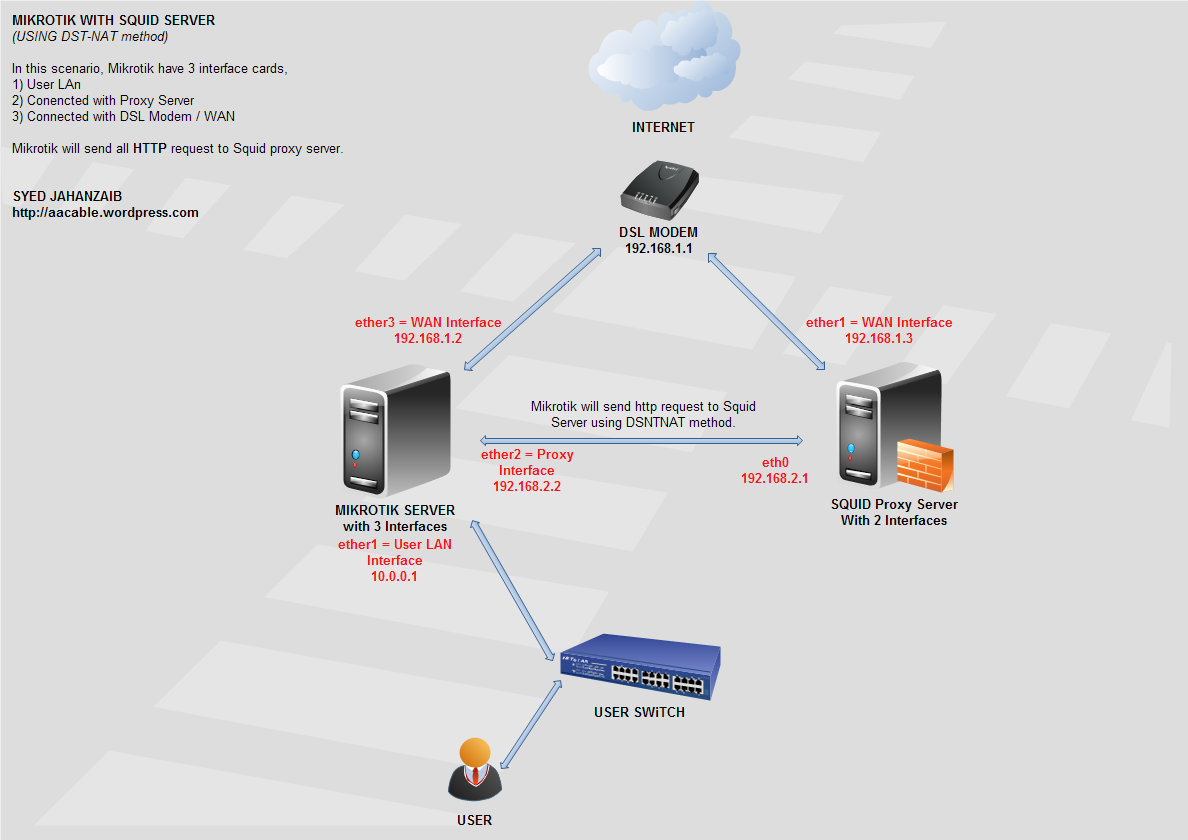
LikeLike
Comment by adidr — November 21, 2013 @ 3:34 AM
Assalam-o-Alekum, JZ bhai main nay yeh config 5th oct ko apply ker di thi apnay server per, kuch websites like sngpl.com.pk per loadshedding k shedule aur bbc.co.uk/urdu us k baad say update nahi ho rahi, abhi tak 5th oct wali cached site hi open hoti hay, main nay kafi try ker k dekh li magar bbc.co.uk update nahi hoti….. sngpl wali update ho gai jab main nay ” | js | ” ko wahan say del kia…. plz help
LikeLike
Comment by Adeel — November 17, 2013 @ 6:59 PM
Exclude these web sites from the CACHE.
try following.
LikeLike
Comment by Syed Jahanzaib / Pinochio~:) — November 17, 2013 @ 9:34 PM
Hello.. squid/lusca is working but I have some problems with refreshing pages and some not refreshing at all. Can you pl recomend what refreshing paterns to use for wisp environment, litle less agressive or how to modify this one.
Thx!
LikeLike
Comment by Makoto — November 20, 2013 @ 2:04 PM
i am facing issue ….
just followed your every step
OS Ubuntu 13.10
Squid 2.7 stable 9
2013/11/24 21:32:34| parse_refreshpattern: Unknown option ‘\.(ipsw|pkg|dmg|asp|xml|ashx|class|css|js|swf|ico|cur|ani|jpg|jpeg|bmp|png|cdr|txt|gif|dll)’: ignore-no-store
2013/11/24 21:32:34| parse_refreshpattern: Unknown option ‘\.(ipsw|pkg|dmg|asp|xml|ashx|class|css|js|swf|ico|cur|ani|jpg|jpeg|bmp|png|cdr|txt|gif|dll)’: store-stale
2013/11/24 21:32:34| parse_refreshpattern: Unknown option ‘(gstatic|diggstatic)\.com/.*’: ignore-no-store
2013/11/24 21:32:34| parse_refreshpattern: Unknown option ‘(gstatic|diggstatic)\.com/.*’: ignore-must-revalidate
2013/11/24 21:32:34| parse_refreshpattern: Unknown option ‘(gstatic|diggstatic)\.com/.*’: store-stale
2013/11/24 21:32:34| parse_refreshpattern: Unknown option ‘^http:\/\/\.*\.gstatic\.com\/(.*)’: ignore-no-store
2013/11/24 21:32:34| parse_refreshpattern: Unknown option ‘^http:\/\/\.*\.gstatic\.com\/(.*)’: store-stale
2013/11/24 21:32:34| parse_refreshpattern: Unknown option ‘guru.avg.com/.*\.(bin)’: ignore-no-store
2013/11/24 21:32:34| parse_refreshpattern: Unknown option ‘guru.avg.com/.*\.(bin)’: store-stale
2013/11/24 21:32:34| parse_refreshpattern: Unknown option ‘(avgate|avira).*(idx|gz)’: ignore-no-store
2013/11/24 21:32:34| parse_refreshpattern: Unknown option ‘(avgate|avira).*(idx|gz)’: store-stale
2013/11/24 21:32:34| parse_refreshpattern: Unknown option ‘update.nai.com/.*\.(gem|zip|mcs)’: ignore-no-store
2013/11/24 21:32:34| parse_refreshpattern: Unknown option ‘update.nai.com/.*\.(gem|zip|mcs)’: store-stale
2013/11/24 21:32:34| parse_refreshpattern: Unknown option ‘symantecliveupdate.com.*\(zip|exe)’: ignore-no-store
2013/11/24 21:32:34| parse_refreshpattern: Unknown option ‘symantecliveupdate.com.*\(zip|exe)’: store-stale
2013/11/24 21:32:34| parse_refreshpattern: Unknown option ‘kaspersky.*\.avc’: store-stale
2013/11/24 21:32:34| parse_refreshpattern: Unknown option ‘kaspersky’: store-stale
2013/11/24 21:32:34| parse_refreshpattern: Unknown option ‘^http:\/\/apps.facebook.com.*\/’: ignore-no-store
2013/11/24 21:32:34| parse_refreshpattern: Unknown option ‘^http:\/\/apps.facebook.com.*\/’: store-stale
2013/11/24 21:32:34| parse_refreshpattern: Unknown option ‘\.zynga.com.*\/’: ignore-no-store
2013/11/24 21:32:34| parse_refreshpattern: Unknown option ‘\.zynga.com.*\/’: ignore-must-revalidate
2013/11/24 21:32:34| parse_refreshpattern: Unknown option ‘\.zynga.com.*\/’: store-stale
2013/11/24 21:32:34| parse_refreshpattern: Unknown option ‘\.farmville.com.*\/’: ignore-no-store
2013/11/24 21:32:34| parse_refreshpattern: Unknown option ‘\.farmville.com.*\/’: ignore-must-revalidate
2013/11/24 21:32:34| parse_refreshpattern: Unknown option ‘\.farmville.com.*\/’: store-stale
2013/11/24 21:32:34| parse_refreshpattern: Unknown option ‘\.ninjasaga.com.*\/’: ignore-no-store
2013/11/24 21:32:34| parse_refreshpattern: Unknown option ‘\.ninjasaga.com.*\/’: ignore-must-revalidate
2013/11/24 21:32:34| parse_refreshpattern: Unknown option ‘\.ninjasaga.com.*\/’: store-stale
2013/11/24 21:32:34| parse_refreshpattern: Unknown option ‘\.mafiawars.com.*\/’: ignore-no-store
2013/11/24 21:32:34| parse_refreshpattern: Unknown option ‘\.mafiawars.com.*\/’: ignore-must-revalidate
2013/11/24 21:32:34| parse_refreshpattern: Unknown option ‘\.mafiawars.com.*\/’: store-stale
2013/11/24 21:32:34| parse_refreshpattern: Unknown option ‘\.crowdstar.com.*\/’: ignore-no-store
2013/11/24 21:32:34| parse_refreshpattern: Unknown option ‘\.crowdstar.com.*\/’: ignore-must-revalidate
2013/11/24 21:32:34| parse_refreshpattern: Unknown option ‘\.crowdstar.com.*\/’: store-stale
2013/11/24 21:32:34| parse_refreshpattern: Unknown option ‘\.popcap.com.*\/’: ignore-no-store
2013/11/24 21:32:34| parse_refreshpattern: Unknown option ‘\.popcap.com.*\/’: ignore-must-revalidate
LikeLike
Comment by Ishtiak Iqbal — November 24, 2013 @ 9:53 PM
hi, i really like your blog a lot …. i am a newbie
but i am having issues with http & p2p cache….
could you please give some reccomendation
i started the process with 3 pc’s … assuming
1st cache server pc = zorin 7 core (64bit) 2 lan cards
2nd pc = the bandwith control (windows xp) 2 lan cards
3rd pc = client pc (windows xp)
Now the problem is when nothing is installed each and every pc can ping each other but as soon as squid3 and nginx is installed for caching purpose of youtube (they cannot ping all at a time … if one lan is getting pinged the other”request timed out” or “destination host unreachable”) ..
I am not getting what might be the problem….
can you please help me with this ….
will be eagerly waiting for your response
Thankx in advance
LikeLike
Comment by Bharat — November 25, 2013 @ 5:11 PM
sir ye kyon aa raha hai
/temp# wget http://horvet.googlecode.com/files/squid-2.7.STABLE-9%2Bpatch.tar.gz
–2013-11-27 17:13:27– http://horvet.googlecode.com/files/squid-2.7.STABLE-9%2Bpatch.tar.gz
Resolving horvet.googlecode.com (horvet.googlecode.com)… 173.194.70.82, 2a00:1450:4001:c02::52
Connecting to horvet.googlecode.com (horvet.googlecode.com)|173.194.70.82|:80… connected.
HTTP request sent, awaiting response… 403 Forbidden
2013-11-27 17:13:28 ERROR 403: Forbidden.
LikeLike
Comment by imtiaz ali — November 27, 2013 @ 5:16 PM
wget https://mikrotik-squid.googlecode.com/files/squid-2.7.STABLE9%2Bpatch.tar.gz
yeah link use karlo app
LikeLike
Comment by Qaseem — November 28, 2013 @ 3:23 PM
thanks
LikeLike
Comment by imtiaz ali — November 29, 2013 @ 12:18 PM
it works very good , thanks alot
I have some questions
1- how to make restart for squid 2.7 in ubuntu 12.xxx???bcoz I used to use squid3
2- if I have two hard disk and 2 aufs line in squid.conf it’s good?
3- in squid3 force the download manager not to split the small files to parts and now I lost this feature
4- if the google chaged the code from where I can ge the new storurl
5- I want to add “apk” extension for android apps cache it possible?
LikeLike
Comment by Ali Iraq — December 6, 2013 @ 2:30 AM
Hi Syed.
I really hope that you could help me with a very small problem. I have a good proxy server running very well.
I’m faceing a problem where if a cellphone like iPhone etc. have news apps, the content get cached but does not refresh.
If you go to the various news websites, all the news is updated.
When the apps connect via a 3g network, the news gets refreshed, but once connected via proxy, it shows the cached news days ago.
How can I resolve this problem?
Regards
LikeLike
Comment by A.J. Hart — December 6, 2013 @ 2:50 AM
Anybody with the same problem? Any suggestions?
LikeLike
Comment by A.J. Hart — December 7, 2013 @ 11:51 AM
jehanzaib bhai ya error q? a raha hai ?
tar xvf squid-2.7.STABLE9%2Bpatch.tar.gz
tar: squid-2.7.STABLE9%2Bpatch.tar.gz.3: Cannot open: No such file or directory
tar: Error is not recoverable: exiting now
LikeLike
Comment by Suleman Mughal — December 6, 2013 @ 4:49 PM
file name mistake. manualy type the file name appearing at your folder
LikeLike
Comment by Syed Jahanzaib / Pinochio~:) — December 6, 2013 @ 8:38 PM
manual type bi kia hai but phr bi error a raha hai.
tar xvf squid-2.7.STABLE9%2Bpatch.tar.gz
tar: squid-2.7.STABLE9%2Bpatch.tar.gz: Cannot open: No such file or directory
tar: Error is not recoverable: exiting now
LikeLike
Comment by Suleman Mughal — December 10, 2013 @ 1:01 PM
try this
tar xvf squid-2.7.STABLE9+patch.tar.gz
LikeLike
Comment by Mohsin — December 18, 2013 @ 4:08 PM
still error
your command is
tar xvf squid-2.7.STABLE-9+patch.tar.gz
error in file name
correct file name is
tar xvf squid-2.7.STABLE9+patch.tar.gz
LikeLike
Comment by Mohsin-SkyLink Telecom — December 20, 2013 @ 6:53 PM
thanks for the follow up.
LikeLike
Comment by Syed Jahanzaib / Pinochio~:) — December 23, 2013 @ 8:16 AM
squid -d1N after typing this i encoun ter this error
FATAL: storeurl.pl /etc/squid/storeurl.pl: (2) No such file or directory
LikeLike
Comment by izhar ali — December 8, 2013 @ 4:14 PM
create storeurl.pl file first. or comment it in squid.conf not load it.
LikeLike
Comment by Syed Jahanzaib / Pinochio~:) — December 9, 2013 @ 10:58 AM
i created storeurl.pl from adeel web site and configure it as my network but still that error….how to coment it in squid?
LikeLike
Comment by izhar ali — December 9, 2013 @ 5:31 PM
I dont have much idea so need little explanation thanks
LikeLike
Comment by izhar ali — December 9, 2013 @ 5:44 PM
can i try this in my squid’s webmin ?
LikeLike
Comment by Nurul Hidayat — December 10, 2013 @ 8:41 AM
Dear Bro, I am relay handsoff for your blogs,it helped in installing DMA soft radius manager in fedora.bhai i want to install squid in my n/w.i will explain my setup
i have radius at one point & i have 2 mikrotik nas in different locations.now i want setup squid every locations to save my bandwidth mainly for torrents.can please help me in this.for this if i have to pay i am ready to pay.please send me details on my mail wifiproducts@yahoo.com
LikeLike
Comment by prasad — December 17, 2013 @ 7:50 AM
Squid dont cache Torrent’s download. You need 3rd party addons/tool to accomplish this.
LikeLike
Comment by Syed Jahanzaib / Pinochio~:) — December 17, 2013 @ 9:03 AM
sir masla hai skype per red signal ho jate clint sit per kia masla ho sakta hai cache ki waja to nai ho sakti
LikeLike
Comment by imtiaz ali — December 18, 2013 @ 11:20 PM
Its not the squid issue as far as i know.
LikeLike
Comment by Syed Jahanzaib / Pinochio~:) — December 20, 2013 @ 10:56 AM
hello.
i was following your script, but still cant hit the youtube…
please help.. thx
LikeLike
Comment by qie — December 20, 2013 @ 8:57 AM
Working F9 THnx
Problem:
Squid doesnot start automatically after power faliure.
ANd Kinldy Make Tut on Squid CacheManager THnx
LikeLike
Comment by SAud — December 20, 2013 @ 11:17 PM
add squid in /etc/rc.local so that it can start every time the box restarts
LikeLike
Comment by Syed Jahanzaib / Pinochio~:) — December 23, 2013 @ 8:15 AM
Do you currently are working?
I did everything by letter dela
youtube videos but do not save
LikeLike
Comment by Jimmy — December 24, 2013 @ 9:57 PM
Sir I have a diffrent scenario. I want every user have to go through with their login page(with username and password provided by company) and then they will get squid.So, for this what I have to do?
user>>>login page (giving user name & password)>>>squid
sir pls help me…..
LikeLike
Comment by shyam — December 25, 2013 @ 11:11 AM
Simple, Use dst-nat method to route http traffic to squid box.
LikeLike
Comment by Syed Jahanzaib / Pinochio~:) — December 26, 2013 @ 9:14 AM
sir, I think i should not create mikrotik hotspot because 250 customer is going to use squid…
LikeLike
Comment by shyam — December 25, 2013 @ 11:59 AM
and I want to give squid service in 4 ip gateways..
LikeLike
Comment by shyam — December 25, 2013 @ 12:01 PM
apt-get update
apt-get -y update
apt-get -y install gcc
apt-get -y install build-essential
apt-get -y install sharutils
sir some yeh updates nhi ho rahi 56% per a kar stop ho jati hy plz help
.
LikeLike
Comment by Hamid Rana — December 25, 2013 @ 5:25 PM
Try to change apt-get resources to US locations
LikeLike
Comment by Syed Jahanzaib / Pinochio~:) — December 26, 2013 @ 9:13 AM
Sir, mujhe 4 ip gateways ko squid provide karna hai…aur normally routing nehi ho raha hai. jab mai bridge use kar raha hu tab rauting ho raha hai..aur yahape jo customer hai woh log apna apna khud ka jo bandwidth recharge kia wohi lena chate hai(with log in page) aur uske saath squid server vi lena cahte hai..sir iske lie aap muje ekk url provide karenge apka, jahase muje sabkuch samaj aae..I am totally confused..pls sir muje help kijie..mai 4 din se thik se nehi soya..
LikeLike
Comment by shyam — December 27, 2013 @ 1:22 AM
sir, i have succeed install your tutorial, and squid can cached any video but why squid can’t cache youtube.com dailymotion.com and any download except video?
LikeLike
Comment by Tri — January 1, 2014 @ 9:04 AM
sir……….isey mikrotik key saath kesey attach karain gey…..?
Internet sharing script key through ya………jo Adeel Bhai ney dia hai apney tutorial main ya
or koi methord hai……………? ALLAH aap ko jaza e khair dain..
LikeLike
Comment by Salman — January 2, 2014 @ 5:32 AM
Sir…………im using ubuntu 12.04. destop and how to attached ubuntu box with mikrotik
how to configure……networks ips in ubuntu 12.04 plz…..explain step by step.
LikeLike
Comment by Salman — January 2, 2014 @ 5:40 AM
sir,, i follow your tutor until the end with almost no error,, but why i cannont browse the internet………….. when i type this on the teriminal :
squidclient mgr:info this message appear :Cannot connect to localhost:3128: Connection refused
LikeLike
Comment by warnetbuntamaso — January 4, 2014 @ 12:00 AM
[…] Following is an automated script to install SQUID 2.7 Stable 9 with aggressive contents & VIDEOS caching support as described in my other article @ https://aacable.wordpress.com/2012/01/19/youtube-caching-with-squid-2-7-using-storeurl-pl/ […]
LikeLike
Pingback by Automated Installation Script for Squid 2.7 Stable 9 with Video Caching support | Syed Jahanzaib Personnel Blog to Share Knowledge ! — January 5, 2014 @ 2:24 AM
Please can you help on media server.wifiproducts@gmail.com
LikeLike
Comment by prasad — January 6, 2014 @ 11:46 AM
??
LikeLike
Comment by Syed Jahanzaib / Pinochio~:) — January 6, 2014 @ 11:10 PM
root@ubuntu:/etc/squid# squid
2014/01/09 02:42:58| parseConfigFile: squid.conf:15 unrecognized: ‘pidfile:’
any body know how to fix this problem please
LikeLike
Comment by alfanet1 — January 9, 2014 @ 3:52 PM
actual directive is
pid_filename /var/run/squid.pidUpdated as well in the article.
LikeLike
Comment by Syed Jahanzaib / Pinochio~:) — January 9, 2014 @ 4:07 PM
thank you bro
LikeLike
Comment by alfanet1 — January 9, 2014 @ 4:18 PM
sir do you have config for windows user…… please need ur help
squid-2.7.STABLE8-bin.zip on win xp
LikeLike
Comment by Layla A. Rosales — January 9, 2014 @ 9:36 PM
Hi, have knowledge dash youtube?,
if anyone wants to share information about it to improve the store, please send me a message 🙂 !
With Youtube – Center you can disable the dash ……
LikeLike
Comment by keikurono01 — January 11, 2014 @ 10:21 AM
hmm, Does any one have some updated storeurl.conf and squid configuration to make caching more better?
LikeLike
Comment by Syed Jahanzaib / Pinochio~:) — January 11, 2014 @ 3:05 PM
Hi, I use HaarpCache, which is a fork of ThunderCache.
Thundercache (https://github.com/vfeitoza/thundercache) is a proxy (configured as a parent together with squid) based on “HAVP”.
Thundercache performs caching as does store.pl and others.
But HaarpCache is making an improvement in stream cache files as servers Youtube. Download the parts and puts them together all in one cache file by efficiently without redound parts of the same video (let me understand?).
Initially the Thundercache was FreeWare (See 1.2 and 3), the version 3.1 was released in GPL V3.0 (https://github.com/vfeitoza/thundercache).
Currently Thundercache is proprietary (versions 4,5,6,7 and 7.1).
Use HaarpCache with discretion and under his responsibility.
LikeLike
Comment by keikurono01 — January 12, 2014 @ 9:58 AM
I’m currently thinking about performing the operation removed the dash Youtube.
LikeLike
Comment by keikurono01 — January 12, 2014 @ 10:00 AM
Hello bro , I noticed some pages not updated from 2 days 😉 I have to refresh to get the new date of pages please how to fix this problem ,
thank you
LikeLike
Comment by alfanet1 — January 11, 2014 @ 2:03 PM
You can lower down the refresh pattern to some lower value, or adjust the value for specific contents to verify cache-expiry for specific pages or content.
LikeLike
Comment by Syed Jahanzaib / Pinochio~:) — January 11, 2014 @ 3:02 PM
Hello bro again , I have 1 or 2 websites do this issue if I want to make refresh pattern for these websites what to do please if possible paste the complete command line for it
also I have local website but when anybody enter it it will pass through mikrotik then it will connect to squid proxy how to by pass this local website from both …
thank you very much
LikeLike
Comment by alfanet1 — January 11, 2014 @ 3:20 PM
Help me! I’m Brazilian and teh folowed errors was show!
squid -z
2014/01/13 14:45:27| parseConfigFile: squid.conf:297 unrecognized: ‘\.(jp(e?g|e|2)|gif|png|tiff?|bmp|ico|flv|wmv|3gp|mp(4|3)|exe|msi|zip|on2|mar|swf)\?’
2014/01/13 14:45:27| parseConfigFile: squid.conf:298 unrecognized: ‘store_rewrite_list_domain’
2014/01/13 14:45:27| parseConfigFile: squid.conf:299 unrecognized: ‘store_rewrite_list_domain’
2014/01/13 14:45:27| parseConfigFile: squid.conf:300 unrecognized: ‘urlpath_regex’
2014/01/13 14:45:27| parseConfigFile: squid.conf:302 unrecognized: ‘\.rapidshare\.com.*\/[0-9]*\/.*\/[^\/]*’
2014/01/13 14:45:27| parseConfigFile: squid.conf:303 unrecognized: ‘\.doubleclick\.net.*’
2014/01/13 14:45:27| parseConfigFile: squid.conf:304 unrecognized: ‘(cbk|mt|khm|mlt|tbn)[0-9]?.google\.co(m|\.uk|\.id)’
2014/01/13 14:45:27| parseConfigFile: squid.conf:305 unrecognized: ‘^http://(.*?)/windowsupdate\?’
2014/01/13 14:45:27| parseConfigFile: squid.conf:306 unrecognized: ‘store_rewrite_list_domain_CDN’
2014/01/13 14:45:27| parseConfigFile: squid.conf:307 unrecognized: ‘store_rewrite_list_domain_CDN’
2014/01/13 14:45:27| parseConfigFile: squid.conf:308 unrecognized: ‘store_rewrite_list_domain_CDN’
2014/01/13 14:45:27| parseConfigFile: squid.conf:309 unrecognized: ‘store_rewrite_list_domain_CDN’
2014/01/13 14:45:27| parseConfigFile: squid.conf:310 unrecognized: ‘url_regex’
2014/01/13 14:45:27| parseConfigFile: squid.conf:311 unrecognized: ‘(([a-z]{1,2}[0-9]{1,3})|([0-9]{1,3}[a-z]{1,2}))\.[a-z]*[0-9]?\.[a-z]{3}’
2014/01/13 14:45:27| parseConfigFile: squid.conf:312 unrecognized: ‘urlpath_regex’
2014/01/13 14:45:27| parseConfigFile: squid.conf:313 unrecognized: ‘\.(jp(e?g|e|2)|gif|png|tiff?|bmp|ico|psf|flv|avc|zip|mp3|3gp|rar|on2|mar|exe)$’
2014/01/13 14:45:27| parseConfigFile: squid.conf:314 unrecognized: ‘store_rewrite_list_domain_CDN’
2014/01/13 14:45:27| parseConfigFile: squid.conf:315 unrecognized: ‘^http:\/\/(www\.ziddu\.com.*\.[^\/]{3,4})\/(.*)’
2014/01/13 14:45:27| parseConfigFile: squid.conf:316 unrecognized: ‘url_regex’
2014/01/13 14:45:27| parseConfigFile: squid.conf:317 unrecognized: ‘store_rewrite_list_domain_CDN’
2014/01/13 14:45:27| parseConfigFile: squid.conf:318 unrecognized: ‘store_rewrite_list_domain_CDN’
2014/01/13 14:45:27| parseConfigFile: squid.conf:319 unrecognized: ‘^http:\/\/\.www[0-9][0-9]\.indowebster\.com\/(.*)(rar|zip|flv|wm(a|v)|3gp|psf|mp(4|3)|exe|msi|avi|(mp(e?g|a|e|1|2|3|4))|cab|exe)’
2014/01/13 14:45:27| parseConfigFile: squid.conf:321 unrecognized: ‘\.googlevideo\.com\/get_video\?’
2014/01/13 14:45:27| parseConfigFile: squid.conf:322 unrecognized: ‘\.google\.com\/videoplay’
2014/01/13 14:45:27| parseConfigFile: squid.conf:323 unrecognized: ‘\.google\.[a-z][a-z]\/videoplayback’
2014/01/13 14:45:27| parseConfigFile: squid.conf:325 unrecognized: ‘videocache_allow_url’
2014/01/13 14:45:27| parseConfigFile: squid.conf:326 unrecognized: ‘va\.wrzuta\.pl\/wa[0-9][0-9][0-9][0-9]?’
2014/01/13 14:45:27| parseConfigFile: squid.conf:328 unrecognized: ‘url_regex’
2014/01/13 14:45:27| parseConfigFile: squid.conf:329 unrecognized: ‘\.mais\.uol\.com\.br\/(.*)\.flv’
2014/01/13 14:45:27| parseConfigFile: squid.conf:330 unrecognized: ‘\.blip\.tv\/(.*)\.(flv|avi|mov|mp3|m4v|mp4|wmv|rm|ram|m4v)’
2014/01/13 14:45:27| parseConfigFile: squid.conf:331 unrecognized: ‘\.apniisp\.com\/(.*)\.(flv|avi|mov|mp3|m4v|mp4|wmv|rm|ram|m4v)’
2014/01/13 14:45:27| parseConfigFile: squid.conf:332 unrecognized: ‘\.break\.com\/(.*)\.(flv|mp4)’
2014/01/13 14:45:27| parseConfigFile: squid.conf:333 unrecognized: ‘videocache_allow_url’
2014/01/13 14:45:27| parseConfigFile: squid.conf:334 unrecognized: ‘[a-z0-9][0-9a-z][0-9a-z]?[0-9a-z]?[0-9a-z]?\.xtube\.com\/(.*)flv’
2014/01/13 14:45:27| parseConfigFile: squid.conf:335 unrecognized: ‘bitcast\.vimeo\.com\/vimeo\/videos\/’
2014/01/13 14:45:27| parseConfigFile: squid.conf:336 unrecognized: ‘va\.wrzuta\.pl\/wa[0-9][0-9][0-9][0-9]?’
2014/01/13 14:45:27| parseConfigFile: squid.conf:337 unrecognized: ‘\.files\.youporn\.com\/(.*)\/flv\/’
2014/01/13 14:45:27| parseConfigFile: squid.conf:338 unrecognized: ‘\.msn\.com\.edgesuite\.net\/(.*)\.flv’
2014/01/13 14:45:27| parseConfigFile: squid.conf:339 unrecognized: ‘media[a-z0-9]?[a-z0-9]?[a-z0-9]?\.tube8\.com\/’
2014/01/13 14:45:27| parseConfigFile: squid.conf:340 unrecognized: ‘www\.tube8\.com\/(.*)\/’
2014/01/13 14:45:27| parseConfigFile: squid.conf:341 unrecognized: ‘videocache_allow_url’
2014/01/13 14:45:27| parseConfigFile: squid.conf:342 unrecognized: ‘\.video[a-z0-9]?[a-z0-9]?\.blip\.tv\/(.*)\.(flv|avi|mov|mp3|m4v|mp4|wmv|rm|ram)’
2014/01/13 14:45:27| parseConfigFile: squid.conf:343 unrecognized: ‘url_regex’
2014/01/13 14:45:27| parseConfigFile: squid.conf:344 unrecognized: ‘\.xvideos\.com\/videos\/flv\/(.*)\/(.*)\.(flv|mp4)’
2014/01/13 14:45:27| parseConfigFile: squid.conf:345 unrecognized: ‘stream\.aol\.com\/(.*)/[a-zA-Z0-9]+\/(.*)\.(flv|mp4)’
2014/01/13 14:45:27| parseConfigFile: squid.conf:346 unrecognized: ‘videos\.5min\.com\/(.*)/[0-9_]+\.(mp4|flv)’
2014/01/13 14:45:27| ACL name ‘store_rewrite_list_domain’ not defined!
FATAL: Bungled squid.conf line 393: storeurl_access allow store_rewrite_list_domain store_rewrite_list_path
Squid Cache (Version 2.7.STABLE9): Terminated abnormally.
LikeLike
Comment by Ronaldo Barboza — January 13, 2014 @ 10:46 PM
squid not running, error
[root@localhost ~]# squid
2014/01/17 06:52:17| ERROR: Directive ‘server_http11’ is obsolete.
2014/01/17 06:52:17| WARNING: the “Hs” formating code is deprecated use the “>Hs” instead
2014/01/17 06:52:17| ERROR: ‘0.0.0.0/0.0.0.0’ needs to be replaced by the term ‘all’.
2014/01/17 06:52:17| SECURITY NOTICE: Overriding config setting. Using ‘all’ instead.
2014/01/17 06:52:17| WARNING: (B) ‘::/0’ is a subnetwork of (A) ‘::/0’
2014/01/17 06:52:17| WARNING: because of this ‘::/0’ is ignored to keep splay tree searching predictable
2014/01/17 06:52:17| WARNING: You should probably remove ‘::/0’ from the ACL named ‘all’
2014/01/17 06:52:17| WARNING: Netmasks are deprecated. Please use CIDR masks instead.
2014/01/17 06:52:17| WARNING: IPv4 netmasks are particularly nasty when used to compare IPv6 to IPv4 ranges.
2014/01/17 06:52:17| WARNING: For now we will assume you meant to write /32
2014/01/17 06:52:17| cache_cf.cc(364) parseOneConfigFile: squid.conf:141 unrecognized: ‘max_stale’
2014/01/17 06:52:17| cache_cf.cc(364) parseOneConfigFile: squid.conf:145 unrecognized: ‘collapsed_forwarding’
2014/01/17 06:52:17| cache_cf.cc(364) parseOneConfigFile: squid.conf:146 unrecognized: ‘cache_vary’
2014/01/17 06:52:17| cache_cf.cc(364) parseOneConfigFile: squid.conf:147 unrecognized: ‘update_headers’
2014/01/17 06:52:17| ERROR: Directive ‘incoming_rate’ is obsolete.
2014/01/17 06:52:17| cache_cf.cc(364) parseOneConfigFile: squid.conf:150 unrecognized: ‘ignore_ims_on_miss’
2014/01/17 06:52:17| ERROR: Directive ‘zph_mode’ is obsolete.
2014/01/17 06:52:17| ERROR: Directive ‘zph_local’ is obsolete.
2014/01/17 06:52:17| ERROR: Directive ‘zph_parent’ is obsolete.
2014/01/17 06:52:17| ERROR: Directive ‘zph_option’ is obsolete.
2014/01/17 06:52:17| cache_cf.cc(364) parseOneConfigFile: squid.conf:200 unrecognized: ‘storeurl_access’
2014/01/17 06:52:17| redreshAddToList: Unknown option ‘\.(ipsw|pkg|dmg|asp|xml|ashx|class|css|js|swf|ico|cur|ani|jpg|jpeg|bmp|png|cdr|txt|gif|dll)’: store-stale
2014/01/17 06:52:17| redreshAddToList: Unknown option ‘\.(ico|video-stats)’: negative-ttl=10080
2014/01/17 06:52:17| redreshAddToList: Unknown option ‘^.*(utm\.gif|ads\?|rmxads\.com|ad\.z5x\.net|bh\.contextweb\.com|bstats\.adbrite\.com|a1\.interclick\.com|ad\.trafficmp\.com|ads\.cubics\.com|ad\.xtendmedia\.com|\.googlesyndication\.com|advertising\.com|yieldmanager|game-advertising\.com|pixel\.quantserve\.com|adperium\.com|doubleclick\.net|adserving\.cpxinteractive\.com|syndication\.com|media.fastclick.net).*’: negative-ttl=40320
2014/01/17 06:52:17| redreshAddToList: Unknown option ‘^.*(utm\.gif|ads\?|rmxads\.com|ad\.z5x\.net|bh\.contextweb\.com|bstats\.adbrite\.com|a1\.interclick\.com|ad\.trafficmp\.com|ads\.cubics\.com|ad\.xtendmedia\.com|\.googlesyndication\.com|advertising\.com|yieldmanager|game-advertising\.com|pixel\.quantserve\.com|adperium\.com|doubleclick\.net|adserving\.cpxinteractive\.com|syndication\.com|media.fastclick.net).*’: max-stale=10
2014/01/17 06:52:17| redreshAddToList: Unknown option ‘^.*safebrowsing.*google’: negative-ttl=10080
2014/01/17 06:52:17| redreshAddToList: Unknown option ‘^http://((cbk|mt|khm|mlt)[0-9]?)\.google\.co(m|\.uk)’: negative-ttl=10080
2014/01/17 06:52:17| redreshAddToList: Unknown option ‘(gstatic|diggstatic)\.com/.*’: store-stale
2014/01/17 06:52:17| redreshAddToList: Unknown option ‘^http:\/\/\.*\.gstatic\.com\/(.*)’: store-stale
2014/01/17 06:52:17| redreshAddToList: Unknown option ‘guru.avg.com/.*\.(bin)’: store-stale
2014/01/17 06:52:17| redreshAddToList: Unknown option ‘(avgate|avira).*(idx|gz)’: store-stale
2014/01/17 06:52:17| redreshAddToList: Unknown option ‘update.nai.com/.*\.(gem|zip|mcs)’: store-stale
2014/01/17 06:52:17| redreshAddToList: Unknown option ‘symantecliveupdate.com.*\(zip|exe)’: store-stale
2014/01/17 06:52:17| redreshAddToList: Unknown option ‘kaspersky.*\.avc’: store-stale
2014/01/17 06:52:17| redreshAddToList: Unknown option ‘kaspersky’: store-stale
2014/01/17 06:52:17| redreshAddToList: Unknown option ‘^http:\/\/apps.facebook.com.*\/’: store-stale
2014/01/17 06:52:17| redreshAddToList: Unknown option ‘\.zynga.com.*\/’: store-stale
2014/01/17 06:52:17| redreshAddToList: Unknown option ‘\.farmville.com.*\/’: store-stale
2014/01/17 06:52:17| redreshAddToList: Unknown option ‘\.ninjasaga.com.*\/’: store-stale
2014/01/17 06:52:17| redreshAddToList: Unknown option ‘\.mafiawars.com.*\/’: store-stale
2014/01/17 06:52:17| redreshAddToList: Unknown option ‘\.crowdstar.com.*\/’: store-stale
2014/01/17 06:52:17| redreshAddToList: Unknown option ‘\.popcap.com.*\/’: store-stale
2014/01/17 06:52:17| cache_cf.cc(364) parseOneConfigFile: squid.conf:383 unrecognized: ‘storeurl_access’
2014/01/17 06:52:17| cache_cf.cc(364) parseOneConfigFile: squid.conf:384 unrecognized: ‘storeurl_access’
2014/01/17 06:52:17| cache_cf.cc(364) parseOneConfigFile: squid.conf:385 unrecognized: ‘storeurl_access’
2014/01/17 06:52:17| cache_cf.cc(364) parseOneConfigFile: squid.conf:386 unrecognized: ‘storeurl_access’
2014/01/17 06:52:17| cache_cf.cc(364) parseOneConfigFile: squid.conf:387 unrecognized: ‘storeurl_access’
2014/01/17 06:52:17| cache_cf.cc(364) parseOneConfigFile: squid.conf:388 unrecognized: ‘storeurl_access’
2014/01/17 06:52:17| cache_cf.cc(364) parseOneConfigFile: squid.conf:389 unrecognized: ‘storeurl_access’
2014/01/17 06:52:17| cache_cf.cc(364) parseOneConfigFile: squid.conf:390 unrecognized: ‘storeurl_access’
2014/01/17 06:52:17| cache_cf.cc(364) parseOneConfigFile: squid.conf:393 unrecognized: ‘storeurl_rewrite_program’
2014/01/17 06:52:17| cache_cf.cc(364) parseOneConfigFile: squid.conf:394 unrecognized: ‘storeurl_rewrite_children’
2014/01/17 06:52:17| cache_cf.cc(364) parseOneConfigFile: squid.conf:395 unrecognized: ‘storeurl_rewrite_concurrency’
2014/01/17 06:52:17| cache_cf.cc(364) parseOneConfigFile: squid.conf:400 unrecognized: ‘storeurl_access’
WARNING: Cannot write log file: /var/log/squid/cache.log
/var/log/squid/cache.log: Permission denied
messages will be sent to ‘stderr’.
LikeLike
Comment by gabriele — January 17, 2014 @ 2:50 AM
Which version of squid you are trying? the config is compatible with squid 2.7 only,
LikeLike
Comment by Syed Jahanzaib / Pinochio~:) — January 17, 2014 @ 7:07 PM
WARNING: Cannot write log file: /var/log/squid/cache.log
/var/log/squid/cache.log: Permission denied
the answer is, you must give permission for your directory of cache log, or you just give comment until the line of config not to use…
permission like “chmod 777 /var/log/squid/” or just give comment, or you can give none for that line like “cache_log none”
thanks…
LikeLike
Comment by Safatah Purwonoto — January 22, 2014 @ 4:58 AM
Hello bro ,
please for which line I need to lower down the refresh_pattern ? coz almost websites with old date …
I installed pdnsd from :
but after reboot server all dns cached gone , !!
is there is any good and faster cache DNS server , which one you advise me to use ?
thank you
LikeLike
Comment by alfanet1 — January 18, 2014 @ 8:57 PM
don’t use refresh_pattern to much, it’s can lowering your squid performance
LikeLike
Comment by Safatah Purwonoto — January 22, 2014 @ 5:04 AM
I removed few access patterns, also I will remove individual entries for refresh_patterns and merge them in single line
LikeLike
Comment by Syed Jahanzaib / Pinochio~:) — January 22, 2014 @ 8:22 AM
thank you verrry much bro
LikeLike
Comment by alfanet1 — January 22, 2014 @ 4:12 PM
AOA , sir whats Fixed and new with your this update,,, kindly Define this thing .when ever you do some thing regarding upgrade this method or update. recently using the settengs which you define in 30 Septem. do i ve need to replace scripts and storeurl,pl.
LikeLike
Comment by azharkhan46 — January 22, 2014 @ 10:52 PM
[…] Youtube caching with SQUID 2.7 [using storeurl.pl] […]
LikeLike
Pingback by Howto add SQUID Proxy Server with MIKROTIK [Short Reference Guide] | Syed Jahanzaib Personnel Blog to Share Knowledge ! — January 23, 2014 @ 9:17 AM
hello
is any one see this product http://www.raptorcache.com/
LikeLike
Comment by laziz — January 27, 2014 @ 7:39 PM
Hi, because the urls of youtube with the variables cms_redirect, redirect_counter, ir, rr ???? what is the problem?
LikeLike
Comment by keikurono01 — January 27, 2014 @ 10:49 PM
not is cached ..
LikeLike
Comment by keikurono01 — January 27, 2014 @ 10:49 PM
I checked today , and the youtube vidoe’s caching is still working fine. I tested few videos and all of them got in cache, and next time I saw HITS for those videos .
LikeLike
Comment by Syed Jahanzaib / Pinochio~:) — January 28, 2014 @ 11:33 AM
Hi :), my question is: because the urls of youtube with the variables cms_redirect, redirect_counter, ir, rr, not have that do cache???? what is the problem with those parameters?.
LikeLike
Comment by keikurono01 — January 28, 2014 @ 7:22 PM
.. after done all configuration … squid is not work properly .. what will be the settings with interface and internet sharing please also add about them ..
LikeLike
Comment by Syed — February 5, 2014 @ 11:03 AM
2014/02/04 22:04:00| parseConfigFile: squid.conf:49 unrecognized: ‘referer_log’
2014/02/04 22:04:00| Squid is already running! Process ID 1987
when i do squid -z and squid … the first one line is appeared .. please provide the solution ??? is it a problem of ubuntu or any other ??
LikeLike
Comment by Syed — February 5, 2014 @ 11:06 AM
You can remove the line with referer_log entry in /etc/squid/squid.conf
LikeLike
Comment by Syed Jahanzaib / Pinochio~:) — February 6, 2014 @ 8:56 AM
$ sudo squid -d1N
2014/02/04 22:11:58| parseConfigFile: squid.conf:49 unrecognized: ‘referer_log’
2014/02/04 22:11:58| Squid is already running! Process ID 1987
…
squid not working what can i do sir …
LikeLike
Comment by Syed — February 5, 2014 @ 11:12 AM
You can remove the line with referer_log entry in /etc/squid/squid.conf
LikeLike
Comment by Syed Jahanzaib / Pinochio~:) — February 6, 2014 @ 8:56 AM
Salam,,
Jhanzaib bhai mai RB2011- UAS-RM use karrha hoon ,, mujhay ismay koi easy Cache ka hal batadain..
LikeLike
Comment by Uzair Subhani — February 8, 2014 @ 3:19 PM
Helo , you are really doing great but there are couple on notification you should pay attention for , i currently use your script on ubuntu 12.04 but after i modified two things, first the chmod 777 -R /cache , to make permissions for the caching folder should go next to the squid -z which initiliaze the folders for caching.. because when you use it later , there would be no wire permissions for the squid on its level one and two folders.. second , you need to tweak the range_offsent_limit to let the cache full cached on disk
LikeLike
Comment by oak777 — February 10, 2014 @ 6:43 AM
Thank you for pointing out. Updated!
LikeLike
Comment by Syed Jahanzaib / Pinochio~:) — February 10, 2014 @ 8:19 AM
thanks for that .. how about the squid command in rc.local .. i use it in ubuntu 12.04 but i have to attache sudo and the path to it 😀 😀 , by the way, how can i view the cached files?
LikeLike
Comment by oak777 — February 10, 2014 @ 8:47 PM
bro what you put on range_offsent_limit ?
LikeLike
Comment by alfanet1 — February 10, 2014 @ 1:59 PM
make it -1 but don’t forget to correctly configure the max, min abort values .. i use 512kB for min and 2 MB for max , and i use the pct percentage variable to continue the very big files download when it is almost done.
LikeLike
Comment by oak777 — February 10, 2014 @ 8:45 PM
thank you bro for the advise
I changed the max, min abort values .. i use 512kB for min and 2 MB for max but what did you mean …” and i use the pct percentage variable to continue the very big files download when it is almost done. “
LikeLike
Comment by alfanet1 — February 11, 2014 @ 3:54 PM
Hello bro
please can you make marks for config updates to modify only the new modifications like you did in this :
REFRESH PATTERN UPDATED: 27th September, 2013
or make beside it line with the date of updates like change logs .
I noticed only one line range_offset_limit 128 KB changed to #range_offset_limit 128 KB
thank you for the great job hope to make new blogs for advanced local DNS cache server .
LikeLike
Comment by alfanet1 — February 10, 2014 @ 1:29 PM
Assalam 0 Alaikum!
syed bhai .. i am using squid on ubuntu 10.. and i have some problem with rc.local .. it cannot start automatically on start-up of ubuntu, i should run squid manually by execute rc.local “sudo /etc/rc.local”
all script in rc.local is fine as per your recommendation.. please provide tips for installation of webmin for ubuntu 10.04..
Thanks
LikeLike
Comment by Syed — February 15, 2014 @ 10:13 PM
cache is good but sometime no internet connection , then i wait 3 to 5 minute got internet connection back i see at bottom left at my browser waiting for http://www.youtube.com 😦
LikeLike
Comment by ali — February 20, 2014 @ 12:35 AM
[…] Syed Jahanzaib / aacable@hotmail.com# https://aacable.wordpress.com/2012/01/19/youtube-caching-with-squid-2-7-using-storeurl-pl/######################## Special thanks to some indonesian friends who provided some updates,## […]
LikeLike
Pingback by ichank620 — February 26, 2014 @ 10:19 AM
[…] # Syed Jahanzaib / aacable@hotmail.com # https://aacable.wordpress.com/2012/01/19/youtube-caching-with-squid-2-7-using-storeurl-pl/ ####################### # Special thanks to some indonesian friends who provided some updates, ## […]
LikeLike
Pingback by INSTALL SQUID-2.7.STABLE9 DI UBUNTU SERVER 12.04 LTS 32 BIT | ichank620 — February 26, 2014 @ 10:31 AM
[…] https://aacable.wordpress.com/2012/01/19/youtube-caching-with-squid-2-7-using-storeurl-pl/ […]
LikeLike
Pingback by TUTORIAL PROXY UBUNTU SERVER 12.04 LTS 32 BIT + SQUID-2.7.STABLE9 | ichank620 — February 27, 2014 @ 9:19 PM
felisidades me ando de 1000, eres un capo men siges siempre asi
LikeLike
Comment by claudinei — March 1, 2014 @ 4:51 PM
me ando muy bien felicidades
LikeLike
Comment by jose — March 1, 2014 @ 4:53 PM
[…] deixando um link aqui… outro script para cache do youtube, atualizado e funcional https://aacable.wordpress.com/2012/01…g-storeurl-pl/ […]
LikeLike
Pingback by Anonymous — March 5, 2014 @ 3:29 AM
to watch videos that are cached: tail -f /path/squid/access.log | grep HIT, you will see at the end of the data, TCP_HIT, which means that the video has been cached. 🙂
LikeLike
Comment by Rodolfo — March 11, 2014 @ 12:32 AM
I’ve followed the instructions, but it did not work cache youtube.
is there a new revision stroreurl.pl?
[08/Mar/2014:10:07:01 +0700] "GET http://r3---sn-npo7enes.googlevideo.com/videoplayback?clen=12080034&cpn=wR-vPWAaDdg2C1cw&dur=395.080&expire=1394273307&fexp=921079%2C937417%2C913434%2C936910%2C936913%2C902907%2C934022&fr=yes&gir=yes&id=o-AB_gr6VAm_xqTgT1Lp6TUausWoRmVR-k8K11lv1eTs0L&ip=36.72.74.60&ipbits=0&itag=133&keepalive=yes&key=yt5&lmt=1383972460595358&range=0-466943&ratebypass=yes&signature=C4CEEF9FA851D55C203B9428E54E2020CFAC5B99.C830F06D0F489FC7FBC9B0D2876D2567D3624205&source=youtube&sparams=clen%2Cdur%2Cgir%2Cid%2Cip%2Cipbits%2Citag%2Clmt%2Csource%2Cupn%2Cexpire&sver=3&upn=onbpGawb8Q4&redirect_counter=1&cms_redirect=yes&ms=nxu&mt=1394247982&mv=m HTTP/1.1" 200 467404 TCP_MISS:DIRECT
how to do a restart command squid?
root @ ubuntu: ~ # service squid restart

Squid: unrecognized service
LikeLike
Comment by admin — March 8, 2014 @ 9:39 AM
to watch videos that are cached: tail -f /path/squid/access.log | grep HIT, you will see at the end of the data, TCP_HIT, which means that the video has been cached. :).
LikeLike
Comment by Rodolfo — March 11, 2014 @ 12:55 AM
i am chech tail -f /path/squid/access.log | grep HIT no information about cache video youtube.
LikeLike
Comment by mahmud — March 11, 2014 @ 8:35 AM
which one it the path to your file? if is: /var/log/squid/access.log you may put in the console tail -f /var/log/squid/access.log | grep HIT, which one it the path to your file? if it: /var/log/squid/access.log you may put in the console: tail -f /var/log/squid/access.log | grep HIT, You should see when you get response cache something like this at the end of data: TCP_HIT:NONE
LikeLike
Comment by Rodo — March 11, 2014 @ 10:37 PM
whether squid.conf and storeurl.pl can be used with lusca ?
My information:
Ubuntu Server 12.04.4 LTS 64-bit
memory : 4GB
eth0 : modem
eth1 : network
typologi :
Pc Client => HUB Proxy ubuntu Modem
terima kasih 😀
LikeLike
Comment by machmud — March 8, 2014 @ 9:49 AM
i am ussing queue tree to limit client but hit squid don,t loss, please help me, now using mangle ip firewall mangle add action=mark-packet chain=prerouting disable=no dscp=12 new-packet-mark=hit pastrough=no
LikeLike
Comment by arief — March 9, 2014 @ 12:07 AM
i have problem in https site exp: yahoo , porsa sites , bank sites
i need out the sites from cache
LikeLike
Comment by roony — March 9, 2014 @ 4:43 PM
Thank you! It really works!
LikeLike
Comment by Rodolfo — March 11, 2014 @ 12:06 AM
thank you, I got a lot of knowledge here
LikeLike
Comment by timbleng — March 12, 2014 @ 12:54 PM
thank you, everything working perfect except Quick Heal Anti virus not updating, can you please help.
LikeLike
Comment by Rakta — March 20, 2014 @ 9:07 PM
and installed many times and went 100% but will install the compu My friend and save the videos but when I look at other see the same video recording another look in the cache and do not miss the video of the cache can watch the same video and I continues to fill the cache storing horn …… how can I solve??
LikeLike
Comment by claudinei — March 26, 2014 @ 11:12 AM
mi squid cachea los vídeos pero al mirarlo otra ves cachea de nuevo y no sale del cache el vídeo sino que graba otra ves llenando mas rápido el cache
LikeLike
Comment by jose — April 1, 2014 @ 8:26 AM
english?
LikeLike
Comment by Syed Jahanzaib / Pinochio~:) — April 1, 2014 @ 10:22 AM
Como estas viendo los registros cacheados? yo los observo asi: tail -f /ruta/access.log | grep HIT,
LikeLike
Comment by rodo — April 1, 2014 @ 8:38 PM
hello excuse me, and installed squid on test pc and I walked full, then buy one pc 16 gb of ram and install squid caches and video but to return to see the video that other caches see the cache leaves not only takes up space and and if they leave the cache files for the files if will work …… where I’m wrong? ay on the test computer also started to spend the same problem! worked before wing perfection, thanks dude ae used google translator
LikeLike
Comment by jose — April 2, 2014 @ 1:34 AM
yo observo mediante el mikrotik y con el tail y con cache ful de donde viene el trafico si del Internet o del squid, cachea los vídeos pero al mirarlo otra ves no sale del cache si no que baja de Internet y cachea otra ves, cual sera el problema?
LikeLike
Comment by jose — April 2, 2014 @ 1:45 AM
192.168.97.105 – – [01/Apr/2014:16:48:59 -0300] “GET http://clients3.google.com/generate_204 HTTP/1.1″ 204 262 TCP_NEGATIVE_HIT:NONE
192.168.96.95 – – [01/Apr/2014:16:49:00 -0300] “GET http://www.virtualnet.com.py/speedtest/swfobject.js?v=2.2 HTTP/1.1″ 404 895 TCP_NEGATIVE_HIT:NONE
192.168.97.105 – – [01/Apr/2014:16:49:00 -0300] “GET http://clients3.google.com/generate_204 HTTP/1.1″ 204 262 TCP_NEGATIVE_HIT:NONE
192.168.97.105 – – [01/Apr/2014:16:49:07 -0300] “GET http://clients3.google.com/generate_204 HTTP/1.1″ 204 262 TCP_NEGATIVE_HIT:NONE
192.168.96.255 – – [01/Apr/2014:16:49:14 -0300] “GET http://clients3.google.com/generate_204 HTTP/1.1″ 204 262 TCP_NEGATIVE_HIT:NONE
192.168.96.255 – – [01/Apr/2014:16:49:14 -0300] “GET http://clients3.google.com/generate_204 HTTP/1.1″ 204 262 TCP_NEGATIVE_HIT:NONE
192.168.96.255 – – [01/Apr/2014:16:49:14 -0300] “GET http://clients3.google.com/generate_204 HTTP/1.1″ 204 262 TCP_NEGATIVE_HIT:NONE
192.168.96.42 – – [01/Apr/2014:16:49:15 -0300] “GET http://apps.outfit7.com/rest/video-gallery/v1/videos/?appId=com.outfit7.mytalkingtomfree&appVersion=1.5&lv=4.1&uid=7PuOpv-MXW5xpYLHZKzkwUHgHxBN&devel=false&platform=android&model=GT-I8260L&os=4.1.2&lc=es&iapu=false&vgTs=1396129910184&gplay=true&cc=ES&jb=false&wifi=true&cpu=2419,2,-1,1&w=480&h=800&cm=false HTTP/1.1″ 204 299 TCP_NEGATIVE_HIT:NONE
I appears so
asi
LikeLike
Comment by jose — April 2, 2014 @ 1:50 AM
hi sir!how can i stop/start squid?command sudo service squid stop not working..it gives an error “squid is already running..tnx
LikeLike
Comment by rcp — April 1, 2014 @ 10:17 AM
use following
killall -9 squid
wait few seconds then
squid
LikeLike
Comment by Syed Jahanzaib / Pinochio~:) — April 1, 2014 @ 10:21 AM
thanks sir,how about removing it sir?is there any way to remove it like apt-get remove command?
LikeLike
Comment by rcp — April 2, 2014 @ 5:47 AM
youtube video not caching but exe file are caching from http://www.filehippo.com help me.
LikeLike
Comment by saikatmallik82 — April 2, 2014 @ 12:32 AM
hello excuse me, and installed squid on test pc and I walked full, entonses buy one pc 16 gb of ram and install squid caches and video but to return to see the video that other caches see the cache leaves not only takes up space and and if they leave the cache files for the files if will work …… where I’m wrong? ay on the test computer also started to spend the same problem! worked before wing perfection, thanks dude ae used google translator
LikeLike
Comment by jose — April 2, 2014 @ 1:29 AM
salam syed can i get your email ? thank you
LikeLike
Comment by ali — April 2, 2014 @ 3:14 AM
dear pak syed,
i would like more learn about create regex (regular expression), how to create it in storeurl.pl
do you have the source or ebook something like that?
please inform if you have
LikeLike
Comment by Ma'el — April 3, 2014 @ 3:57 AM
squid is no longer caching youtube since this march using this config?or is it me only?thanks…
LikeLike
Comment by rcp — April 3, 2014 @ 11:58 AM
ya not work anymore using this config , syed need update new config
LikeLike
Comment by iz — April 3, 2014 @ 8:38 PM
worked for me too that configuration but a week I stop caching videos and no settings changed and squid .. I think youtube videos and also change the dowenload 4 shared.com ago
LikeLike
Comment by jose — April 4, 2014 @ 4:12 PM
Syed this config not work to cache youtube you need update new squid.conf and storeurl thank you
LikeLike
Comment by iz — April 3, 2014 @ 8:39 PM
Google maded changes these days about caching .
LikeLike
Comment by Tnet — April 4, 2014 @ 8:27 PM
my teacher can you give me a video explain how to install squid proxy step by step ?? |
or can you show me how to use the best options for squid ???
LikeLike
Comment by Helmi — April 7, 2014 @ 12:44 PM
hai Mr.Syed Jahanzaib.
i have tested your squid configuration and storeurl.pl.
http://www.youtube.com still direct from google cached.
http://www.facebook.com working, video tested
http://www.dailymotion.com doesn’t work
http://www.msn.com working, video tested
all porn website working, video tested.
sorry for my bad english, i need your help for update new squid.conf and storeurl.pl
thankyou.
LikeLike
Comment by Trian — April 8, 2014 @ 10:32 PM
Dear Bro, Youtube.com is blocked in my country officially. Therefore I cannot do any testing on it. Hope the ban will be remove soon.
LikeLike
Comment by Syed Jahanzaib / Pinochio~:) — April 10, 2014 @ 8:54 AM
who to install squid 2.7 on centos
LikeLike
Comment by akshay — April 8, 2014 @ 11:58 PM
how to install on centos
LikeLike
Comment by akshay — April 8, 2014 @ 11:59 PM
step 1
Requirement
1. Development Tools
Install by this command
#yum groupinstall ‘Development Tools’
2. keyutils-libs-devel
3. e2fsprogs-devel
4. libsepol-devel
5. libselinux-devel
6. krb5-devel
7. openssl-devel
8. cyrus-sasl-devel
9. openldap-devel
10. pam-devel
(2-10 install it by yum install)
Disable Transparent Proxy Mode
step 2
Uninstall old version
#yum remove squid
This will remove
-squid
-app-squid
-adzapper
and backup old squid.conf to squid.conf.rpmsave
step 3
mkdir /temp
cd /temp
wget https://mikrotik-squid.googlecode.com/files/squid-2.7.STABLE9%2Bpatch.tar.gz
tar xvf squid-2.7.STABLE9+patch.tar.gz
cd squid-2.7.STABLE9
step 4
./configure –prefix=/usr –exec_prefix=/usr –bindir=/usr/sbin –sbindir=/usr/sbin –libexecdir=/usr/lib/squid –sysconfdir=/etc/squid \
–localstatedir=/var/spool/squid –datadir=/usr/share/squid –enable-async-io=24 –with-aufs-threads=24 –with-pthreads –enable-storeio=aufs \
–enable-linux-netfilter –enable-arp-acl –enable-epoll –enable-removal-policies=heap,lru –with-aio –with-dl –enable-snmp \
–enable-delay-pools –enable-htcp –enable-cache-digests –disable-unlinkd –enable-large-cache-files –with-large-files \
–enable-err-languages=English –enable-default-err-language=English –with-maxfd=65536
step 5
make && make install
step 6
mkdir /var/log/squid
chown squid:squid /var/log/squid
adduser proxy or squid
step 7
nano /etc/squid/squid.conf
squid.conf=
# SQUID 2.7 Stable9 Configuration FILE with updated STOREURL.PL [jz]
# For youtube and others contents caching, tested and working as of 27th September, 2013 [jz]
# Tested with Ubuntu 10.4 + Squid 2.7 STABLE 9 & Ubuntu 12.4 and Squid 2.7/S9 [jz]
# Various contents copied from multiple public shared sources, personnel configs, hits and trial, vc etc
# It do have lot of junk / un-necessary entries, so remove them if not required.
# Syed Jahanzaib / https://aacable.wordpress.com [jz]
# Email: aacable@hotamil.com
# PORT and Transparent Option [jz]
http_port 3128 transparent
server_http11 on
icp_port 0
# Cache Directory , modify it according to your system. [jz]
# but first create directory in root by mkdir /cache1
# and then issue this command chown proxy:proxy /cache1
# [for ubuntu user is proxy, in Fedora user is SQUID]
# I have set 200 GB for caching reserved just for caching ,
# adjust it according to your need.
# My recommendation is to have one cache_dir per drive. /zaib
# Using 1800 GB in this example per drive
store_dir_select_algorithm round-robin
cache_dir aufs /cache-1 1700000 16 256
# Cache Replacement Policies [jz]
cache_replacement_policy heap GDSF
memory_replacement_policy heap GDSF
# If you want to enable DATE time n SQUID Logs,use following [jz]
emulate_httpd_log on
logformat squid %tl %6tr %>a %Ss/%03Hs %<st %rm %ru %un %Sh/%h %ru
#access_log /var/log/squid/yt.log squid1 yutub
acl redirec urlpath_regex -i .*&redirect_counter=1&cms_redirect=yes
acl redirec urlpath_regex -i .*&ir=1&rr=12
acl reddeny url_regex -i c\.youtube\.com\/videoplayback.*redirect_counter=1.*$
acl reddeny url_regex -i c\.youtube\.com\/videoplayback.*cms_redirect=yes.*$
storeurl_access deny reddeny
#——————————————————–#
# REFRESH PATTERN [jz] UPDATED: 27th September, 2013 [jz]
#——————————————————–#
# 1 year = 525600 mins, 1 month = 43800 mins
################################################
# General FILES including Apple Updates i.e ipsw [jz]
refresh_pattern -i \.(ipsw|pkg|dmg|asp|xml|ashx|class|css|js|swf|ico|cur|ani|jpg|jpeg|bmp|png|cdr|txt|gif|dll) 43200 99% 43200 ignore-reload ignore-no-cache ignore-no-store override-expire override-lastmod reload-into-ims store-stale
refresh_pattern -i \.(rar|jar|gz|tgz|bz2|exe|ashx|msi|iso|m1v|m2(v|p)|mo(d|v)|arj|lha|lzh|zip|tar|deb|rpm|bin) 43200 99% 43200 ignore-reload ignore-no-cache override-expire override-lastmod reload-into-ims
refresh_pattern -i \.(jp(e?g|e|2)|gif|pn[pg]|bm?|tiff?) 129600 999999% 129600 ignore-reload ignore-no-cache ignore-private override-expire override-lastmod reload-into-ims
refresh_pattern -i \.(3gp|7z|ace|asx|divx|dvr-ms|ram|inc|cab|qt) 43200 99% 43200 ignore-reload ignore-no-cache override-expire override-lastmod reload-into-ims
refresh_pattern -i \.(avi|ac4|mp(e?g|a|e|1|2|3|4)|mk(a|v)|ms(i|u|p)|og(x|v|a|g)|rm|r(a|p)m|snd|vob) 43200 99% 43200 ignore-reload ignore-no-cache override-expire override-lastmod reload-into-ims
refresh_pattern -i \.(mp(e?g|a|e|1|2|3|4)|mk(a|v)|ms(i|u|p)|og(x|v|a|g)|rar|rm|r(a|p)m|snd|vob|wav) 129600 999999% 129600 ignore-reload ignore-no-cache ignore-private override-expire override-lastmod reload-into-ims
refresh_pattern -i \.(pdf|rtf|wax|wm(a|v)|wmx|wpl|cb(r|z|t)|xl(s?x)|do(c?x)|flv|x-flv) 43200 99% 43200 ignore-reload ignore-no-cache override-expire override-lastmod reload-into-ims
# Various URL REGEX PARAMETER [jz]
refresh_pattern imeem.*\.flv 0 0% 0 override-lastmod override-expire
refresh_pattern \.rapidshare.*\/[0-9]*\/.*\/[^\/]* 161280 90% 161280 ignore-reload
refresh_pattern (get_video\?|videoplayback\?|videodownload\?|\.flv?|\.mov?|\.mp4?) 129600 999999% 129600 ignore-no-cache ignore-private override-expire override-lastmod reload-into-ims
refresh_pattern (get_video\?|videoplayback\?id|videoplayback.*id|videodownload\?|\.flv?|\.mov?|\.mp4?) 129600 999999% 129600 ignore-no-cache ignore-private override-expire override-lastmod reload-into-ims
refresh_pattern \.SQUIDINTERNAL 229600 50% 865000 override-expire override-lastmod ignore-reload
refresh_pattern \.(ico|video-stats) 129600 999999% 129600 override-expire ignore-reload ignore-no-cache ignore-private ignore-auth override-lastmod negative-ttl=10080
refresh_pattern \.etology\? 129600 999999% 129600 override-expire ignore-reload ignore-no-cache
refresh_pattern galleries\.video(\?|sz) 129600 999999% 129600 override-expire ignore-reload ignore-no-cache
refresh_pattern brazzers\? 129600 999999% 129600 override-expire ignore-reload ignore-no-cache
refresh_pattern yahoo\? 129600 999999% 129600 ignore-reload override-expire reload-into-ims
refresh_pattern \.adtology\? 129600 999999% 129600 override-expire ignore-reload ignore-no-cache
refresh_pattern ^.*(utm\.gif|ads\?|rmxads\.com|ad\.z5x\.net|bh\.contextweb\.com|bstats\.adbrite\.com|a1\.interclick\.com|ad\.trafficmp\.com|ads\.cubics\.com|ad\.xtendmedia\.com|\.googlesyndication\.com|advertising\.com|yieldmanager|game-advertising\.com|pixel\.quantserve\.com|adperium\.com|doubleclick\.net|adserving\.cpxinteractive\.com|syndication\.com|media.fastclick.net).* 129600 20% 129600 ignore-no-cache ignore-private override-expire ignore-reload ignore-auth negative-ttl=40320 max-stale=10
refresh_pattern ^.*safebrowsing.*google 129600 999999% 129600 override-expire ignore-reload ignore-no-cache ignore-private ignore-auth negative-ttl=10080
refresh_pattern ^http://((cbk|mt|khm|mlt)[0-9]?)\.google\.co(m|\.uk) 129600 999999% 129600 override-expire ignore-reload ignore-private negative-ttl=10080
refresh_pattern ytimg\.com.*\.jpg 129600 999999% 129600 override-expire ignore-reload
refresh_pattern images\.friendster\.com.*\.(png|gif|jpg|bmp|gif|ico|cur|ani) 129600 999999% 129600 ignore-reload override-expire ignore-reload
refresh_pattern garena\.com 129600 999999% 129600 override-expire reload-into-ims
refresh_pattern photobucket.*\.(jp(e?g|e|2)|tiff?|bmp|gif|png) 129600 999999% 129600 ignore-reload override-expire ignore-reload
refresh_pattern vid\.akm\.dailymotion\.com.*\.on2\? 129600 999999% 129600 ignore-no-cache override-expire override-lastmod
refresh_pattern mediafire.com\/images.*\.(jp(e?g|e|2)|tiff?|bmp|gif|png) 129600 999999% 129600 reload-into-ims override-expire ignore-private
refresh_pattern ^http:\/\/images|pics|thumbs[0-9]\. 129600 999999% 129600 reload-into-ims ignore-no-cache ignore-reload override-expire
refresh_pattern ^http:\/\/www.onemanga.com.*\/ 129600 999999% 129600 reload-into-ims ignore-no-cache ignore-reload override-expire
refresh_pattern ^http:\/\/www.porntube.com.*\/ 129600 999999% 129600 reload-into-ims ignore-no-cache ignore-reload override-expire
# Google Search Images
refresh_pattern (gstatic|diggstatic)\.com/.* 43200 9999% 43200 override-expire ignore-reload ignore-no-cache ignore-private ignore-no-store ignore-must-revalidate store-stale
refresh_pattern ^http:\/\/\.*\.gstatic\.com\/(.*) 129600 999999% 129600 reload-into-ims ignore-no-cache ignore-no-store ignore-reload override-expire store-stale
# ANTI VIRUS [jz]
refresh_pattern guru.avg.com/.*\.(bin) 43200 999999% 43200 ignore-no-cache ignore-no-store ignore-reload reload-into-ims store-stale
refresh_pattern (avgate|avira).*(idx|gz) 43200 999999% 43200 ignore-no-cache ignore-no-store ignore-reload reload-into-ims store-stale
refresh_pattern update.nai.com/.*\.(gem|zip|mcs) 43200 999999% 43200 ignore-no-cache ignore-no-store ignore-reload reload-into-ims store-stale
refresh_pattern symantecliveupdate.com.*\(zip|exe) 43200 999999% 43200 ignore-no-cache ignore-no-store ignore-reload reload-into-ims store-stale
refresh_pattern kaspersky.*\.avc 129600 999999% 129600 ignore-reload store-stale
refresh_pattern kaspersky 1440 50% 161280 ignore-no-cache store-stale
# WINDOWS UPDATE [jz]
refresh_pattern windowsupdate.com/.*\.(cab|exe) 43200 999999% 129600 ignore-no-cache ignore-reload reload-into-ims
refresh_pattern update.microsoft.com/.*\.(cab|exe) 43200 999999% 129600 ignore-no-cache ignore-reload reload-into-ims
refresh_pattern download.microsoft.com/.*\.(cab|exe) 43200 999999% 129600 ignore-no-cache ignore-reload reload-into-ims
# FACEBOOK IMAGES & few GAMES, You can add more entries as required [jz]
refresh_pattern ((facebook.com)|(69.171.237.16)).*\.(jpg|jpeg|flv|swf|png|gif) 129600 999999% 129600 ignore-reload override-expire ignore-no-cache
refresh_pattern -i \.fbcdn.net.*\.(jpg|gif|png|swf|ashx|mp3) 4600 999999% 4600 ignore-reload override-expire ignore-no-cache
refresh_pattern static\.ak\.fbcdn\.net*\.(jpg|gif|png) 4600 999999% 4600 ignore-reload override-expire ignore-no-cache
refresh_pattern ^http:\/\/profile\.ak\.fbcdn.net*\.(jpg|gif|png) 4600 999999% 4600 ignore-reload override-expire ignore-no-cache
refresh_pattern ^http:\/\/apps.facebook.com.*\/ 10080 999999% 43200 ignore-reload override-expire ignore-no-cache ignore-no-store store-stale
refresh_pattern -i \.zynga.com.*\/ 10080 999999% 43200 ignore-reload override-expire ignore-no-cache ignore-no-store ignore-must-revalidate store-stale
refresh_pattern -i \.farmville.com.*\/ 10080 999999% 43200 ignore-reload override-expire ignore-no-cache ignore-no-store ignore-must-revalidate store-stale
refresh_pattern -i \.ninjasaga.com.*\/ 10080 999999% 43200 ignore-reload override-expire ignore-no-cache ignore-no-store ignore-must-revalidate store-stale
refresh_pattern -i \.mafiawars.com.*\/ 10080 999999% 43200 ignore-reload override-expire ignore-no-cache ignore-no-store ignore-must-revalidate store-stale
refresh_pattern -i \.crowdstar.com.*\/ 10080 999999% 43200 ignore-reload override-expire ignore-no-cache ignore-no-store ignore-must-revalidate store-stale
refresh_pattern -i \.popcap.com.*\/ 10080 999999% 43200 ignore-reload override-expire ignore-no-cache ignore-no-store ignore-must-revalidate store-stale
# IIX BANNER, I am sure not required much, remove them if not required [jz]
refresh_pattern ^http:\/\/openx.*\.(jp(e?g|e|2)|gif|pn[pg]|swf|ico|css|tiff?) 129600 99999% 129600 reload-into-ims ignore-reload override-expire ignore-no-cache
refresh_pattern ^http:\/\/ads(1|2|3).kompas.com.*\/ 43200 99999% 129600 reload-into-ims ignore-reload override-expire ignore-no-cache
refresh_pattern ^http:\/\/img.ads.kompas.com.*\/ 43200 99999% 129600 reload-into-ims ignore-reload override-expire ignore-no-cache
refresh_pattern .kompasimages.com.*\.(jpg|gif|png|swf) 43200 99999% 129600 reload-into-ims ignore-reload override-expire ignore-no-cache
refresh_pattern ^http:\/\/openx.kompas.com.*\/ 43200 99999% 129600 reload-into-ims ignore-reload override-expire ignore-no-cache
refresh_pattern kaskus.\us.*\.(jp(e?g|e|2)|gif|png|swf) 43200 99999% 129600 reload-into-ims ignore-reload override-expire ignore-no-cache
refresh_pattern ^http:\/\/img.kaskus.us.*\.(jpg|gif|png|swf) 43200 99999% 129600 reload-into-ims ignore-reload override-expire ignore-no-cache
#—————–#
# General Pattern
#—————–#
refresh_pattern ^http:\/\/\.www[0-9][0-9]\.indowebster\.com\/(.*)(mp3|rar|zip|flv|wmv|3gp|mp(4|3)|exe|msi|zip) 43200 99999% 129600 reload-into-ims ignore-reload override-expire ignore-no-cache ignore-auth
refresh_pattern ^ftp: 1440 100% 10080
refresh_pattern ^gopher: 1440 0% 1440
refresh_pattern . 8260 100% 161280 reload-into-ims
########################################################################
## MORE REFRESH PATTERN SETTINGS (including video cache config too) [jz]
########################################################################
acl dontrewrite url_regex -i \.(youtube|googlevideo)\.com\/(get_video|videoplayback).*(begin|start)\=[1-9\-]*.*
acl store_rewrite_list urlpath_regex \/(get_video|videoplayback\?id|videoplayback.*id) \.(jp(e?g|e|2)|gif|png|tiff?|bmp|ico|flv|wmv|3gp|mp(4|3)|exe|msi|zip|on2|mar|swf)\?
acl store_rewrite_list_domain url_regex ^http:\/\/([a-zA-Z-]+[0-9-]+)\.[A-Za-z]*\.[A-Za-z]*
acl store_rewrite_list_domain url_regex (([a-z]{1,2}[0-9]{1,3})|([0-9]{1,3}[a-z]{1,2}))\.[a-z]*[0-9]?\.[a-z]{3}
acl store_rewrite_list_path urlpath_regex \.(jp(e?g|e|2)|gif|png|tiff?|bmp|ico|flv|avc|zip|mp3|3gp|rar|on2|mar|exe)$
acl store_rewrite_list_domain_CDN url_regex streamate.doublepimp.com.*\.js\? .fbcdn.net \.rapidshare\.com.*\/[0-9]*\/.*\/[^\/]* ^http:\/\/(www\.ziddu\.com.*\.[^\/]{3,4})\/(.*) \.doubleclick\.net.* yield$
acl store_rewrite_list_domain_CDN url_regex (cbk|mt|khm|mlt|tbn)[0-9]?.google\.co(m|\.uk|\.id)
acl store_rewrite_list_domain_CDN url_regex ^http://(.*?)/windowsupdate\?
acl store_rewrite_list_domain_CDN url_regex photos-[a-z].ak.fbcdn.net
acl store_rewrite_list_domain_CDN url_regex ^http:\/\/([a-z])[0-9]?(\.gstatic\.com|\.wikimapia\.org)
acl store_rewrite_list_domain_CDN url_regex ^http:\/\/download[0-9]{3}.avast.com/iavs5x/
acl store_rewrite_list_domain_CDN url_regex ^http:\/\/dnl-[0-9]{2}.geo.kaspersky.com
acl store_rewrite_list_domain_CDN url_regex ^http:\/\/[1-4].bp.blogspot.com
acl store_rewrite_list_domain url_regex ^http:\/\/([a-zA-Z-]+[0-9-]+)\.[A-Za-z]*\.[A-Za-z]*
acl store_rewrite_list_domain url_regex (([a-z]{1,2}[0-9]{1,3})|([0-9]{1,3}[a-z]{1,2}))\.[a-z]*[0-9]?\.[a-z]{3}
acl store_rewrite_list_path urlpath_regex \.fid\?.*\&start= \.(jp(e?g|e|2)|gif|png|tiff?|bmp|ico|psf|flv|avc|zip|mp3|3gp|rar|on2|mar|exe)$
acl store_rewrite_list_domain_CDN url_regex \.rapidshare\.com.*\/[0-9]*\/.*\/[^\/]* ^http:\/\/(www\.ziddu\.com.*\.[^\/]{3,4})\/(.*) \.doubleclick\.net.*
acl store_rewrite_list_domain_CDN url_regex ^http:\/\/[.a-z0-9]*\.photobucket\.com.*\.[a-z]{3}$ quantserve\.com
acl store_rewrite_list_domain_CDN url_regex ^http:\/\/[a-z]+[0-9]\.google\.co(m|\.id)
acl store_rewrite_list_domain_CDN url_regex ^http:\/\/\.www[0-9][0-9]\.indowebster\.com\/(.*)(rar|zip|flv|wm(a|v)|3gp|psf|mp(4|3)|exe|msi|avi|(mp(e?g|a|e|1|2|3|4))|cab|exe)
acl videocache_allow_url url_regex -i \.googlevideo\.com\/videoplayback \.googlevideo\.com\/videoplay \.googlevideo\.com\/get_video\?
acl videocache_allow_url url_regex -i \.google\.com\/videoplayback \.google\.com\/videoplay \.google\.com\/get_video\?
acl videocache_allow_url url_regex -i \.google\.[a-z][a-z]\/videoplayback \.google\.[a-z][a-z]\/videoplay \.google\.[a-z][a-z]\/get_video\?
acl videocache_allow_url url_regex -i proxy[a-z0-9\-][a-z0-9][a-z0-9][a-z0-9]?\.dailymotion\.com\/
acl videocache_allow_url url_regex -i \.vimeo\.com\/(.*)\.(flv|mp4)
acl videocache_allow_url url_regex -i va\.wrzuta\.pl\/wa[0-9][0-9][0-9][0-9]?
acl videocache_allow_url url_regex -i \.youporn\.com\/(.*)\.flv
acl videocache_allow_url url_regex -i \.msn\.com\.edgesuite\.net\/(.*)\.flv
acl videocache_allow_url url_regex -i \.tube8\.com\/(.*)\.(flv|3gp)
acl videocache_allow_url url_regex -i \.mais\.uol\.com\.br\/(.*)\.flv
acl videocache_allow_url url_regex -i \.blip\.tv\/(.*)\.(flv|avi|mov|mp3|m4v|mp4|wmv|rm|ram|m4v)
acl videocache_allow_url url_regex -i \.apniisp\.com\/(.*)\.(flv|avi|mov|mp3|m4v|mp4|wmv|rm|ram|m4v)
acl videocache_allow_url url_regex -i \.break\.com\/(.*)\.(flv|mp4)
acl videocache_allow_url url_regex -i redtube\.com\/(.*)\.flv
acl videocache_allow_url url_regex -i vid\.akm\.dailymotion\.com\/
acl videocache_allow_url url_regex -i [a-z0-9][0-9a-z][0-9a-z]?[0-9a-z]?[0-9a-z]?\.xtube\.com\/(.*)flv
acl videocache_allow_url url_regex -i bitcast\.vimeo\.com\/vimeo\/videos\/
acl videocache_allow_url url_regex -i va\.wrzuta\.pl\/wa[0-9][0-9][0-9][0-9]?
acl videocache_allow_url url_regex -i \.files\.youporn\.com\/(.*)\/flv\/
acl videocache_allow_url url_regex -i \.msn\.com\.edgesuite\.net\/(.*)\.flv
acl videocache_allow_url url_regex -i media[a-z0-9]?[a-z0-9]?[a-z0-9]?\.tube8\.com\/ mobile[a-z0-9]?[a-z0-9]?[a-z0-9]?\.tube8\.com\/ www\.tube8\.com\/(.*)\/
acl videocache_allow_url url_regex -i \.mais\.uol\.com\.br\/(.*)\.flv
acl videocache_allow_url url_regex -i \.video[a-z0-9]?[a-z0-9]?\.blip\.tv\/(.*)\.(flv|avi|mov|mp3|m4v|mp4|wmv|rm|ram)
acl videocache_allow_url url_regex -i video\.break\.com\/(.*)\.(flv|mp4)
acl videocache_allow_url url_regex -i \.xvideos\.com\/videos\/flv\/(.*)\/(.*)\.(flv|mp4)
acl videocache_allow_url url_regex -i stream\.aol\.com\/(.*)/[a-zA-Z0-9]+\/(.*)\.(flv|mp4)
acl videocache_allow_url url_regex -i videos\.5min\.com\/(.*)/[0-9_]+\.(mp4|flv)
acl videocache_allow_url url_regex -i msn\.com\/(.*)\.(flv|mp4|avi|mkv|mp3|rm|rmvb|m4v|mov|wmv|3gp|mpg|mpeg)
acl videocache_allow_url url_regex -i msn\.(.*)\.(com|net)\/(.*)\.(flv|mp4|avi|mkv|mp3|rm|rmvb|m4v|mov|wmv|3gp|mpg|mpeg)
acl videocache_allow_url url_regex -i msnbc\.(.*)\.(com|net)\/(.*)\.(flv|mp4|avi|mkv|mp3|rm|rmvb|m4v|mov|wmv|3gp|mpg|mpeg)
acl videocache_allow_url url_regex -i \.blip\.tv\/(.*)\.(flv|mp4|avi|mkv|mp3|rm|rmvb|m4v|mov|wmv|3gp|mpg|mpeg)
acl videocache_deny_url url_regex -i \.blip\.tv\/(.*)filename
acl videocache_allow_url url_regex -i \.break\.com\/(.*)\.(flv|mp4|avi|mkv|mp3|rm|rmvb|m4v|mov|wmv|3gp|mpg|mpeg)
acl videocache_allow_url url_regex -i cdn\.turner\.com\/(.*)/(.*)\.(flv)
acl videocache_allow_url url_regex -i \.dailymotion\.com\/video\/[a-z0-9]{5,9}_?(.*)
acl videocache_allow_url url_regex -i proxy[a-z0-9\-]?[a-z0-9]?[a-z0-9]?[a-z0-9]?\.dailymotion\.com\/(.*)\.(flv|on2|mp4|avi|mkv|mp3|rm|rmvb|m4v|mov|wmv|3gp|mpg|mpeg)
acl videocache_allow_url url_regex -i vid\.akm\.dailymotion\.com\/(.*)\.(flv|on2|mp4|avi|mkv|mp3|rm|rmvb|m4v|mov|wmv|3gp|mpg|mpeg)
acl videocache_allow_url url_regex -i vid\.ec\.dmcdn\.net\/(.*)\.(flv|on2|mp4|avi|mkv|mp3|rm|rmvb|m4v|mov|wmv|3gp|mpg|mpeg)
acl videocache_allow_url url_regex -i video\.(.*)\.fbcdn\.net\/(.*)/[0-9_]+\.(mp4|flv|avi|mkv|m4v|mov|wmv|3gp|mpg|mpeg)
acl videocache_allow_url url_regex -i \.mccont\.com\/ItemFiles\/(.*)?\.(flv|mp4|avi|mkv|mp3|rm|rmvb|m4v|mov|wmv|3gp|mpg|mpeg)
acl videocache_allow_url url_regex -i (.*)\.myspacecdn\.com\/(.*)\/[a-zA-Z0-9]+\/vid\.(flv|mp4|avi|mkv|mp3|rm|rmvb|m4v|mov|wmv|3gp|mpg|mpeg)
acl videocache_allow_url url_regex -i (.*)\.myspacecdn\.(.*)\.footprint\.net\/(.*)\/[a-zA-Z0-9]+\/vid\.(flv|mp4|avi|mkv|mp3|rm|rmvb|m4v|mov|wmv|3gp|mpg|mpeg)
acl videocache_allow_url url_regex -i \.vimeo\.com\/(.*)\.(flv|mp4|avi|mkv|mp3|rm|rmvb|m4v|mov|wmv|3gp|mpg|mpeg)
acl videocache_allow_url url_regex -i \.amazonaws\.com\/(.*)\.vimeo\.com(.*)\.(flv|mp4|avi|mkv|mp3|rm|rmvb|m4v|mov|wmv|3gp|mpg|mpeg)
acl videocache_allow_url url_regex -i v\.imwx\.com\/v\/wxcom\/[a-zA-Z0-9]+\.(flv|mp4|avi|mkv|mp3|rm|rmvb|m4v|mov|wmv|3gp|mpg|mpeg)\?(.*)videoId=[0-9]+&
acl videocache_allow_url url_regex -i c\.wrzuta\.pl\/wv[0-9]+\/[a-z0-9]+/[0-9]+/
acl videocache_allow_url url_regex -i c\.wrzuta\.pl\/wa[0-9]+\/[a-z0-9]+
acl videocache_allow_url url_regex -i cdn[a-z0-9]?[a-z0-9]?[a-z0-9]?\.public\.extremetube\.phncdn\.com\/(.*)\/[a-zA-Z0-9_-]+\.(flv|mp4|avi|mkv|mp3|rm|rmvb|m4v|mov|wmv|3gp|mpg|mpeg)
acl videocache_allow_url url_regex -i vs[a-z0-9]?[a-z0-9]?[a-z0-9]?\.hardsextube\.com\/(.*)\/(.*)\.(flv|mp4|avi|mkv|mp3|rm|rmvb|m4v|mov|wmv|3gp|mpg|mpeg)
acl videocache_deny_url url_regex -i \.hardsextube\.com\/videothumbs
acl videocache_allow_url url_regex -i cdn[a-z0-9]?[a-z0-9]?[a-z0-9]?\.public\.keezmovies\.phncdn\.com\/(.*)\/[0-9a-zA-Z_\-]+\.(flv|mp4|avi|mkv|mp3|rm|rmvb|m4v|mov|wmv|3gp|mpg|mpeg)
acl videocache_allow_url url_regex -i cdn[a-z0-9]?[a-z0-9]?[a-z0-9]?\.public\.keezmovies\.com\/(.*)\/[0-9a-zA-Z_\-]+\.(flv|mp4|avi|mkv|mp3|rm|rmvb|m4v|mov|wmv|3gp|mpg|mpeg)
acl videocache_allow_url url_regex -i nyc-v[a-z0-9]?[a-z0-9]?[a-z0-9]?\.pornhub\.com\/(.*)/videos/[0-9]{3}/[0-9]{3}/[0-9]{3}/[0-9]+\.(flv|mp4|avi|mkv|mp3|rm|rmvb|m4v|mov|wmv|3gp|mpg|mpeg)
acl videocache_allow_url url_regex -i \.video\.pornhub\.phncdn\.com\/videos/(.*)/[0-9]+\.(flv|mp4|avi|mkv|mp3|rm|rmvb|m4v|mov|wmv|3gp|mpg|mpeg)
acl videocache_allow_url url_regex -i video(.*)\.redtubefiles\.com\/(.*)\.(flv|mp4|avi|mkv|mp3|rm|rmvb|m4v|mov|wmv|3gp|mpg|mpeg)
acl videocache_allow_url url_regex -i \.slutload-media\.com\/(.*)\/[a-zA-Z0-9_.-]+\.(flv|mp4|avi|mkv|mp3|rm|rmvb|m4v|mov|wmv|3gp|mpg|mpeg)
acl videocache_allow_url url_regex -i cdn[a-z0-9]?[a-z0-9]?[a-z0-9]?\.public\.spankwire\.com\/(.*)\/(.*)\.(flv|mp4|avi|mkv|mp3|rm|rmvb|m4v|mov|wmv|3gp|mpg|mpeg)
acl videocache_allow_url url_regex -i cdn[a-z0-9]?[a-z0-9]?[a-z0-9]?\.public\.spankwire\.phncdn\.com\/(.*)\/(.*)\.(flv|mp4|avi|mkv|mp3|rm|rmvb|m4v|mov|wmv|3gp|mpg|mpeg)
acl videocache_allow_url url_regex -i \.tube8\.com\/(.*)\.(flv|mp4|avi|mkv|mp3|rm|rmvb|m4v|mov|wmv|3gp|mpg|mpeg)
acl videocache_allow_url url_regex -i \.xtube\.com\/(.*)\.(flv|mp4|avi|mkv|mp3|rm|rmvb|m4v|mov|wmv|3gp|mpg|mpeg)
acl videocache_deny_url url_regex -i \.xtube\.com\/(.*)(Thumb|videowall)
acl videocache_allow_url url_regex -i \.xvideos\.com\/videos\/flv\/(.*)\/(.*)\.(flv|mp4)
acl videocache_allow_url url_regex -i \.public\.youporn\.phncdn\.com\/(.*)\/[a-zA-Z0-9_-]+\/(.*)\.(flv|mp4|avi|mkv|mp3|rm|rmvb|m4v|mov|wmv|3gp|mpg|mpeg)
acl videocache_allow_dom dstdomain .mccont.com .metacafe.com .redtube.com .dailymotion.com .fbcdn.net
acl videocache_deny_dom dstdomain .download.youporn.com .static.blip.tv
acl dontrewrite url_regex redbot\.org (get_video|videoplayback\?id|videoplayback.*id).*begin\=[1-9][0-9]*
acl getmethod method GET
storeurl_access deny !getmethod
storeurl_access deny dontrewrite
storeurl_access allow videocache_allow_url
storeurl_access allow videocache_allow_dom
storeurl_access allow store_rewrite_list_domain_CDN
storeurl_access allow store_rewrite_list
storeurl_access allow store_rewrite_list_domain store_rewrite_list_path
storeurl_access deny all
# Load SOTREURL.PL REWRITE PROGRAM
storeurl_rewrite_program /etc/squid/storeurl.pl
storeurl_rewrite_children 15
storeurl_rewrite_concurrency 999
acl store_rewrite_list urlpath_regex -i \/(get_video\?|videodownload\?|videoplayback.*id)
acl store_rewrite_list urlpath_regex -i \.flv$ \.mp3$ \.mov$ \.mp4$ \.swf$ \
storeurl_access allow store_rewrite_list
storeurl_access deny all
step 8
touch /etc/squid/storeurl.pl
chmod +x /etc/squid/storeurl.pl
nano /etc/squid/storeurl.pl
isi dengan ini=
#!/usr/bin/perl
# This script is NOT written or modified by me, I only copy pasted it from the internet.
# It was First originally Written by chudy_fernandez@yahoo.com
# & Have been modified by various persons over the net to fix/add various functions.
# Like For Example modified by member of comstuff.net to satisfy common and dynamic content.
# th30nly @comstuff.net a.k.a invisible_theater , and possibly other people too.
# For more info, http://wiki.squid-cache.org/ConfigExamples/DynamicContent/YouTube
# Syed Jahanzaib / aacable@hotmail.com
# https://aacable.wordpress.com/2012/01/19/youtube-caching-with-squid-2-7-using-storeurl-pl/
#####################
#### REFERENCES ##### http://www2.fh-lausitz.de/launic/comp/misc/squid/projekt_youtube/
#####################
#####################
#!/usr/bin/perl
## storeurl.pl-130411-0.05
## s. 130411.howto.squid.youtube.html
## CHANGES
## 130411 hl+mf
## – fix youtube loop redir
## – rel. 0.05
## 130409 hl
## – add usleep
## 120726 hl
## – add printtimenow
## 120725 hl
## – remove html-tags
## – add debug
## – disable unused rules
## – rel. 0.04
## 120130 aacable
## – fix match variable.domain.com
## https://aacable.wordpress.com/2012/01/30/youtube-caching-problem-an-error-occured-please-try-again-later-solved/
## 120111 aacable
## https://aacable.wordpress.com/2012/01/11/howto-cache-youtube-with-squid-lusca-and-bypass-cached-videos-from-mikrotik-queue/
#
#### notes
## – config (s. 130411.howto.squid.youtube.html)
## squid.conf:storeurl_rewrite_program /etc/squid/storeurl.pl
## – test
## $ cat squid.diag.youtube.url | awk ‘{print “0”,$7,”10.0.0.1/- – GET – myip=10.0.0.2 myport=3128″}’ | ./storeurl.pl
#### var
use IO::File;
$|=1;
STDOUT->autoflush(1);
$debug=1; ## recommended:0
$bypassallrules=0; ## recommended:0
$sucks=””; ## unused
$sucks=”sucks” if ($debug>=1);
$timenow=””;
$printtimenow=1; ## print timenow: 0|1
my $logfile = ‘/tmp/storeurl.log’;
open my $logfh, ‘>>’, $logfile
or die “Couldn’t open $logfile for appending: $!\n” if $debug;
$logfh->autoflush(1) if $debug;
#### main
## in : 0 http://server/path?var 192.168.5.10/- – GET – myip=192.168.1.224 myport=3128
while () {
$timenow=time().” ” if ($printtimenow);
print $logfh “$timenow”.”in : $_” if ($debug>=1);
chop; ## strip eol
@X = split;
$x = $X[0]; ## 0
$u = $X[1]; ## url
$_ = $u; ## url
if ($bypassallrules){
$out=”$u”; ## map 1:1
#youtube with range (YOUTUBE has split its videos into segments)
}elsif (m/(youtube|google).*videoplayback\?.*range/ ){
@itag = m/[&?](itag=[0-9]*)/;
@id = m/[&?](id=[^\&]*)/;
@range = m/[&?](range=[^\&\s]*)/;
@begin = m/[&?](begin=[^\&\s]*)/;
@redirect = m/[&?](redirect_counter=[^\&]*)/;
$out=”http://video-srv.youtube.com.SQUIDINTERNAL/@itag&@id&@range&@redirect”;
#sleep(1); ## delay loop
#youtube without range
}elsif (m/(youtube|google).*videoplayback\?/ ){
@itag = m/[&?](itag=[0-9]*)/;
@id = m/[&?](id=[^\&]*)/;
@redirect = m/[&?](redirect_counter=[^\&]*)/;
$out=”http://video-srv.youtube.com.SQUIDINTERNAL/@itag&@id&@redirect”;
#sleep(1); ## delay loop
#speedtest
}elsif (m/^http:\/\/(.*)\/speedtest\/(.*\.(jpg|txt))\?(.*)/) {
$out=”http://www.speedtest.net.SQUIDINTERNAL/speedtest/” . $2 . “”;
#mediafire
}elsif (m/^http:\/\/199\.91\.15\d\.\d*\/\w{12}\/(\w*)\/(.*)/) {
$out=”http://www.mediafire.com.SQUIDINTERNAL/” . $1 .”/” . $2 . “”;
#fileserve
}elsif (m/^http:\/\/fs\w*\.fileserve\.com\/file\/(\w*)\/[\w-]*\.\/(.*)/) {
$out=”http://www.fileserve.com.SQUIDINTERNAL/” . $1 . “./” . $2 . “”;
#filesonic
}elsif (m/^http:\/\/s[0-9]*\.filesonic\.com\/download\/([0-9]*)\/(.*)/) {
$out=”http://www.filesonic.com.SQUIDINTERNAL/” . $1 . “”;
#4shared
}elsif (m/^http:\/\/[a-zA-Z]{2}\d*\.4shared\.com(:8080|)\/download\/(.*)\/(.*\..*)\?.*/) {
$out=”http://www.4shared.com.SQUIDINTERNAL/download/$2\/$3″;
#4shared preview
}elsif (m/^http:\/\/[a-zA-Z]{2}\d*\.4shared\.com(:8080|)\/img\/(\d*)\/\w*\/dlink__2Fdownload_2F(\w*)_3Ftsid_3D[\w-]*\/preview\.mp3\?sId=\w*/) {
$out=”http://www.4shared.com.SQUIDINTERNAL/$2″;
#photos-X.ak.fbcdn.net where X a-z
}elsif (m/^http:\/\/photos-[a-z](\.ak\.fbcdn\.net)(\/.*\/)(.*\.jpg)/) {
$out=”http://photos” . $1 . “/” . $2 . $3 . “”;
#YX.sphotos.ak.fbcdn.net where X 1-9, Y a-z
} elsif (m/^http:\/\/[a-z][0-9]\.sphotos\.ak\.fbcdn\.net\/(.*)\/(.*)/) {
$out=”http://photos.ak.fbcdn.net/” . $1 .”/”. $2 . “”;
#maps.google.com
} elsif (m/^http:\/\/(cbk|mt|khm|mlt|tbn)[0-9]?(.google\.co(m|\.uk|\.id).*)/) {
$out=”http://” . $1 . $2 . “”;
# compatibility for old cached get_video?video_id
} elsif (m/^http:\/\/([0-9.]{4}|.*\.youtube\.com|.*\.googlevideo\.com|.*\.video\.google\.com).*?(videoplayback\?id=.*?|video_id=.*?)\&(.*?)/) {
$z = $2; $z =~ s/video_id=/get_video?video_id=/;
$out=”http://video-srv.youtube.com.SQUIDINTERNAL/” . $z . “”;
#sleep(1); ## delay loop
} elsif (m/^http:\/\/www\.google-analytics\.com\/__utm\.gif\?.*/) {
$out=”http://www.google-analytics.com/__utm.gif”;
#Cache High Latency Ads
} elsif (m/^http:\/\/([a-z0-9.]*)(\.doubleclick\.net|\.quantserve\.com|\.googlesyndication\.com|yieldmanager|cpxinteractive)(.*)/) {
$y = $3;$z = $2;
for ($y) {
s/pixel;.*/pixel/;
s/activity;.*/activity/;
s/(imgad[^&]*).*/\1/;
s/;ord=[?0-9]*//;
s/;×tamp=[0-9]*//;
s/[&?]correlator=[0-9]*//;
s/&cookie=[^&]*//;
s/&ga_hid=[^&]*//;
s/&ga_vid=[^&]*//;
s/&ga_sid=[^&]*//;
# s/&prev_slotnames=[^&]*//
# s/&u_his=[^&]*//;
s/&dt=[^&]*//;
s/&dtd=[^&]*//;
s/&lmt=[^&]*//;
s/(&alternate_ad_url=http%3A%2F%2F[^(%2F)]*)[^&]*/\1/;
s/(&url=http%3A%2F%2F[^(%2F)]*)[^&]*/\1/;
s/(&ref=http%3A%2F%2F[^(%2F)]*)[^&]*/\1/;
s/(&cookie=http%3A%2F%2F[^(%2F)]*)[^&]*/\1/;
s/[;&?]ord=[?0-9]*//;
s/[;&]mpvid=[^&;]*//;
s/&xpc=[^&]*//;
# yieldmanager
s/\?clickTag=[^&]*//;
s/&u=[^&]*//;
s/&slotname=[^&]*//;
s/&page_slots=[^&]*//;
}
$out=”http://” . $1 . $2 . $y . “”;
#cache high latency ads
} elsif (m/^http:\/\/(.*?)\/(ads)\?(.*?)/) {
$out=”http://” . $1 . “/” . $2 . “”;
# spicific servers starts here….
} elsif (m/^http:\/\/(www\.ziddu\.com.*\.[^\/]{3,4})\/(.*?)/) {
$out=”http://” . $1 . “”;
#cdn, varialble 1st path
} elsif (($u =~ /filehippo/) && (m/^http:\/\/(.*?)\.(.*?)\/(.*?)\/(.*)\.([a-z0-9]{3,4})(\?.*)?/)) {
@y = ($1,$2,$4,$5);
$y[0] =~ s/[a-z0-9]{2,5}/cdn./;
$out=”http://” . $y[0] . $y[1] . “/” . $y[2] . “.” . $y[3] . “”;
#rapidshare
} elsif (($u =~ /rapidshare/) && (m/^http:\/\/(([A-Za-z]+[0-9-.]+)*?)([a-z]*\.[^\/]{3}\/[a-z]*\/[0-9]*)\/(.*?)\/([^\/\?\&]{4,})$/)) {
$out=”http://cdn.” . $3 . “/SQUIDINTERNAL/” . $5 . “”;
} elsif (($u =~ /maxporn/) && (m/^http:\/\/([^\/]*?)\/(.*?)\/([^\/]*?)(\?.*)?$/)) {
$out=”http://” . $1 . “/SQUIDINTERNAL/” . $3 . “”;
#like porn hub variables url and center part of the path, filename etention 3 or 4 with or without ? at the end
} elsif (($u =~ /tube8|pornhub|xvideos/) && (m/^http:\/\/(([A-Za-z]+[0-9-.]+)*?(\.[a-z]*)?)\.([a-z]*[0-9]?\.[^\/]{3}\/[a-z]*)(.*?)((\/[a-z]*)?(\/[^\/]*){4}\.[^\/\?]{3,4})(\?.*)?$/)) {
$out=”http://cdn.” . $4 . $6 . “”;
#…spicific servers end here.
#photos-X.ak.fbcdn.net where X a-z
} elsif (m/^http:\/\/photos-[a-z].ak.fbcdn.net\/(.*)/) {
$out=”http://photos.ak.fbcdn.net/” . $1 . “”;
#for yimg.com video
} elsif (m/^http:\/\/(.*yimg.com)\/\/(.*)\/([^\/\?\&]*\/[^\/\?\&]*\.[^\/\?\&]{3,4})(\?.*)?$/) {
$out=”http://cdn.yimg.com//” . $3 . “”;
#for yimg.com doubled
} elsif (m/^http:\/\/(.*?)\.yimg\.com\/(.*?)\.yimg\.com\/(.*?)\?(.*)/) {
$out=”http://cdn.yimg.com/” . $3 . “”;
#for yimg.com with &sig=
} elsif (m/^http:\/\/(.*?)\.yimg\.com\/(.*)/) {
@y = ($1,$2);
$y[0] =~ s/[a-z]+[0-9]+/cdn/;
$y[1] =~ s/&sig=.*//;
$out=”http://” . $y[0] . “.yimg.com/” . $y[1] . “”;
#youjizz. We use only domain and filename
} elsif (($u =~ /media[0-9]{2,5}\.youjizz/) && (m/^http:\/\/(.*)(\.[^\.\-]*?\..*?)\/(.*)\/([^\/\?\&]*)\.([^\/\?\&]{3,4})((\?|\%).*)?$/)) {
@y = ($1,$2,$4,$5);
$y[0] =~ s/(([a-zA-A]+[0-9]+(-[a-zA-Z])?$)|(.*cdn.*)|(.*cache.*))/cdn/;
$out=”http://” . $y[0] . $y[1] . “/” . $y[2] . “.” . $y[3] . “”;
#general purpose for cdn servers. add above your specific servers.
} elsif (m/^http:\/\/([0-9.]*?)\/\/(.*?)\.(.*)\?(.*?)/) {
$out=”http://squid-cdn-url//” . $2 . “.” . $3 . “”;
#generic http://variable.domain.com/path/filename.”ex” “ext” or “exte” with or withour “? or %”
} elsif (m/^http:\/\/(.*)(\.[^\.\-]*?\..*?)\/(.*)\.([^\/\?\&]{2,4})((\?|\%).*)?$/) {
@y = ($1,$2,$3,$4);
$y[0] =~ s/(([a-zA-Z]+[0-9]+(-[a-zA-Z])?$)|(.*cdn.*)|(.*cache.*))/cdn/;
$out=”http://” . $y[0] . $y[1] . “/” . $y[2] . “.” . $y[3] . “”;
## generic http://variable.domain.com/…
#} elsif (m/^http:\/\/(([A-Za-z]+[0-9-]+)*?|.*cdn.*|.*cache.*)\.(.*?)\.(.*?)\/(.*)$/) {
#$out=”http://cdn.” . $3 . “.” . $4 . “/” . $5 . “”;
## spicific extention that ends with ?
#} elsif (m/^http:\/\/(.*?)\/(.*?)\.(jp(e?g|e|2)|gif|png|tiff?|bmp|ico|flv|wmv|3gp|mp(4|3)|exe|msi|zip|on2|mar|rar|cab|amf|swf)(.*)/) {
#$out=”http://” . $1 . “/” . $2 . “.” . $3 . “”;
## all that ends with ;
#} elsif (m/^http:\/\/(.*?)\/(.*?)\;(.*)/) {
#$out=”http://” . $1 . “/” . $2 . “”;
} else {
$out=”$u”; ##$X[2]=”$sucks”;
}
print $logfh “$timenow”.”out: $x $out $X[2] $X[3] $X[4] $X[5] $X[6] $X[7]\n” if ($debug>=1);
print “$x $out $X[2] $X[3] $X[4] $X[5] $X[6] $X[7]\n”;
}
close $logfh if ($debug);
step 9
mkdir /cache-1
chown squid:squid /cache-1
chmod -R 777 /cache-1
step 10
squid -z
squid -d1N
LikeLike
Comment by Trian — April 10, 2014 @ 4:42 AM
the guide was made for Ubuntu , centos/fedora have some different commands and folder structure.
LikeLike
Comment by Syed Jahanzaib / Pinochio~:) — April 10, 2014 @ 8:53 AM
but it is work in my clearos 5.2 32 bit and clearos 6.5 heheh.
LikeLike
Comment by Trian — April 10, 2014 @ 8:17 PM
[…] Youtube caching with SQUID 2.7 [using storeurl.pl] […]
LikeLike
Pingback by Howto setup Mini ISP using Mikrotik as PPPoE Server + DMASOFTLAB Radius Manager Scratch Card Billing System+ Linux Transparent Firewall Bridge + Ubuntu SQUID 2.7 Proxy Server | Syed Jahanzaib Personnel Blog to Share Knowledge ! — April 9, 2014 @ 7:31 PM
salam Alikum
any body updated the config to cache video from youtube ?
thank you
LikeLike
Comment by alfanet1 — April 10, 2014 @ 8:43 PM
there’s work fucking good in my machine 😀 thank’s a lot beib
LikeLike
Comment by nurdiansyah rezkinanda — April 13, 2014 @ 2:10 PM
😦 .. isn’t yet as good as i think for caching youtube, help me
LikeLike
Comment by nurdiansyah rezkinanda — April 13, 2014 @ 3:39 PM
There’s the last of my trial and error. and good fuckin work in my machine
First, check your ubuntu (32 or 64 bit), if you configure the “./configure” of 64bit in your ubuntu 32bit,
you’ll found this error
“2012/04/19 02:23:30| WARNING: store_rewriter #5 (FD 11) exited
2012/04/19 02:23:30| WARNING: store_rewriter #2 (FD 8) exited
2012/04/19 02:23:30| WARNING: store_rewriter #3 (FD 9) exited
2012/04/19 02:23:30| WARNING: store_rewriter #1 (FD 7) exited
2012/04/19 02:23:30| Too few store_rewriter processes are running”
So, please RTFM (read the f*ckin manually) really really read this tutorial
Second, use the storeurl.pl from this shit https://aacable.wordpress.com/2012/01/11/howto-cache-youtube-with-squid-lusca-and-bypass-cached-videos-from-mikrotik-queue/
Last, if you need my working result, i will sent to you the ‘printscreen’ from mail.
Thank’s ..
LikeLike
Comment by nurdiansyah rezkinanda — April 13, 2014 @ 8:42 PM
UPDATED:
19th April, 2014
It is brought to notice that youtube caching is no longer working with this guide, rest of things mentioned (mostly) working OK. It should be noted that YOUTUBE is officially banned in Pakistan therefore its not possible for me to do some extensive R&D on it. Whenever I get some free time, I do all the testing for youtube related things at a remote network outside Pakistan and it happens very rare.
For youtube I have tested another method with LUSCA and it worked perfect. I will post its detail soon as currently I am busy in some office project.
19th april update ended here. Jz
LikeLike
Comment by Syed Jahanzaib / Pinochio~:) — April 19, 2014 @ 6:23 PM
you can use my network as your R&D for cached youtube content. please contact me soon.
LikeLike
Comment by Trian — April 20, 2014 @ 6:10 AM
Sir can u give me for windows youtube squid cache 2.7…. thank u very much
LikeLike
Comment by andrew — April 19, 2014 @ 11:28 PM
or all the code translated to windows squid cache 2.7
thank u
LikeLike
Comment by andrew — April 19, 2014 @ 11:52 PM
sir can u make squid cache youtube to windows…..
Windows user here… thank you very much
LikeLike
Comment by gregor savel — April 21, 2014 @ 8:09 AM
[…] https://aacable.wordpress.com/2012/01/19/youtube-caching-with-squid-2-7-using-storeurl-pl/ https://aacable.wordpress.com/2012/08/13/youtube-caching-with-squid-nginx/ […]
LikeLike
Pingback by Howto Cache Youtube with SQUID / LUSCA and bypass Cached Videos from Mikrotik Queue | Syed Jahanzaib Personnel Blog to Share Knowledge ! — April 21, 2014 @ 4:34 PM
hi syed,
how to make mangle and layer7 in mikrotik for android apk, android software update limitter?
looking forward for your reply.
thanks,
LikeLike
Comment by one kuyak — June 29, 2014 @ 7:01 PM
FATAL: Bungled squid.conf line 29: cache_dir aufs /cache-1 10240 16 256
Squid Cache (Version 2.7.STABLE9): Terminated abnormally.
plz iwant to solve this problem
LikeLike
Comment by ahmed mohamed Ibrahim — July 1, 2014 @ 6:37 PM
Make sure you have created the cache directory in /cache-1 and assigned proper permissions.
LikeLike
Comment by Syed Jahanzaib / Pinochio~:) — July 2, 2014 @ 9:50 AM
sir i am using centos 6.4 with squid 2.7 stable9 everything is ok but youtube and other videos not caching pls help.
LikeLike
Comment by Rakesh Duklan — August 27, 2014 @ 11:36 AM
cache works perfect but I am having problems with hotmail, slow to check mail, error “Could not complete this task retry” is the only problem I’m having 😦 happens to someone? any solution?
LikeLike
Comment by Javier — September 17, 2014 @ 8:17 PM
I am having problems with hotmail with this configuration, “you can not complete this task try again” someone else happens, because it can happen, any possible solution, remove squid and it works fine, and clear the cache and is not the issue
LikeLike
Comment by jpirovaninjp2212 — September 17, 2014 @ 11:54 PM
strangefuly, i face this issue some times , specially in firefox, even without squid.
LikeLike
Comment by Syed Jahanzaib / Pinochio~:) — September 22, 2014 @ 3:45 PM
Thanks for your attention, trying uninstall dnsmasq install bind and the problem was corrected very weird because I had already tried without success to reinstall dnsmasq
LikeLike
Comment by jpirovaninjp2212 — September 22, 2014 @ 4:20 PM
Now Youtube is no more in https and is cachable , but i see that the same video after some days needs to be cached again ! Do you have any idea why this happens ? maybe any sugestion from the config ? Thanks
LikeLike
Comment by Tnet — September 22, 2014 @ 4:06 PM
hello Syed
i installed everything perfectly, but there’s only one problem, it is that when i open youtube it opens as https and not http.. how can i fix that please?
LikeLike
Comment by ahmad — December 27, 2014 @ 12:06 AM
it is that we want to force youtube to open only as HTTP and not as HTTPS .. i want a solution for this issue please
thanks
LikeLike
Comment by ahmad — December 27, 2014 @ 12:07 AM
YT have shifted to HTTPS, and its not cacheable by old methods. You ahve to crate and then import a certificate at every users browser. which is not suitable IMO to do so. read this
LikeLike
Comment by Syed Jahanzaib / Pinochio~:) — December 29, 2014 @ 9:13 AM
no solution to redirect https to http. it will break things
LikeLike
Comment by Syed Jahanzaib / Pinochio~:) — December 29, 2014 @ 9:20 AM
LikeLike
Comment by Syed Jahanzaib / Pinochio~:) — December 29, 2014 @ 9:13 AM
Hello,
I wanted above all to thank you for this excellent tutorial . But I will wish to ask you a question . I found that the site https (google , facebook , youtube … ) are not catched . There is there a solution?
Best Regards.
LikeLike
Comment by kkws — January 22, 2015 @ 5:49 PM
There is no proper solution to cache HTTPS in a environment where you dont have control over the user pc. better to avoid caching https
LikeLike
Comment by Syed Jahanzaib / Pinochio~:) — January 23, 2015 @ 8:45 AM
Hello Mr.syed thanks for sharing this awesome jop but i just want to know is there a configuration about squid 2.7 on window 8.1?
LikeLike
Comment by hengvisal — February 27, 2015 @ 1:36 PM
Squid isn’t really good with Windows specially ver 8.x/
try with linux like Ubuntu or Centos
LikeLike
Comment by Syed Jahanzaib / Pinochio~:) — March 1, 2015 @ 2:54 PM
Dear sir,
I have already follow all your configure but there is no access.log in var/log/squid/ and i have already touch /var/log/squid/access.log but it still it can not write to the access.log can you help me?thanks before hand and best regards…
LikeLike
Comment by hengvisal — March 9, 2015 @ 1:12 PM
Dear sir,
i installed everything perfectly, but there’s only one problem, it doesn’t cache anything.when i check access.log all i can see is TCP_MISS Please give me some solution.Best regards.
LikeLike
Comment by hengvisal — March 9, 2015 @ 10:08 PM
AOA ! !!
I built all configuration perfectly but service of squid not start the error message comes “The store_rewriter helper are carshing”
my Q is which command is used for start stop or restart the service ?
when i execute this command #squid -d1N the error message is comes “The store_rewriter helper are crashing rapidly”
i configure this squid simple not transparent mode for youtube or other caching. please help in this regard.
i did all configuration according to you above mention configuration. but page are not loading in client side after setting the proxy setting. The most important thing is /etc/init.d/ the squid file for starting or stop not here in this path. may service are not run.
my mail id :salmansk17@yahoo.com
please send me complete configuration step by step specially transparent iptables rules and squid service running problem
LikeLike
Comment by Ahamd Salman — May 12, 2015 @ 3:06 PM
Help: I can not start the cache FATAL: Write failure – to check your disk space as I delete old files ??
LikeLike
Comment by Walter — August 11, 2015 @ 6:20 AM
[…] # then you can access it via http://squid_ip/cgi-bin/cachemgr.cgi acl manager url_regex -i ^cache_object:// /squid-internal-mgr/ acl managerAdmin src 10.0.0.1 # Change it to your management pc ip cache_mgr […]
LikeLike
Pingback by Youtube caching with SQUID 2.7 [using storeurl.pl] – WELCOME TO UT SOLUTIONs — August 15, 2017 @ 8:01 PM
shah sb i have configured with same method per access.log mein kisi b site ki HIT nh show ho rae .TCP_MISS aa raha hy please help
umaradil99@gmail.com
LikeLike
Comment by umar — September 16, 2020 @ 5:16 PM