Following is my personnel experience / Guide on Howto configure a mini ISP type Network using following scenario . . . .

.
.

Recently [Year 2010-2011] I was contacted by a friend who was really passionate in starting a mini–ISP type network setup for about 1000 users in the interior area of city. (soon it may expand up to 2000+ users). He asked my help to setup a scratch card base fully automatic system where user purchase scratch card, & using User self care portal web site, user may create his new ID or refresh his previous ID or change the service package according to the card package offers. I had previously setup this kind of scenario in a cable.net environment using Mikrotik built-in radius server called ‘User Manager’, but it have very limited basic features and all it can offer was a pre–paid type option and it doesn’t have many accounting features. So I thought I should give a try to more rich feature radius server and after a lot of googling i decided to go with (FREERADIUS base ) DMASOFTLAB RADIUS MANAGER.
A very famous radius billing linux base server with all the option that a mini-ISP would required at unbelievably low price.
The hardware that I have used for this setup.
*Main Mikrotik = v4.17 x86 / Xeon 3.6Ghz Dual / 2 GB Ram / WD 500 GB Sata Hdd , This MT is serving as a PPPoE Server + NAT + bandwidth shaping. It also redirects HTTP traffic to Proxy server.
* Mikrotik RB750 = Just for HOTSPOT to redirect users to self care portal.
(This can be done on Main MT also, but I prefer it this way)
* Radius Server = DMASoftlab RM v3.9 installed on Fedora v10 / Xeon 3.6Ghz Dual / 4 GB Ram / WD 500 GB x2 Sata Hdd
* SQUID PROXY GW = SQUID v2.7 on UBUNTU Karmic Koala v9.10 / Xeon 3.6Ghz Dual / 8 GB Ram / WD 500 GB x3 SATA HDD (2 HDD reserved for Cache), This server acts as a proxy + Gateway machine for the Mikrotik, It also do URL Filtering blocking ads, it also have ZPH enabled so content available in squid cache should be downloaded at full speed (without package limitation) at user end.
* Linux Transparent BRIDGE firewall + DHCP + DNS + MRTG + WEB Server on FEDORA V10 / Xeon 3.6Ghz Dual / 4 GB Ram / WD 500 GB SATA HDD, This server sits between Mikrotik and Users , filtering unwanted traffic, ports and do some other stuff like lightweight DNSMASQ DNS Server, DHCP server providing ips to users , Web Site with MRTG , Psychostats ranking system for Counter Strike Game, Server Monitoring Scripts and Alerts, PHPBB Forums for Users, and some other cool stuff. DNS+DHCP is hosted on this server to minimize load on main mikrotik machine, alos this machine filters unwanted traffic from passing by to main mikrotik.
In this setup , I have configured HOTSPOT on extra RB750 only to redirect user to my advertisement page, where he is informed that he is not logged in via dialer, either create / refresh his ID from RM User Self Care Portal, or if he already have an id, connect it via dialer. I don’t prefer HotSpot authentication due to various security reasons, mainly due to I had a very bad experience having HOTSPOT hit by ARP-POISONING and many virus flooder that requires default gateway.
When user first login , his PC MAC address is binded with his ID to prevent accessing it from different pcs. Multiple session of same ID is NOT allowed , I provide user with scratch card (with refill code) , which he can use to refill his account according to card amount/package from RM User self care portal. RM demo can be viewed at http://www.dmasoftlab.com/cont/radman
When users with pppoe dialer tries to connect to main Mikrotik, MT verifies its credentials by asking Radius Server for the account validity, if the ID is valid, user connects okay and can use internet , otherwise he gets disconnected. When the User account is expired, he still can login via dialer, but then he is redirect to my local web server page where he is informed that his account is expired and he should visit billing.local page to renew his account using the card.
Please find along with attachment is my Network Diagram (This was initially designed, I made few changes afterward, I removed FTP from MT DMZ to user subnet lan to avoid load on MT , I moved ftp OS from windows to Linux and integrate it with radius authentication using APACHE.
Some other entertainment services that I setup here were:
2 FTP Media Sharing Servers ( 4 TB of data ) based on Linux Apache with radius as back-end authentication
2 Live TV Channel streaming over LAN using VLC Media Player Broadcasting
1 Counter Strike 1.6 Dedicated Server with Psychostats Ranking System and adminmod/amxmod
1 Web Server (Ubunut) hosting site u-dear . com , an entertainment portal and hosting other features. It also features monitoring system with MRTG / SMS Alerts via attached Mobile.
About RM: Radius Manager uses a nice web interface for administering the users and the whole system (traffic accounting, tracking of online users, display statistics, maintenance ,account management etc.) and to add that DMASoftlab customer support guys (specially Mr. Viktor.K) have excellent support and respond instantly even to the dumbest of questions. It is real value for money especially for those who do not have big budgets.
We will distribute this article in following sections.
1) MIKROTIK ROUTEROS CONFIGURATION [x86 v4.17]
2) SQUID SERVER CONFIGURATION [using UBUNTU 9.1]
3) RADIUS MANGER CONFIGURATION [using FEDORA 10] + Adding Service Plans & Generating Refill Cards
4) LINUX TRANSPARENT FIREWALL BRIDGE CONFIGURATION [using FEDORA 10]
5) USER / CLIENT SIDE CONFIGURATION [using WINXP/WIN7]
I will focus only Radius Manager configuration here because it was a little tricky to setup at the first time, Rest of configs like mikrotik , squid and others are well descriebd in my other articles which i have mentioned in this post)
Now we will start from Mikrotik 🙂
1) MIKROTIK ROUTEROS CONFIGURATION [x86 v4.17]
In this scenario , Mikrotik have FOUR interface card. Description is as follows
1) LAN interface = Connected with user switch
2) WAN interface = Connected with ISP WAN
3) DMZ interface = Connected with FTP Server’s Switch or via Crossover cable if there is only single ftp server.
4) Proxy interface = Connected with SQUID PROXY Server via Crossover cable
For various reasons, I am not sharing exact Mikrotik Configuration. Just a basic modified version.
# apr/01/2006 02:35:02 by RouterOS 4.17
# software id =
#

/interface ethernet
set 0 arp=enabled auto-negotiation=yes cable-settings=default comment="" \
disable-running-check=yes disabled=no full-duplex=yes mac-address=\
00:0E:0C:06:7C:96 mtu=1500 name=lan speed=100Mbps
set 1 arp=enabled auto-negotiation=yes cable-settings=default comment="" \
disable-running-check=yes disabled=no full-duplex=yes mac-address=\
00:0E:0C:06:5B:BE mtu=1500 name=proxy speed=100Mbps
set 2 arp=enabled auto-negotiation=yes cable-settings=default comment="" \
disable-running-check=yes disabled=no full-duplex=yes mac-address=\
00:13:72:93:4B:C0 mtu=1500 name=wan speed=100Mbps
set 3 arp=enabled auto-negotiation=yes cable-settings=default comment="" \
disable-running-check=yes disabled=no full-duplex=yes mac-address=\
00:0E:0C:06:62:54 mtu=1500 name=dmz speed=100Mbps

# Setting IP Addresses for interfaces
/ip address
add address=10.10.0.1/8 broadcast=10.255.255.255 comment="" disabled=no \
interface=lan network=10.0.0.0
add address=111.1111.111.111/29 broadcast=111.1111.111.111 comment="" disabled=no \
interface=wan network=203.101.173.0
add address=192.168.20.1/24 broadcast=192.168.20.255 comment="" disabled=no \
interface=proxy network=192.168.20.0
add address=192.168.2.1/24 broadcast=192.168.2.255 comment="" disabled=no \
interface=dmz network=192.168.2.0

# Adding PPPoE Profile , Change DNS accordingly to your network
/ppp profile
set default change-tcp-mss=default comment="" dns-server=10.10.0.1 name=\
default only-one=default use-compression=default use-encryption=default \
use-vj-compression=default
add change-tcp-mss=default comment="" dns-server=192.168.20.2 local-address=\
10.10.0.1 name=ppoe-profile only-one=default remote-address=256k \
use-compression=default use-encryption=default use-vj-compression=default
set default-encryption change-tcp-mss=yes comment="" name=default-encryption \
only-one=default use-compression=default use-encryption=yes \
use-vj-compression=default

# Setting PPPoE Server configuration
/interface pppoe-server server
add authentication=pap default-profile=ppoe-profile disabled=no interface=lan \
keepalive-timeout=10 max-mru=1480 max-mtu=1480 max-sessions=1 mrru=\
disabled one-session-per-host=yes service-name=glassline1
add authentication=pap,chap,mschap1,mschap2 default-profile=ppoe-profile \
disabled=yes interface=lan keepalive-timeout=10 max-mru=1480 max-mtu=1480 \
max-sessions=1 mrru=disabled one-session-per-host=yes service-name=\
service1

# Setting DNS Server for LOCAL LAN users
/ip dns
set allow-remote-requests=yes cache-max-ttl=1w cache-size=250000KiB \
max-udp-packet-size=512 servers=221.132.112.8,8.8.8.8

# User gets ip from these pools as per there packages, Just to locate and for some record purpose.
/ip pool
add name=256k ranges=172.16.2.1-172.16.4.250
add name=512k ranges=172.16.5.1-172.16.7.250
add name=1mb ranges=172.16.8.1-172.16.9.250
add name=2mb ranges=172.16.10.1-172.16.10.250
add name=expired-pool ranges=172.16.99.1-172.16.101.250

/queue type
set default kind=pfifo name=default pfifo-limit=50
set ethernet-default kind=pfifo name=ethernet-default pfifo-limit=50
set wireless-default kind=sfq name=wireless-default sfq-allot=1514 \
sfq-perturb=5
set synchronous-default kind=red name=synchronous-default red-avg-packet=1000 \
red-burst=20 red-limit=60 red-max-threshold=50 red-min-threshold=10
set hotspot-default kind=sfq name=hotspot-default sfq-allot=1514 sfq-perturb=\
5
add kind=sfq name=exempt sfq-allot=1514 sfq-perturb=5
set default-small kind=pfifo name=default-small pfifo-limit=10

# Unlimited Speed for CACHE content to be delivered to users at LAN speed regardless of there pcakge.
/queue simple
add burst-limit=0/0 burst-threshold=0/0 burst-time=0s/0s comment="" \
direction=both disabled=no dst-address=0.0.0.0/0 interface=all limit-at=\
0/0 max-limit=0/0 name=Proxy-HITTING packet-marks=proxy-hit parent=none \
priority=1 queue=default-small/default-small total-queue=default-small

## Unlimited Speed for CACHE content to be delivered to users at LAN speed regardless of there pcakge.
## Unlimited Speed for FTP SERVER's in DMZ
/queue tree
add burst-limit=0 burst-threshold=0 burst-time=0s disabled=no limit-at=0 \
max-limit=1G name=CACHE-HIT packet-mark=proxy-hit parent=global-out \
priority=1 queue=default
add burst-limit=0 burst-threshold=0 burst-time=0s disabled=no limit-at=0 \
max-limit=1G name=pmark packet-mark=proxy-hit parent=global-out priority=\
1 queue=default
add burst-limit=0 burst-threshold=0 burst-time=0s disabled=no limit-at=0 \
max-limit=1G name=exempt-up packet-mark=exempt-up parent=global-in \
priority=8 queue=exempt
add burst-limit=0 burst-threshold=0 burst-time=0s disabled=no limit-at=0 \
max-limit=1G name=exempt-down packet-mark=exempt-down parent=global-out \
priority=8 queue=exempt

# For SNMP Monitoring
/snmp
set contact=aacable@hotmail.com enabled=yes engine-boots=33 engine-id="" location="Glassline Nawabshah" time-window=15 \
trap-sink=0.0.0.0 trap-version=1
/snmp community
set secret_name address=0.0.0.0/0 authentication-password="" authentication-protocol=MD5 encryption-password="" \
encryption-protocol=DES name=gl read-access=yes security=none write-access=no

# Logging features, I used to have 14 lines, with all necessary info written to DISK for record purpose.
/system logging action
set memory memory-lines=100 memory-stop-on-full=no name=memory target=memory
set disk disk-file-count=14 disk-file-name=GLMT-log disk-lines-per-file=10000 disk-stop-on-full=no name=disk target=disk
set echo name=echo remember=no target=echo

/system logging
add action=memory disabled=no prefix="" topics=info,!firewall
add action=echo disabled=no prefix="" topics=error
add action=echo disabled=no prefix="" topics=warning
add action=echo disabled=no prefix="" topics=critical
add action=remote disabled=no prefix="" topics=firewall
add action=disk disabled=no prefix="" topics=pppoe,ppp,info
add action=disk disabled=no prefix="" topics=critical
add action=disk disabled=no prefix="" topics=system,info
add action=disk disabled=no prefix="" topics=pppoe,info

# Adding rules to block Virus and adding some security
/ip firewall filter
add action=reject chain=forward comment="" disabled=yes dst-address=\
!192.168.20.2 reject-with=icmp-admin-prohibited src-address=\
172.16.99.1-172.16.101.250
add action=accept chain=input comment="Accept established connections" \
connection-state=established disabled=no
add action=accept chain=input comment="Accept related connections" \
connection-state=related disabled=no
add action=drop chain=input comment="Drop invalid connections" \
connection-state=invalid disabled=no
add action=accept chain=input comment=UDP disabled=no protocol=udp
add action=drop chain=virus comment="Drop Blaster Worm" disabled=no dst-port=\
135-139 protocol=tcp
add action=drop chain=virus comment="Drop Messenger Worm" disabled=no \
dst-port=135-139 protocol=udp
add action=drop chain=virus comment="Drop Blaster Worm" disabled=no dst-port=\
445 protocol=tcp
add action=drop chain=virus comment="Drop Blaster Worm" disabled=no dst-port=\
445 protocol=udp
add action=add-src-to-address-list address-list="port scanners" \
address-list-timeout=2w chain=input comment="Port scanners to list " \
disabled=no protocol=tcp psd=21,3s,3,1
add action=add-src-to-address-list address-list="port scanners" \
address-list-timeout=2w chain=input comment="NMAP FIN Stealth scan" \
disabled=no protocol=tcp tcp-flags=fin,!syn,!rst,!psh,!ack,!urg
add action=add-src-to-address-list address-list="port scanners" \
address-list-timeout=2w chain=input comment="SYN/FIN scan" disabled=no \
protocol=tcp tcp-flags=fin,syn
add action=add-src-to-address-list address-list="port scanners" \
address-list-timeout=2w chain=input comment="SYN/RST scan" disabled=no \
protocol=tcp tcp-flags=syn,rst
add action=add-src-to-address-list address-list="port scanners" \
address-list-timeout=2w chain=input comment="FIN/PSH/URG scan" disabled=\
no protocol=tcp tcp-flags=fin,psh,urg,!syn,!rst,!ack
add action=add-src-to-address-list address-list="port scanners" \
address-list-timeout=2w chain=input comment="ALL/ALL scan" disabled=no \
protocol=tcp tcp-flags=fin,syn,rst,psh,ack,urg
add action=add-src-to-address-list address-list="port scanners" \
address-list-timeout=2w chain=input comment="NMAP NULL scan" disabled=no \
protocol=tcp tcp-flags=!fin,!syn,!rst,!psh,!ack,!urg
add action=drop chain=input comment="dropping port scanners" disabled=no \
src-address-list="port scanners"
add action=drop chain=input comment="drop ftp brute forcers" disabled=no \
dst-port=21 protocol=tcp src-address-list=ftp_blacklist
add action=drop chain=input comment="DROP PING REQUEST - SECURITY" disabled=\
no protocol=icmp
add action=accept chain=input comment="" disabled=no dst-port=\
21,22,23,80,443,8291 protocol=tcp src-address-list=management-servers
add action=drop chain=input comment="" disabled=yes dst-port=\
21,22,23,443,8291 protocol=tcp

# Marking various packets like http, cache content, ftp etc . . .
/ip firewall mangle
add action=mark-packet chain=prerouting comment=squid disabled=no dscp=12 \
new-packet-mark=proxy-hit passthrough=no
add action=mark-packet chain=postrouting comment="" disabled=no dscp=12 \
new-packet-mark=proxy-hit passthrough=no
add action=mark-routing chain=prerouting comment="" disabled=no dst-port=80 \
new-routing-mark=http passthrough=yes protocol=tcp
add action=mark-packet chain=prerouting comment="UNLIMITED SPEED FOR FTP" disabled=no dst-address=\
192.168.2.0/24 new-packet-mark=exempt-up passthrough=yes src-address=\
172.16.0.0/16
add action=mark-packet chain=postrouting comment="UNLIMITED SPEED FOR FTP" disabled=no dst-address=\
172.16.0.0/16 new-packet-mark=exempt-down passthrough=yes src-address=\
192.168.2.0/24

# NAT rule for pppoe users pool only
/ip firewall nat
add action=accept chain=srcnat comment="ACCEPT PORT 80 FOR ROUTING" disabled=no dst-port=80 protocol=tcp
add action=masquerade chain=srcnat comment="NAT FOR 172.16.0.0/16 SERIES" disabled=no out-interface=wan src-address=\
172.16.0.0/16

# Adding default route for HTTP to be routred to SQUID and all other traffic to Mikrotik WAN
# Also adding route for DMZ / FTP
/ip route
add comment="" disabled=no distance=1 dst-address=0.0.0.0/0 gateway=\
192.168.20.2 routing-mark=http scope=30 target-scope=10
add comment="" disabled=yes distance=1 dst-address=0.0.0.0/0 gateway=\
192.168.2.1 routing-mark=ftp scope=30 target-scope=10
add comment="" disabled=no distance=1 dst-address=0.0.0.0/0 gateway=\
111.1111.111.111 scope=30 target-scope=10

# Adding RADIUS SUPPORT
/ppp aaa
set accounting=yes interim-update=1m use-radius=yes

/radius
add accounting-backup=no accounting-port=1813 address=10.10.0.2 \
authentication-port=1812 called-id="" comment="" disabled=no domain="" \
realm="" secret=immiarro9 service=ppp timeout=2s

/radius incoming
set accept=yes port=1700
/system logging
add action=memory disabled=no prefix="" topics=info
add action=memory disabled=no prefix="" topics=error
add action=memory disabled=no prefix="" topics=warning
add action=echo disabled=no prefix="" topics=critical
add action=disk disabled=no prefix="" topics=info
add action=disk disabled=no prefix="" topics=warning
For General Mikrotik configuration, Please read the following post.
https://aacable.wordpress.com/2011/08/09/mikrotik-pppoe-server-with-user-manager-pre-paid-billing-system/
For User ip redirection to SQUID configuration in Mikrotik, Please read the following post.
https://aacable.wordpress.com/2011/07/21/mikrotik-howto-redirect-http-traffic-to-squid-with-original-source-client-ip/
For FTP queue exemption in Mikrotik, Please read the following post.
https://aacable.wordpress.com/2011/08/04/howto-exempt-rate-limit-for-ftp-server-behind-mt-dmz-in-placment-of-dynamic-queues/
2) SQUID SERVER CONFIGURATION [using UBUNTU 9.1 Karmic Koala]
SQUID Server have two lan cards.
One is connected with ISP WAN
Other is connected directly with Mikrotik with cross over cable.
I used the following script to share the basic internet. just copy all contents in any file , for example /etc/squid/fw.sh
and paste the following content in it.
#!/bin/sh
# ------------------------------------------------------------------------------------
# See URL: http://www.cyberciti.biz/tips/linux-setup-transparent-proxy-squid-howto.html
# (c) 2006, nixCraft under GNU/GPL v2.0+
# -------------------------------------------------------------------------------------
# squid server IP
SQUID_SERVER="192.168.20.2"
# Interface connected to Internet
INTERNET="eth1"
# Interface connected to LAN
LAN_IN="eth0"
# Squid port
SQUID_PORT="8080"

# DO NOT MODIFY BELOW
# Clean old firewall
iptables -F
iptables -X
iptables -t nat -F
iptables -t nat -X
iptables -t mangle -F
iptables -t mangle -X
# Load IPTABLES modules for NAT and IP conntrack support
modprobe ip_conntrack
modprobe ip_conntrack_ftp
# For win xp ftp client
modprobe ip_nat_ftp
echo 1 > /proc/sys/net/ipv4/ip_forward
# Setting default filter policy
#iptables -P INPUT DROP
iptables -P OUTPUT ACCEPT
# Unlimited access to loop back
iptables -A INPUT -i lo -j ACCEPT
iptables -A OUTPUT -o lo -j ACCEPT
# Allow UDP, DNS and Passive FTP
iptables -A INPUT -i $INTERNET -m state --state ESTABLISHED,RELATED -j ACCEPT
# set this system as a router for Rest of LAN
iptables --table nat --append POSTROUTING --out-interface $INTERNET -j MASQUERADE
iptables --append FORWARD --in-interface $LAN_IN -j ACCEPT
# unlimited access to LAN
iptables -A INPUT -i $LAN_IN -j ACCEPT
iptables -A OUTPUT -o $LAN_IN -j ACCEPT
# DNAT port 80 request comming from LAN systems to squid 8080 ($SQUID_PORT) aka transparent proxy
iptables -t nat -A PREROUTING -i $LAN_IN -p tcp --dport 80 -j DNAT --to $SQUID_SERVER:$SQUID_PORT
# if it is same system
iptables -t nat -A PREROUTING -i $INTERNET -p tcp --dport 80 -j REDIRECT --to-port $SQUID_PORT
# DROP everything and Log it
iptables -A INPUT -j LOG
#iptables -A INPUT -j DROP
route add -net 172.16.0.0 netmask 255.255.0.0 gw 192.168.20.1 dev eth0
route add -net 10.0.0.0 netmask 255.0.0.0 gw 192.168.20.1 dev eth0
The above script will share internet connection on this BOX. add it in /etc/rc.local so it may run every time system restarts.
For fine tunned squid.conf , I used the following modified version.
/etc/squid/squid.conf withe the following data.
# SQUID 2.7 CONFIG FILE
# By - Syed Jahanzaib</pre>
# Email: aacable@hotmail.com
# Web  : https://aacable.wordpress.com

# PORT and Transparent Option
http_port 8080 transparent
server_http11 on
icp_port 0

# Cache Directory , modify it according to your system.
# but first create directory in root by
# mkdir /cache1
# chown proxy:proxy /cache1
# [for ubuntu user is proxy, in Fedora user is SQUID]
# I have set 200 GB for caching, Adjust it according to your need.
# My recommendation is to have one cache_dir per drive. Syed Jahanzaib

store_dir_select_algorithm round-robin
cache_dir aufs /cache1 200000 16 256
#cache_dir ufs /mnt/hdd2/cache2 200000 16 256 # If you have secondary HDD
memory_replacement_policy heap GDSF
cache_replacement_policy heap GDSF

# If you want to enable DATE time n SQUID Logs,use following
emulate_httpd_log on
logformat squid %tl %6tr %>a %Ss/%03Hs %<st %rm %ru %un %Sh/%<A %mt
log_fqdn off

# How much days to keep users access web logs
# You need to rotate your log files with a cron job. For example:
# 0 0 * * * /usr/local/squid/bin/squid -k rotate
logfile_rotate 14
debug_options ALL,1
cache_access_log /var/log/squid/access.log
cache_log none
cache_store_log none

#acl adsites dstdomain url_regex "/etc/squid/adslist.txt"
#http_access deny adsites
#deny_info http://192.168.6.1/psb.htm adsites

#I used DNSAMSQ service for fast dns resolving
#so install by using "apt-get install dnsmasq" first
dns_nameservers 127.0.0.1 221.132.112.8
ftp_user anonymous@
ftp_list_width 32
ftp_passive on
ftp_sanitycheck on

#ACL Section mylan myacl
acl all src 0.0.0.0/0.0.0.0
#acl all src 192.168.50.0/255.255.255.0
#acl all2 src 10.0.0.0/255.0.0.0
acl manager proto cache_object
acl localhost src 127.0.0.1/255.255.255.255
acl to_localhost dst 127.0.0.0/8
acl SSL_ports port 443 563 # https, snews
acl SSL_ports port 873 # rsync
acl Safe_ports port 80 # http
acl Safe_ports port 21 # ftp
acl Safe_ports port 443 563 # https, snews
acl Safe_ports port 70 # gopher
acl Safe_ports port 210 # wais
acl Safe_ports port 1025-65535 # unregistered ports
acl Safe_ports port 280 # http-mgmt
acl Safe_ports port 488 # gss-http
acl Safe_ports port 591 # filemaker
acl Safe_ports port 777 # multiling http
acl Safe_ports port 631 # cups
acl Safe_ports port 873 # rsync
acl Safe_ports port 901 # SWAT
acl purge method PURGE
acl CONNECT method CONNECT
http_access allow manager all
http_access deny manager
http_access allow purge localhost
http_access deny purge
http_access deny !Safe_ports
http_access deny CONNECT !SSL_ports
http_access allow localhost
http_access allow all
#http_access allow all2
http_reply_access allow all
#http_reply_access allow all2
icp_access allow all

#==========================
# Administrative Parameters
#==========================

# I used UBUNTU so user is proxy, in FEDORA you may use use squid
cache_effective_user proxy
cache_effective_group proxy
cache_mgr SAJID
visible_hostname aacable.wordpress.com
unique_hostname aacable@hotmail.com

# Memory
cache_mem 8 MB
minimum_object_size 0 bytes
maximum_object_size 700 MB
maximum_object_size_in_memory 32 KB

tcp_outgoing_tos 0x30 all
zph_mode tos
zph_local 0x30
zph_parent 0
zph_option 136

acl store_rewrite_list urlpath_regex            \/(get_video|videoplayback\?id|videoplayback.*id)
acl store_rewrite_list urlpath_regex            \.(jp(e?g|e|2)|gif|png|tiff?|bmp|ico|flv|wmv|3gp|mp(4|3)|exe|msi|zip|on2|mar)\?
acl store_rewrite_list_domain url_regex         ^http:\/\/([a-zA-Z-]+[0-9-]+)\.[A-Za-z]*\.[A-Za-z]*
acl store_rewrite_list_domain url_regex         (([a-z]{1,2}[0-9]{1,3})|([0-9]{1,3}[a-z]{1,2}))\.[a-z]*[0-9]?\.[a-z]{3}
acl store_rewrite_list_path urlpath_regex       \.(jp(e?g|e|2)|gif|png|tiff?|bmp|ico|flv|avc|zip|mp3|3gp|rar|on2|mar|exe)$
acl store_rewrite_list_domain_CDN url_regex     \.rapidshare\.com.*\/[0-9]*\/.*\/[^\/]* ^http:\/\/(www\.ziddu\.com.*\.[^\/]{3,4})\/(.*) \.doubleclick\.net.*
acl store_rewrite_list_domain_CDN url_regex     ^http:\/\/[.a-z0-9]*\.photobucket\.com.*\.[a-z]{3}$ quantserve\.com
acl store_rewrite_list_domain_CDN url_regex     ^http:\/\/[a-z]+[0-9]\.google\.co(m|\.id)
acl store_rewrite_list_domain_CDN url_regex     ^http:\/\/\.www[0-9][0-9]\.indowebster\.com\/(.*)(rar|zip|flv|wm(a|v)|3gp|mp(4|3)|exe|msi|avi|(mp(e?g|a|e|1|2|3|4))|cab|exe)
acl dontrewrite url_regex redbot\.org \.php
acl getmethod method GET

storeurl_access deny dontrewrite
storeurl_access deny !getmethod
storeurl_access allow store_rewrite_list_domain_CDN
storeurl_access allow store_rewrite_list
storeurl_access allow store_rewrite_list_domain
storeurl_access allow store_rewrite_list_path
storeurl_access deny all
# First add storeurl.pl to enable below, see my other guides
# e.g: https://aacable.wordpress.com/2012/01/19/youtube-caching-with-squid-2-7-using-storeurl-pl/
#storeurl_rewrite_program /etc/squid/storeurl.pl
#storeurl_rewrite_children 7
#storeurl_rewrite_concurrency 0

##
refresh_pattern -i \.htm 120 50% 10080 reload-into-ims
refresh_pattern -i \.html 120 50% 10080 reload-into-ims
refresh_pattern ^http://*.facebook.com/* 720 100% 4320
refresh_pattern ^http://mail.yahoo.com/.* 720 100% 4320
refresh_pattern ^http://*.yahoo.*/.* 720 100% 4320
refresh_pattern ^http://*.yimg.*/.* 720 100% 4320
refresh_pattern ^http://*.gmail.*/.* 720 100% 4320
refresh_pattern ^http://*.google.*/.* 720 100% 4320
refresh_pattern ^http://*.kaskus.*/.* 720 100% 4320
refresh_pattern ^http://*.googlesyndication.*/.* 720 100% 4320
refresh_pattern ^http://*.plasa.*/.* 720 100% 4320
refresh_pattern ^http://*.telkom.*/.* 720 100% 4320
##

# 1 year = 525600 mins, 1 month = 43800 mins
refresh_pattern imeem.*\.flv  0 0% 0     override-lastmod override-expire
refresh_pattern \.rapidshare.*\/[0-9]*\/.*\/[^\/]*   161280    90%    161280 ignore-reload

refresh_pattern (get_video\?|videoplayback\?|videodownload\?|\.flv?)    10800 80% 10800 ignore-no-cache  ignore-private override-expire override-lastmod reload-into-ims
refresh_pattern (get_video\?|videoplayback\?id|videoplayback.*id|videodownload\?|\.flv?)    10800 80% 10800 ignore-no-cache  ignore-private override-expire override-lastmod reload-into-ims
#refresh_pattern -i (get_video\?|videoplayback\?id|videoplayback.*id||videodownload\?|\.flv?)       10800 80% 10800 ignore-no-cache  ignore-private override-expire override-lastmod reload-into-ims
refresh_pattern \.(ico|video-stats) 10800 80% 10800    override-expire ignore-reload ignore-no-cache  ignore-private ignore-auth override-lastmod  negative-ttl=10080
refresh_pattern \.etology\?                       10800 80% 10800    override-expire ignore-reload ignore-no-cache
refresh_pattern galleries\.video(\?|sz)               10800 80% 10800    override-expire ignore-reload ignore-no-cache
refresh_pattern brazzers\?                       10800 80% 10800    override-expire ignore-reload ignore-no-cache
refresh_pattern \.adtology\?                      10800 80% 10800    override-expire ignore-reload ignore-no-cache
refresh_pattern ^.*(utm\.gif|ads\?|rmxads\.com|ad\.z5x\.net|bh\.contextweb\.com|bstats\.adbrite\.com|a1\.interclick\.com|ad\.trafficmp\.com|ads\.cubics\.com|ad\.xtendmedia\.com|\.googlesyndication\.com|advertising\.com|yieldmanager|game-advertising\.com|pixel\.quantserve\.com|adperium\.com|doubleclick\.net|adserving\.cpxinteractive\.com|syndication\.com|media.fastclick.net).* 10800 20% 10800 ignore-no-cache  ignore-private override-expire ignore-reload ignore-auth   negative-ttl=40320 max-stale=10
refresh_pattern ^.*safebrowsing.*google  10800 80% 10800 override-expire ignore-reload ignore-no-cache ignore-private ignore-auth  negative-ttl=10080
refresh_pattern ^http://((cbk|mt|khm|mlt)[0-9]?)\.google\.co(m|\.uk) 10800 80% 10800 override-expire ignore-reload   ignore-private  negative-ttl=10080
refresh_pattern ytimg\.com.*\.jpg                   10800 80% 10800    override-expire ignore-reload
refresh_pattern images\.friendster\.com.*\.(png|gif)           10800 80% 10800    override-expire ignore-reload
refresh_pattern garena\.com                                   10800 80% 10800     override-expire reload-into-ims
refresh_pattern photobucket.*\.(jp(e?g|e|2)|tiff?|bmp|gif|png)  10800 80% 10800     override-expire ignore-reload
refresh_pattern vid\.akm\.dailymotion\.com.*\.on2\?           10800 80% 10800 ignore-no-cache override-expire override-lastmod
refresh_pattern mediafire.com\/images.*\.(jp(e?g|e|2)|tiff?|bmp|gif|png)    10800 80% 10800 reload-into-ims override-expire ignore-private
refresh_pattern ^http:\/\/images|pics|thumbs[0-9]\.      10800 80% 10800 reload-into-ims ignore-no-cache  ignore-reload override-expire
refresh_pattern ^http:\/\/www.onemanga.com.*\/           10800 80% 10800 reload-into-ims ignore-no-cache  ignore-reload override-expire

# ANTI VIRUS
refresh_pattern guru.avg.com/.*\.(bin)                      10800 80% 10800 ignore-no-cache  ignore-reload  reload-into-ims
refresh_pattern (avgate|avira).*(idx|gz)$                           10800 80% 10800 ignore-no-cache  ignore-reload  reload-into-ims
refresh_pattern kaspersky.*\.avc$                                   10800 80% 10800 ignore-no-cache  ignore-reload  reload-into-ims
refresh_pattern kaspersky                                           10800 80% 10800 ignore-no-cache  ignore-reload  reload-into-ims
refresh_pattern update.nai.com/.*\.(gem|zip|mcs)                    10800 80% 10800 ignore-no-cache  ignore-reload  reload-into-ims
refresh_pattern ^http:\/\/liveupdate.symantecliveupdate.com.*\(zip)     10800 80% 10800 ignore-no-cache  ignore-reload  reload-into-ims

refresh_pattern windowsupdate.com/.*\.(cab|exe)             10800  80%  10800 ignore-no-cache  ignore-reload  reload-into-ims
refresh_pattern update.microsoft.com/.*\.(cab|exe)             10800  80%  10800 ignore-no-cache  ignore-reload  reload-into-ims
refresh_pattern download.microsoft.com/.*\.(cab|exe)             10800  80%  10800 ignore-no-cache  ignore-reload  reload-into-ims

#images facebook
refresh_pattern ((facebook.com)|(85.131.151.39)).*\.(jpg|png|gif)      10800 80% 10800 ignore-reload  override-expire ignore-no-cache
refresh_pattern -i \.fbcdn.net.*\.(jpg|gif|png|swf|mp3)                  10800 80% 10800 ignore-reload  override-expire ignore-no-cache
refresh_pattern  static\.ak\.fbcdn\.net*\.(jpg|gif|png)                  10800 80% 10800 ignore-reload  override-expire ignore-no-cache
refresh_pattern ^http:\/\/profile\.ak\.fbcdn.net*\.(jpg|gif|png)      10800 80% 10800 ignore-reload  override-expire ignore-no-cache

#banner IIX
refresh_pattern ^http:\/\/openx.*\.(jp(e?g|e|2)|gif|pn[pg]|swf|ico|css|tiff?) 10800 99999% 10800 reload-into-ims  ignore-reload override-expire ignore-no-cache
refresh_pattern ^http:\/\/ads(1|2|3).kompas.com.*\/           10800 99999% 10800 reload-into-ims  ignore-reload override-expire ignore-no-cache
refresh_pattern ^http:\/\/img.ads.kompas.com.*\/           10800 99999% 10800 reload-into-ims  ignore-reload override-expire ignore-no-cache
refresh_pattern .kompasimages.com.*\.(jpg|gif|png|swf)       10800 99999% 10800 reload-into-ims  ignore-reload override-expire ignore-no-cache
refresh_pattern ^http:\/\/openx.kompas.com.*\/           10800 99999% 10800 reload-into-ims  ignore-reload override-expire ignore-no-cache
refresh_pattern kaskus.\us.*\.(jp(e?g|e|2)|gif|png|swf)        10800 99999% 10800 reload-into-ims  ignore-reload override-expire ignore-no-cache
refresh_pattern ^http:\/\/img.kaskus.us.*\.(jpg|gif|png|swf)       10800 99999% 10800 reload-into-ims  ignore-reload override-expire ignore-no-cache

#IIX DOWNLOAD
refresh_pattern ^http:\/\/\.www[0-9][0-9]\.indowebster\.com\/(.*)(mp3|rar|zip|flv|wmv|3gp|mp(4|3)|exe|msi|zip) 10800 99999% 10800 reload-into-ims  ignore-reload override-expire ignore-no-cache    ignore-auth

#All File
refresh_pattern -i \.(3gp|7z|ace|asx|avi|bin|cab|dat|deb|divx|dvr-ms)      10800 80% 10800 ignore-no-cache  ignore-private override-expire override-lastmod reload-into-ims
refresh_pattern -i \.(rar|jar|gz|tgz|bz2|iso|m1v|m2(v|p)|mo(d|v))          10800 80% 10800 ignore-no-cache  ignore-private override-expire override-lastmod reload-into-ims
refresh_pattern -i \.(jp(e?g|e|2)|gif|pn[pg]|bm?|tiff?|ico|swf|css|js)     10800 80% 10800 ignore-no-cache  ignore-private override-expire override-lastmod reload-into-ims
refresh_pattern -i \.(mp(e?g|a|e|1|2|3|4)|mk(a|v)|ms(i|u|p)|og(x|v|a|g)|rar|rm|r(a|p)m|snd|vob|wav) 10800 80% 10800 ignore-no-cache ignore-private override-expire override-lastmod reload-into-ims
refresh_pattern -i \.(pp(s|t)|wax|wm(a|v)|wmx|wpl|zip|cb(r|z|t))     10800 80% 10800 ignore-no-cache ignore-private override-expire override-lastmod reload-into-ims

refresh_pattern (cgi-bin|\?)       0      0%      0
refresh_pattern ^gopher:    1440    0%    1440
refresh_pattern ^ftp:         10080     95%     10800 override-lastmod reload-into-ims
refresh_pattern         .     180     95% 10800 override-lastmod reload-into-ims

global_internal_static off
max_stale 10 years
retry_on_error on
buffered_logs on
read_ahead_gap 32 KB

header_access Accept-Encoding deny  all
client_persistent_connections off
server_persistent_connections on
half_closed_clients off
strip_query_terms off
quick_abort_min 0 KB
quick_abort_max 0 KB
quick_abort_pct 100
vary_ignore_expire on
reload_into_ims on
pipeline_prefetch on
read_timeout 30 minutes
client_lifetime 6 hours
negative_ttl 30 seconds
positive_dns_ttl 6 hours
negative_dns_ttl 60 seconds
pconn_timeout 15 seconds
request_timeout 1 minute
store_avg_object_size 13 KB
log_icp_queries off
ipcache_size 16384
ipcache_low 98
ipcache_high 99
log_fqdn off
fqdncache_size 16384
memory_pools off
forwarded_for on
client_db on
max_filedescriptors 8192
For Basic Internet Sharing on Linux , please read the following post.
https://aacable.wordpress.com/2011/06/01/linux-simple-internet-sharing-script/
For basic SQUID configuration , Please read the following post.
https://aacable.wordpress.com/2011/08/08/linux-transparent-squid-proxy-server-guide/
For fine tuned squid.conf, Please read the following post.
https://aacable.wordpress.com/2011/06/01/working-squid-conf-example-fil/
For ZPH configuration in squid, Please read the following post. (To deliver cache content to user in full lan speed, exempt cache content from queue)
https://aacable.wordpress.com/2011/07/21/mikrotik-with-squidzph-unlimited-speed-for-cache-content-traffic/
_______________________________________
3) RADIUS MANGER CONFIGURATION [using FEDORA 10] The Real Giant :p

MANAGER Version 3.9
INSTALLATION MANUAL © DMA Softlab LLC
This RM installation guide is a shorter version, copied from DMASOFTLAB RM original manual. I edited it and cut off all un-necessary paragraphs which are not required for basic installation and added some info of my personnel experience.
For RM Screenshot gallery, please visit following link.
http://www.dmasoftlab.com/cont/screenshots
This document describes the installation procedure of Radius Manager billing system on a Linux host using FEDORA 10. For beginners I recommend the usage of Fedora Core 10. Fedora Core is the easiest and the most comfortable Linux system for RM isntallation (Although I have tested in Ubuntu also, but still FED wins in few aspects) It comes with all required packages to install and run Radius Manager. The packages are available on the installation media and they are also down-loadable from the official online repositories using the Yum tool.
In this document You will also find guidelines on how to set up your NAS (mikrotik) to integrate with Radius Manager system.
To successfully install Radius Manager on your host, You have to complete the following steps:
1. Install ionCube runtime libraries
2. Build and configure FreeRadius server
3. Configure MySQL database and credentials
4. Install Radius Manager WEB components
5. Install Radius Manager binaries
6. Complete the post installation steps and fine tuning
INSTALLATION Prerequisites:
To successfully install and run Radius Manager, You need the following components installed on the Linux host, If they are not isntalled already, dont worrry 😉 we will install them in next step 😀
Software Requirements:
• FreeRadius 2.1.8 DMA mod 2 (downloadable from http://www.dmasoftlab.com)
• PHP 5 or better
• MySQL 5 or better
• MySQL development libraries
• php-mysql
• php-mcrypt
• curl, php-curl
• glibc 2.4 or better
• GNU C/C++ compiler
• IonCube runtime libraries. They are downloadable freely from http://www.ioncube.com and http://www.dmasoftlab.com
• Javascript enabled browser on running on client machines
Preparing the Linux system Fedora 10
Install the necessary components on your Linux host before You begin the installation of Radius Manager.
1. Disable SeLinux in /etc/sysconfig/selinux and reboot your host:
SELINUX=disabled
2. On Fedora Core 10 install the required packages in one step:
yum install make php php-mysql php-mcrypt mysql-devel mysql-server gcc libtool-ltdl
[ Note: This will download and install about 60-70 mb of packages depends on you FED installation. Be patience if you have slow internet connection ]
Installation procedure of ionCube runtime system
Radius Manager requires ionCube runtime libraries. You can download them from: http://www.dmasoftlab.com/downloads
Before installing ionCube, You have to know the following:
1. The architecture of your Linux system (32 or 64 bit) (usually 32bit pc is used in most cases, I will use 32bit only as example)
2. Which PHP version are You using (use php -v to view version info, hopefully you will get v5.2.9)
3. Where is your php.ini file located (On fedora its usually /etc/php.ini)
Example ionCube installation
1. First create a temp folder in root
mkdir /temp
 cd /temp
Now download ionCube by issuing following command
wget http://www.dmasoftlab.com/cont/download/ioncube_loaders_lin_x86.tar.gz
UNTAR the ionCube runtime libraries to /usr/ local/ioncube by using following command
tar zxvf ioncube_loaders_lin_x86.tar.gz
Now copy the ioncube foler to to /usr/ local/ioncube by using following command
cp /temp/ioncube/* /usr/local/ioncube/
2. Add the appropriate ionCube loader to your php.ini. You have to add the following line in /etc/php.ini
zend_extension=/usr/local/ioncube/ioncube_loader_lin_5.2.so
3. Test the ionCube loader from shell:
[root@localhost]# php -v

You have to see the ionCube PHP Loader version displayed correctly.

PHP 5.2.9 (cli) (built: Apr 17 2009 03:29:12)
 Copyright (c) 1997-2009 The PHP Group
 Zend Engine v2.2.0, Copyright (c) 1998-2009 Zend Technologies
 with the ionCube PHP Loader v3.3.14, Copyright (c) 2002-2010, by ionCube Ltd.
4. Restart the web server by following command:
sevice httpd restart
5. Run ifconfig command from shell to determine the MAC address of the network interface card (NIC):
[root@localhost]# ifconfig

eth0    Link encap:Ethernet  HWaddr 00:00:E8:EC:8A:E8
6. Now it’s time to request a license for your server. If this is first time, Ask support@dmasoftlab.com to grant you id passwrod for customer portal. after getting Id, Log on to DMA Softlab customer’s portal (https://customers.dmasoftlab.com) and request a trial license for the hardware address (MAC address) of your network interface card.
Radius Manager will run only on the specified host and the license is binding to the MAC address of the network interface card. You can migrate Radius Manager to another host if You also move the same network interface card with it.
It is strongly recommended to request a license for a removable networking interface to allow migration to new host without loosing the license.
7. When a license file is issued (You will get a notification about it in email), download and copy the lic.txt and mod.txt to radiusmanager web directory (read the “Installation procedure of Radius Manager” chapter of this manual) to enable licensing of your Radius Manager installation.
Troubleshooting the ionCube loader system
If encoded files fail to run, you can test ionCube runtime by using the helper PHP script ioncubeloader-helper.php, which is included in the loader download archive.
1. Copy the ioncube-encoded-file.php PHP script to your http root (on Redhat-based system it is /var/www/html).
2. Try to access the ioncube-encoded-file.php script using your favorite web browser:
http://yourhost/ioncube-encoded-file.php
3. If You can see the message “This file has been successfully decoded. ionCube Loaders are correctly installed”, it means You have successfully installed ionCube runtime on your host and it is ready to use. If You can’t decode the file via a HTTP call, check the php.ini and be sure SeLinux is disabled.
Installation procedure of FreeRadius
Follow the installation steps to successfully build, install and configure FreeRadius RADIUS server on your host. Use only FreeRadius 2.1.8 DMA mod 2 source archive (downloadable from our site). It is prepared and tested by our team and it is 100% compatible with Radius Manager.
Other versions and builds will not function properly with Radius Manager. If your host already has a different FreeRadius version installed, remove it completely including it’s configuration files (/etc/raddb or /usr/local/etc/raddb).
Execute the following actions as super user (root user):
1. Download FreeRadius archive in /temp folder from the following URL: http://www.dmasoftlab.com/downloads by issuing following command
cd /temp
 wget http://www.dmasoftlab.com/cont/download/freeradius-server-2.1.8-dmamod-2.tar.gz
2. Build FreeRadius server from sources. Do it in the following way. Ungzip and untar the FreeRadius archive:
gzip -d freeradius-server-2.1.8-dmamod-2.tar.gz
tar xvf freeradius-server-2.1.8-dmamod-2.tar
Create the makefile:
cd freeradius-server-2.1.8
./configure
 make
 make install
By default, FreeRadius will be installed in /usr/local directory.
3. Now You can test FreeRadius in debug mode. Start it with parameter -X
radiusd -X

Listening on authentication address * port 1812 Listening on accounting address * port 1813
 Listening on command file /usr/local/var/run/radiusd/radiusd.sock Listening on proxy address * port 1814

Ready to process requests.
It must answer with “Ready to process requests”.
If radiusd cannot find the required libraries, issue ldconfig from shell to refresh the ld linker’s cache.
ldconfig
4. Set the correct permissions on FreeRadius configuration files (Fedora):
chown apache /usr/local/etc/raddb
 chown apache /usr/local/etc/raddb/clients.conf
Radius Manager updates the clients.conf automatically, so it is necessary to set the correct permission on it. Do not modify the clients.conf by hand. Don’t forget to define all NASes in ACP with the correct secret and restart FreeRadius (from ACP or from shell) after modifying the NASes in the system.
5. Review and modify (if needed) the MySQL credentials in /usr/local/etc/raddb/sql.conf: by issuing following command
nano /usr/local/etc/raddb/sql.conf

# Connection info:
 server = “localhost” #port = 3306
 login = “radius”
 password = “radius123”
Creating MySQL databases with MySQL command line tool
If You are familiar with MySQL command line tool, You can create databases, users and permissions with it easily and much faster. First start MYSQL daemon via
service mysqld start
Now, Log on to MySQL server as root:
mysql -u root -ppassword
where password is the MySql root password. If there is no password for root, simply change it via
mysqladmin -u root password NEWPASSWORD
or if you want to change old password, issue this command
mysqladmin -u root -p’oldpassword’ password newpass
Execute the following statement from the MySQL command shell:
CREATE DATABASE radius;
 CREATE DATABASE conntrack;
 CREATE USER 'radius'@'localhost’ IDENTIFIED BY 'radius123';
 CREATE USER 'conntrack'@'localhost' IDENTIFIED BY 'conn123'; GRANT ALL ON radius.* TO radius@localhost;
 GRANT ALL ON conntrack.* TO conntrack@localhost;
 exit
Completing this step the databases are ready to use.
Installation procedure of Radius Manager
There are two methods of installation available:
1. Interactive, using the included installer script. (We will focus on this as its easier for newbie)
2. Manual installation, using Unix commands. (We will not discuss it as its already briefly described in RM Manual)
Interactive installation
The easiest way to install Radius Manager is to use the included install.sh script. It is located in Radius Manager tar archive and can be used on Redhat, Debian and (with slight modification of the environment) on other systems. Before You begin, be sure You have prepared the MySQL database tables and credentials. Radius Manager requires two databases:
1. RADIUS – for storing all system data, including users and accounting information.
2. CONNTRACK – for storing connection tracking system (CTS) data.
Create both databases even on a non-CTS enabled system.
Now download RM (radiusmanager-3.9.0.tgz) from dma customer portal in /temp folder. Now decompress the Radius Manager tarball using following command.
tar xf radiusmanager-3.9.0.tgz
 cd radiusmanager-3.9.0-rel-allpatches-1-5/
Now invoke the installer script, but first change its permission to 755. In the examples below we will use the installer script on Redhat / Fedora system.
chmod 755 install.sh

./install.sh

Radius Manager installer
 Copyright 2004-2011, DMA Softlab LLC All right reserved.
 (Use CTRL+C to abort any time)

Select the type of your operating system:
 1. Redhat (Fedora, CentOS etc.)
 2. Debian (Ubuntu etc.)
 Choose an option: [1]
Select the operating system You have. For Redhat, RHEL, CentOS, Fedora select option 1.
Now select the installation method:
Select installation type:

1. New installation
2. Upgrade old system
 Choose an option: [1]
For new installation, use option 1. You can see the default options after every question, so You can just press enter in most cases.
Choose an option: [1]
 Selected installation method: NEW INSTALLATION
 WWW root path: [/var/www/html]
Now define the HTTP root folder. The installer will create radiusmanager subfolder in it automatically. On Redhat You can simply press enter.
Now define the MySQL database credentials:
RADIUS database host: [localhost]
 RADIUS database username: [radius]
 RADIUS database password: [radius123]
 CTS database host: [localhost]
 CTS database username: [conntrack]
 CTS database password: [conn123]
For the default setup simply press enter and use MySQL user “radius” with password “radius123” for RADIUS database, and conntrack / conn123 for CONNTRACK database.
The host is “localhost” by default. If You have different setup, specify proper values. If You are planning to use the system with hundreds of online users, it is recommended to use separate database host for CONNTRACK database.
In the next step You have to define the FreeRadius user. It must be the correct user to set the permission properly on /etc/radiusmanager.cfg. If there are permission problems on /etc/radiusmanager.cfg, Radius Manager binaries will not function at all.
Freeradius UNIX user: [root]
On Fedora it is root, so simply press enter.
Now define the HTTP user (the user name under Apache is running). It is required to set the permission on files in radiusmanager/config directory. On Fedora it is the apache user.
Httpd UNIX user: [apache]
You can now decide to create rmpoller service or not? It is a standard Fedora / Debian compatible service script which invokes rmpoller helper. You can also start rmpoller using alternative ways.
Create rmpoller service: [y]
In most cases simply press enter. When a service has been created, You can use the command (on Fedora)
service rmpoller [start | stop]
to control rmpoller service activity. Also make this service auto starting at boot time together with FreeRadius. Use command chkconfig -add rmpoller on or use Webmin to activate the service at boot time.
In the next step select yes if You want to create the rmconntrack service. It is a standard Linux service, like rmpoller. It is required for Radius Manager CTS only.
Create rmconntrack service: [y]
When a service has been created, You can use the command
service rmconntrack [start | stop]
to control rmconntrack service activity. Also make this service auto starting at boot time.
It is strongly recommended to create a full database backup before You continue. Answer ‘yes’ to the following question:
Back up RADIUS database: [y]
Now the system warns You it will overwrite the existing databases if You continue. Press ‘y’ to continue or ‘n’ to abort the installation process.
WARNING! If You continue You will overwrite the existing RADIUS database!
 Are You sure to start the installation? [n]
 You can press Ctrl+C any time to abort the installation process.

Starting installation process...
 Backing up radiusmanager.cfg Backing up system_cfg.php Backing up netcash_cfg.php Backing up paypal_cfg.php Backing up authorizenet_cfg.php Backing up dps_cfg.php Backing up 2co_cfg.php
 Copying web content to /var/www/html/radiusmanager Copying binaries to /usr/local/bin
 Copying rootexec to /usr/local/sbin Copying radiusmanager.cfg to /etc
 Backing up RADIUS database... Creating mysql tables
 Creating rmpoller service
 Creating rmconntrack service
 Copying logrotate script
 Setting permission on raddb files
 Copying radiusd init script to /etc/init.d

Installation finished!
the installation process is finished, You can begin configuring the system with /etc/radiusmanager.cfg and radiusmanager/config files.
Add the following line to /etc/crontab to execute rmscheduler.php every day after midnight by issuing following command:
crontab -e
Now press i and add the the following entry.
02 0 * * * root /usr/bin/php /var/www/html/radiusmanager/rmscheduler.php 12345
Now press ESC button, now press SHIFT+: , now press wq
it will save the crontab and exit.
12345 is the default password, as it is defined in system_cfg.php. Always specify the full path of the PHP interpreter. If You are not sure, check it’s location before You add the crontab record. The password has to match the predefined one in system_cfg.php.
Now download the the license files (lic.txt and mod.txt) and copy them in in radiusmanager web folder
cp lic.txt /var/www/html/radiusmanager
 cp mod.txt /var/www/html/radiusmanager
Now Try to access the ACP (Administration Control Panel) by pointing your browser to http://localhost/radiusmanager/admin.php.
Reboot your system to check if helper services are starting properly (radiusd, rmpoller and optionally rmconntrack). By default few services donot run at Fed startup, See the last paragraph of this guide on Starting daemons at boot time so that required services automatically starts at boot. You can use the following commands to make sure the services starts at boot time.
chkconfig --add radiusd
 chkconfig --add rmpoller
 chkconfig --add rmconntrack
 chkconfig --add mysqld
 chkconfig --add httpd
 chkconfig --add dnsmasq
To test RADIUS communication, be sure MySQL server is running. Start FreeRadius in debug mode:
radiusd -X

Listening on authentication address * port 1812 Listening on accounting address * port 1813
 Listening on command file /usr/local/var/run/radiusd/radiusd.sock Listening on proxy address * port 1814
 Ready to process requests.
On the second terminal issue the radtest command:
radtest user 1111 localhost 1812 testing123

Sending Access-Request of id 57 to 127.0.0.1 port 1812
 User-Name = “user”
 User-Password = “1111” NAS-IP-Address = 127.0.0.1 NAS-Port = 1812
 rad_recv: Access-Accept packet from host 127.0.0.1 port 1812, id=57, length=50
 WISPr-Bandwidth-Max-Up = 262144
 WISPr-Bandwidth-Max-Down = 262144 Acct-Interim-Interval = 60
You have to see Access-Accept answer. If You see an error message, check the following:
• Is MySQL server running?
• Are MySQL credentials correct? • Are MySQL table permissions correct? • Can FreeRadius connect to MySQL database?
• Have You created the RADIUS and CONNTRACK databases and tables?
• Is the NAS defined in ACP? In this case it is 127.0.0.1 ?( NAS-IP-Address = 127.0.0.1).
• If the hostname is different than localhost, You have to substitute the localhost with the IP address of the Linux server. You have to update the NAS list in RM ACP in this case.
Now access the ACP (Administration Control Panel) by pointing your browser to http://localhost/radiusmanager/admin.php and First add Mikrotik NAS device in ACP.
Enter the ip address of Mikrotik. In Secret , type the secret that you will set in Mikrotik RADIUS (See below section / screenshot)
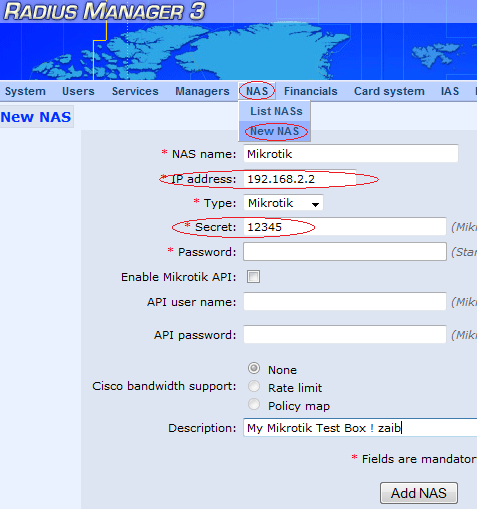
Also test the functionality of the User Control Panel (UCP):
http://yourhost/radiusmanager/user.php
The initial username and password are:
Username: user
 Password: 1111
To be able to log on to UCP as another user, create the user in ACP first.
System optimization Tips
The performance of the entire Radius Manager system mainly depends on the speed of the hard disks and the MySQL subsystem. If You encounter performance problems, check the following:
1. Check radacct table size. If it is large (> 300-500 MB), delete the old years from it using the deloldyears.sql script (included in the RM tar archive in doc directory).
2. Add more RAM to the system. Adding 2-4 GB of RAM doesn’t mean any problem nowadays.
3. Use RAID 0 or RAID 5 array MySQL db storage devices.
4. Optimize the MySQL server via my.cnf file.
key_buffer=1024M
myisam_sort_buffer_size=512M sort_buffer_size=32M
Set key_buffer = RAM size / 2, myisam_sort_buffer_size = RAM size / 4, sort_buffer_size = RAM size / 64.
Adding more RAM will drastically speed up the MySQL system. Indexes must be fit in the RAM for optimal performance.
Notes
By default, many web servers can list the contents of the directory where Radius Manager files are stored. To prevent this there are several methods available:
1. Use .htaccess file. Enable the Options -Indexes directive In .htaccess file (example file is included in radiusmanager directory in the installation archive). Be sure to enable the htaccess support in order to use this feature (set AllowOverride All directive in httpd.conf).
2. Disable the directory listing in httpd configuration files.
HOWTO REPLACE/MODIFY DMASOFTLAB RM LOGO and TEXT !!!
You can Replace/Edit the default DMASOFTLAB logo files. by default, Images are available where you have installed the radiusmanager. Look into the images folder of radiusmanager.
For example I installed RM in /var/www/html/radiusmanager. There will be a folder name ‘images’ Look for these files.
dmalogo_small.gif
radmanlogo_small.gif
main1_01.gif
main1_02.gif
main1_03.gif
emailheader.gif
Edit Various Text/headings show at UCP/ACP
You can also edit the texts/descriptions in language description files in radiusmanager/lang/english folder.
look for texts.txt and strings.txt
To add logo in prepaid cards
You can modify its base image at radiusmanager/lang/english/card folder.
look for classic_bg.png and refill_bg.png
Some Example:

MIKROTIK NAS CONFIGURATION
Setting up RADIUS authentication and accounting
To send authentication and accounting requests to Radius server, You have to configure your Mikrotik NAS. Use Winbox to view and edit the configuration. Follow these steps:
1. Connect to your Mikrotik router using Winbox.
2. Select Radius from the main menu.
3. Click on the + to create a new RADIUS server description:
(see the attached screenshot)

Description of fields:
• Service:
• PPP: for PPP RADIUS authentication
• Address is your RADIUS server host. eg 192.168.2.1
• Secret is the NAS secret from /usr/local/etc/raddb/clients.conf e.g 12345
• Authentication and Accounting ports are the standard RADIUS ports.
• Timeout defines how much milliseconds can elapse while the answer arrives from the RADIUS server. If You are using slower connection to RADIUS server or the accounting tables are large, set this timeout higher (3000-5000 ms).
Now Set the AAA options of PPP service (PPPoE): Goto PPP / Secrets / click on PPP Authentication & Accounting Button, and see the following.

Turn on RADIUS authentication (Use Radius) and RADIUS accounting (Accounting). Interim update is the time interval when RADIUS client (Mikrotik NAS) sends the accounting information to the RADIUS server. If You have more than 200 online users, use higher values (5-8 minutes) to avoid MySQL overload.
Now Enable incoming RADIUS requests (POD packets). It is required to use the REMOTE disconnection method in Radius Manager: Don’t forget to open the UDP port 1700 in firewall on Mikrotik and Linux server.
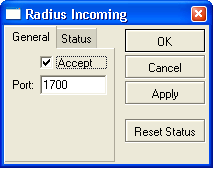
To Test the database connectivity: use the following command from RADIUS CLI.
rmauth 192.168.2.9 user 1

Mikrotik-Xmit-Limit=1028,Mikrotik-Rate-Limit=”262144/262144”
(Where 192.168.2.1 is the MT IP) You have to see similar output to this. If there is a MySQL socket error, define the correct socket location in /etc/radiusmanager.cfg. The default socket file on Redhat is /var/lib/mysql/mysql.sock. On Debian systems the proper socket path is /var/run/mysqld/mysqld.sock.
To successfully test rmauth, You have to create NAS entries in ACP. In this example, the NAS IP
You have to restart FreeRadius every time when You modify the NAS devices. Unfortunately FreeRadius doesn’t read the configuration files dynamically.
ADDITIONAL SETUP
Starting daemons at boot time
Radius Manager system supports automatic startup of daemons: radiusd, rmpoller and rmconntrack. The automatic installer copies all the required scripts to /etc/init.d directory and sets the required permissions on them.
The following methods are available to set up automatic service startup:
• Use Webmin to start services at boot time or
• Use command chkconfig –add [service_name] (Fedora only)
A chkconfig example follows:
chkconfig --add radiusd
 chkconfig --add rmpoller
 chkconfig --add rmconntrack
 chkconfig --add mysqld
 chkconfig --add httpd
 chkconfig --add dnsmasq
ADDED SECURITY: (My Suggestion, zaib)
I placed this RADIUS Server on user subnet, which is not suitable, palce it on behind Mikrotik DMZ,
then create a user in Mikrotik For example ‘user’ with restricted ip pool, and using FIREWALL rules,
Restrict this id/ip to access only RADIUS Server , block all other access for this id / pass.
This way user have to first dialin to open RM User Self Care Portal.
HOWTO ADD Service Plans in RM ACP & Generate Prepaid/Refill Cards:
256Kbps Monthly Service Plan
Following is an example on howto add New Service and assosicate it with new user.
Package = 256Kb
Expiry = 30 Days
Login to RM ACP , Goto Services and click on New Service.
In Service Name* tpye ‘256Kbps Monthly’
Click on ‘Available in UCP‘
Click on ‘Limit Expiration’
on ‘Set data rates’ (DL/UL) type 256 / 256
Now goto Bottom and in ‘Expiration Date Unit’ Select 1 , Initial 0, and
Finally, Click on Store Service Bottom in the End.
Done Your new service is created with 256Kbps Speed Limitation with 1 Month Up-Time Limitaion.
Following are screenshot for the above created Service.

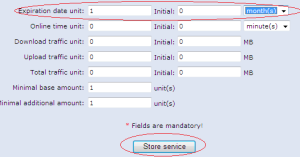
- Add Service – Image 2 aacable@hotmail.com

Now we have created the new service , its time to create new user or generate pre-paid cards and assosciate them with this new service plan.
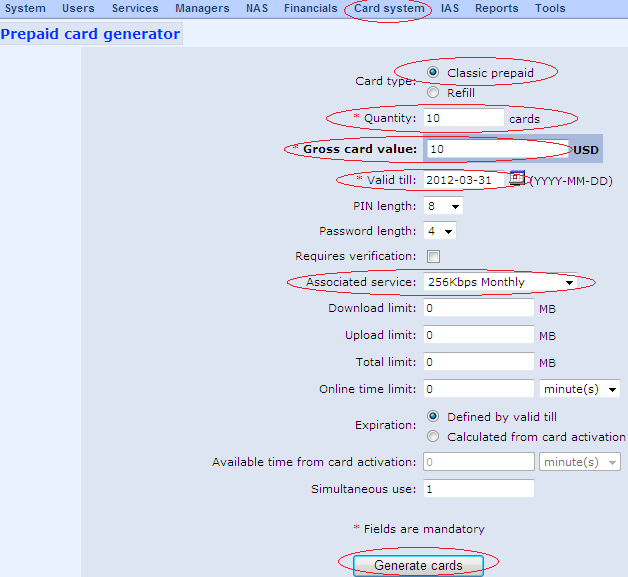
rm-add-pre-paid-cards / aacable@hotmail.com
Service is ready to be used. 🙂
HOWTO ADD QUOTA BASE SERVICE IN RM:
Now we will Add Quota Base Service Plan. For example User is allowed to use 1GB @ 1mbps per Day, After using his 1 GB Quota, his service plan should auto switch to 256Kbps speed plan for the rest of teh day. . . We have to use DAILY SERVICE option in RM for this purpose. First create Daily service with 256Kbps limitation, and then create the 1Mbps / 1Gb Daily Quota limit service and use the next dail service option in 1mb service plan to point it to 256k.
First we will create 256Kbps service plan. This will be very simple basic plan.
Open RM ACP, Goto Services, and create new service, and name it
256Mbps – Daily Service , rest of options can be set by seeing the image below.

256k-daily-image-1
- 256k-daily-image-2
Click on Store Service. Now 256Kbps daily service is ready, its time to create your regular 1Mbps / 1GB daily Quota Service Plan.
Open RM ACP, Goto Services, and create new service, and name it
256Mbps – Monthly, rest of options can be set by seeing the image below.

1mb-1gb-quota-image-1
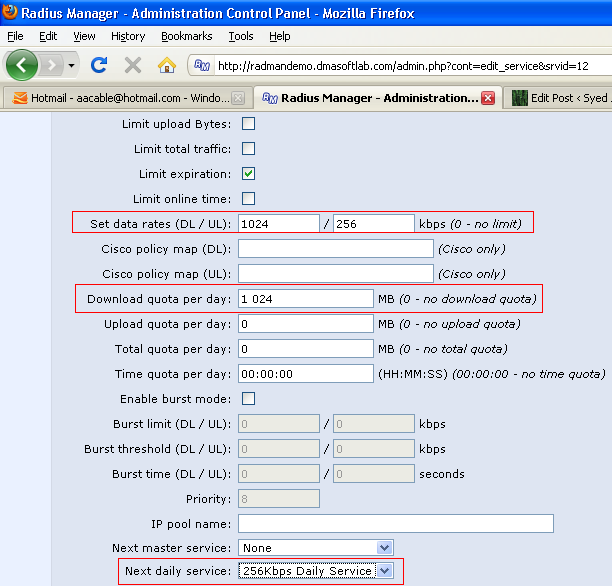
1mb-1gb-quota-image-2

1mb-1gb-quota-image-3
All Done. Now Simply generate cards or user ids and associate it with the 1mbps service.
HOWTO SEND EMAIL NOTIFICATIONS / WARNING TO USERS BEFORE THERE ACCOUNT EXPIRE
Goto Home / system settings , here you can set it.

4) LINUX TRANSPARENT FIREWALL BRIDGE CONFIGURATION [using FEDORA 10]


Following is a comprehensive guide on how you can setup Linux base Transparent bridge with advance firewall capabilities like DHCP Server MACto IP binding restriction, Easily add remove clients via single file using text editor or WEBMIN, Also you can Port Filtering to block unwanted traffic from passing through.
A bridge is a way to connect two Ethernet segments together in a protocol independent way. Packets are forwarded based on Ethernet address, rather than IP address (like a router). Since forwarding is done at Layer 2, all protocols can go transparently through a bridge.You can think of a bridge like a advance manageable network switch/firewall/router. We will be using this Linux Transparent bridge according to the network diagram shown at the start of this article.
The job of the bridge is to examine the destination of the data packets one at a time and decide
whether or not to pass the packets to the other side of the Ethernet segment. The result is a faster, quieter
network with less collisions.
You don’t need to change your existing network layout. You just plug in the bridge and you start working. If for some reasons, your Linux bridge box should go down, reconnect the cables from your bridge to your switch, and nobody will even notice that something was not working!
The placement of the bridge would be something like.
Sserver’s >> switch >>eth0>> LINUX BRIDGE with 2 interfaces >>eth1>> User Switch >>User
Pc’s
Now there are few scripts involved in engaging the bridge, If any one requires them, email me and I will send him my script copies, File Name: firewall.rar
SIMPLE STEP BY STEP instructions on howto copy and execute the scripts:
HAWRDWARE REQUIREMENTS:
Any adequate P4 / Xeon Dual Core with at least 1 GB RAM , 2 Lan Cards (preferably Gigabit)
SOFTWARE REQUIREMENTS:
Any Linux flavor, preferably FEDORA CORE 10 or likewise (Full installation with all packages selected at them time of installation, specially bridge utilities)
After successfull installation of FEDORA, copy firewall.rar , unrar them, and copy all scripts in a folder
/firewall/aacable

Now goto /firewall/aacable folder, make all scripts executable by issuing command chmod +x *.*
If required, convert them using dos2unix command, as sometimes copying it from windows generates some problems.
Now copy rc.local to /etc/ (overwrite older one) & restart the system.
Now after booting , rc.local will excute following files . . .
1)
/firewall/aacable/bridge.sh
(It will remove ip address from eth0 n eth1 and create bridge interface br0 with following ip: 10.0.8.1 for remote access and management of local bridge system, also dhcpd will be bind to this interface)
2)
/firewall/aacable/conf
(This is some custom configuration to prevent timeouts / delays, Latency and some other stuff)
3)
/firewall/aacable/start
(This is the main firewall script , It will execute All DHCP n Firewall related Scripts one by one. It will add all mac/ ip foundin macip.allowed file in dhcp configuration file and then bind them using iptables so that user mac ip must be matched with the file accordingly otherwise user access will not be granted. Any user whose entry will not be found in macip.allowed file, will get off subnet ip like 192.168.100.x
You can view the ‘start‘ file and see the related actions defined in there.
Your BRIDGE is ready & Following restrictions will be in place.
1)
If a user MAC n IP is found in /firewall/aacable/macip.allowed file, User will be granted valid ip as you entered in the macip.allowed file, for example
00:19:d1:fd:83:b1 10.10.2.13 # ZAIB-PC
The user with above mac address will always get the 10.10.2.13 ip, if he manually tries to change the ip or mac, he will not be able to pass the bridge. MAC n IP combination matching is required in order to pass the bridge.
If a user MAC n IP is not found in /firewall/aacable/macip.allowed file, User will be granted INVALID ip series from following off subnet 192.168.100.10-192.168.100.200 and thus will be completely isolated from the local valid network.
You can change all ip series in DHCP related files.
To add user , you can manually edit /firewall/aacable/macip.allowed file and add entry in following format
00:16:76:7E:05:7B 10.0.0.1 # SERVER1-ISA
00:06:5b:62:71:0a 10.10.2.12 # JOHN-LAPTOP
and the run start file which will add entry in macip.allowed file and add dhcp entry and run the security script.
OR the easiest way is to setup WEBMIN and link the file with webmin, so you can add/remove files easily via webmin GUI.I have done some advance customization of webmin, I added support user in webmin for support personnel , and grant him only right of editing this file, after the support personnel edit this file and click on save, it automatically execute the start script which add / remove all entries again in firewall. See the below images for example.


This firewall script also blocks few ports which are commonly used in virus flooding. thus saving junk traffic from passing by from one end to other end.
You can do many interesting things using this bridge :~)
BRIDGE SETUP DONE.
x=x=x=x=x=xx=x=x=x=x=x=x=x=x=x=x=x=x=x=x=x=x=x
Note: Later on, I moved FTP servers from Mikrotik DMZ to User Subnet, I also changed FTP operating system from Microsoft Windows 2003 R2 Server to Ubuntu Linux and set all sharing via Apache and linked apache authentication with Radius Manager , This step was done because there was unnecessary junk load of FTP data going through Mikrotik router , so I placed them on user subnet and put radius authenticaiton on it, so only valid account holder can access it. I have also posted an article on my blog website on how I achieved it.
So guys, this is a very shorten version of how I completed this project. It was a very good project for me. I learned many new techniques on howto handle various issues. It took me many days n nights in googling, and I must say GOOGLE was my best friend and I consider google my teacher 🙂
If you need any assistance , Do let me know
Later Updates Year 2012:
https://aacable.wordpress.com/2012/11/26/dmasoftlab-radius-manager-sms-notification-configuration/
https://aacable.wordpress.com/2012/11/22/howto-enable-mikrotik-to-sendreceive-sms-using-gsm-modem/
https://aacable.wordpress.com/2012/11/20/dmasoftlab-rm-email-notifications-for-various-events/
https://aacable.wordpress.com/2012/11/20/mikrotik-radius-manager-quota-base-service/
🙂
Regard’s
SYED JAHANZAIB
Email: aacable [at] hotmail.com
+92.333.xxxxxx
 Syed Jahanzaib - Personal Blog to Share Knowledge !

Looking forward to the complete guide, when do you expect it to be released?
LikeLike
Comment by zak — July 25, 2011 @ 11:11 AM
As soon as I get some free time. I have written many howto’s on this topic before, but most of them are unmanaged and haven’t published yet, and need to be put together bit by bit, In the meanwhile if you require any specific topic help, do let me know.
LikeLiked by 1 person
Comment by Pinochio / zaib — July 25, 2011 @ 11:22 AM
Was hoping to try yours out for a mini wisp project wish to do. I saw the other blog post, but was looking for a more indepth guide, config files and such.
LikeLike
Comment by zak — July 25, 2011 @ 12:46 PM
I will try to write it sooner, any configuration specifically you want to get quickly ?
LikeLike
Comment by Pinochio / zaib — July 26, 2011 @ 6:06 AM
no thank, all important.:)
LikeLike
Comment by zak — July 28, 2011 @ 1:31 AM
I too would be interested in a detailed step by step guide for the setup of Radius Manager on Fedora 10-13 as I will be venturing in a ISP business at the end of August. I’m a Linux newbie and have attempted to setup radius Manager on fedora 13 with no success and need to get up to speed with Radius Manager as soon as possible. Your help would be greatly appreciated.
LikeLike
Comment by Steve Anderson — July 31, 2011 @ 7:37 PM
Do not use Fedora 13.
User Fedora 10 , I have installed RM 3.9 many times in FED 10 with success. A bit lengthy process though, but the result is awesome 🙂
I have recently posted the shorten version of RM manual on this page, view it or I can email you the complete RM manual if you like.
Let me know how can I help you.
LikeLike
Comment by Pinochio / zaib — August 10, 2011 @ 12:07 PM
HI
PLEASE I need RM manuel
Thank.
LikeLike
Comment by jean yves — March 9, 2013 @ 1:22 AM
yes pls it will be grait syed tks 🙂
LikeLike
Comment by joe — March 10, 2013 @ 3:48 AM
Waoh that great can u send the net d tiagram and the howto ? i look forward to it thanks
LikeLike
Comment by Emmanuel Oghenero Onowojo — August 10, 2011 @ 1:35 AM
You can view the story and diagram here.
LikeLike
Comment by Pinochio / zaib — August 10, 2011 @ 12:04 PM
[…] Diagram Layout : (Complete setup guide can found at https://aacable.wordpress.com/2011/07/19/mikrotik-squid-zph-complete-guide-incomplete-post-i-will-edi… GLASSLINE-Network-Presentation-by-zaib Update 03/08/2001 24.851000 67.008300 […]
LikeLike
Pingback by A Success story with Mikrotik and DMASoftlab RADIUS MANAGER [Glass Line Pvt Ltd.] June, 2011 « Syed Jahanzaib Personnel Blog to share knwoledge ! — August 10, 2011 @ 2:45 PM
Awesome I’ve been waiting on your reply. I’m going to try the install today and will let you know how it went. Much appreciated.
LikeLike
Comment by steve anderson — August 10, 2011 @ 7:52 PM
Most Welcome ! Let me know your progress . . .
LikeLike
Comment by Pinochio / zaib — August 11, 2011 @ 11:29 AM
Hi, very interesting guide, I am using RM since ver 3.0, manual of install is clear but reading your guide it seems to be very easy.
The only things that are not well discussed are conntrack on remote host, how to set up the firewall (what use, selinux or others ?) how syncronize another radius server for backup in case of fault by main radius server.
My network don’t use centralized PPPoE server, I had a mikrotik “router configured” with 4 lan (1 wan, 1 lan, 1 log, 1 web), radius manager as centralized auth system on another server, for now a log server using syslog. I had CTS but I never configure it, it will be interesting have some explanation about it ;-), PPPoE is made by mikrotik RB433AH that work also for distribution, every bts make his PPPoE with his pool of address.
Reading about squid server I am thinking to insert it on my network but you belive it will be helpful like proxy server for increase some activity like youtube. You think that it will help?
Thak you
LikeLike
Comment by Ivan — August 20, 2011 @ 3:20 AM
Setting CTS is not a big deal. Just install another box with Fedora, install Mysql, and create DB over there. Although I personally never tested it as separating DB is not required for under few thousands of users , or if you have modern n fast hardware.
SQUID can really help you in reducing load from your main internet feed. the sample squid.conf I posted at my blogs, gave me very good HIT RATIO, I have also ZPH, which is useful to deliver cache content at full LAN speed to users , it increases users browsing speed to satisfactory level, even for low bandwidth package users.
As far as Youtube is concerned , its not cached by default, although there are few articles on internet available on howto cache YT, but believe me, usually they dont work or stop workign after few time, What I ahve tested is a Addon for SQUID name ‘VIDEOCACHE’ which cache all videos of YT and other internet video sites, its really usefull if your users frequently visit YT alot. for example, on my network, YT access ratio is almost 50% of all the traffic.
LikeLike
Comment by Pinochio / zaib — August 20, 2011 @ 10:45 AM
Hello, greetings from Puerto Rico;
I would like if possible to make an inquiry.
Currently I have a network that has a mikrotik server (pppoe server) connected to wireless clients connecting with Ubiquiti antennas which authenticate PPPoE.
I am following the diagram [https://aacable.wordpress.com/2011/07/19/mikrotik-dmasoftlab-rm-squid-zph-linux-bridgecomplete-guide/]
I have on my network as follows:
1 – Cisco 870 Router
1 – Mikrotik PPPoE Server x86
3 – Remote Sites w / Mikrotik RB750 w / OSPF & EoIP
1 – Proxy Server w / pfSense + Squid
1 – Firewall Server
1 – Radius Server
2 – Switch
In one of the LAN Switch I have connected my Mikrotik PPPoE Server with the Firewall and Radius Server.
At the other switch I have the Firewall Server, the Radius Server and point to point of the 3 remote sites with 9 Sectors 2.4Ghz, 3 on each site in which PPPoE clients connect with their antennas.
I want to:
1 – Setting up a second serve that would be the HotSpot. For customers that are not configured with their antennas authenticating PPPoE.
2 – if it may have to change my network to authenticate hotspot customers and clients authenticating pppoe equally through the radius and the firewall ..
Thank you for the help they can give me, I have yet to clear the diagram that shows the connection firewall and radius server, not if I’m doing well.
LikeLike
Comment by H3KTOR — September 26, 2011 @ 1:51 AM
You haven’t described what ‘firewall’ server is doing ? whats its role ? is it linux base transparent bridge ? It would be much better if you draw an detailed network diagram to describe your network. I use EDRAW for network diagrams 🙂
HOTPOST & PPPoE server can work together on single server. You don’t need to separate them. User can select any options which suites them either to connect via dialer or just use the hotspot browser base Login method which is convenient for most of the users. Just configure them like you do normally, Both services can use same Radius server for authentication. For example if you have external radius like freeradius.
No special rules are required. BUT use separate Interface card for hotpost and pppoe. for example . . .
ether1 > WAN
ether2 > PPPoE
ether3 > HOTSPOT
However If you want to configure separate server, its not a problem. Configure hotspot on another server.
Set Users DEFAULT GATEWAYand DNS pointing to HOTSPOT via DHCP server.
PPPoE clients will work regardless of gateway n dsn as pppoe works on Layer2 Broadcast, not by ip.
I recommend you to use IPLESS scenario for pppoe server.
There are so many things you can do in your network to secure / improve it. Just dig in there :>)
LikeLike
Comment by Pinochio~:) — September 26, 2011 @ 11:01 AM
Greetings;
Thank you very much for such a quick response.
Well first of all, what I have running is the following:
1 – Cisco 870 Router
1 – Mikrotik Server (PPPoE Server) x86 PC
1 – Proxy Server (Squid + pfSense + lightsquid) – Dell PowerEdge 860 1U rackmount.
3 – Wireless Sites (3 Mikrotik RB750G w / OSPF + EoIP) Point to Point between Sites in 5GHz to 2.4GHz Access Points for customers who are running as a router CPE Ubiquiti authenticating PPPoE within them.
So as this is currently running.
The other teams I have them physically with me or on order but still I have not mounted yet.
1 – Firewall Server (pfSense OS) – Dell PowerEdge 860 1U rackmount.
1 – Radius Server – Dell PowerEdge 860 1U rackmount.
1 – NAS Server (Storage) – Dell PowerVault 745N Rackmount.
1 – Monitoring Server (Microsoft OS w / MikroTik The Dude) – Dell PowerEdge 860 1U rackmount.
1 – Rhino w / Asterisk PBX Server 1U Rackmount. (Still in Plans)
I just want to know is how I can take advantage of all I want to ride and Maximise the benefits that can give me, I want if possible to help me set everything up, even I have doubts about the configuration of RB750G HotSpot with the settings I have.
We need to break everything I have or what I have I can give both services?
Attached is a PDF document without any logo or image for use, provided they give me the credit lol.
URL: http://www.centronetpr.com/CNet/centronet.pdf
LikeLike
Comment by Hector Rivera Santiago — September 26, 2011 @ 5:58 PM
Hardware + Network Scenarios seems good 🙂
You don’t have to break anything to setup Hotspot along with PPPoE.
If you have extra RB750, then you can setup HOTSPOT separately.
There is always a room for improvements , So You can Add many new features and services to your Network. I will write in details when I will be free. send me an email and we can be in touch via mail.
LikeLike
Comment by Pinochio~:) — September 26, 2011 @ 7:04 PM
and as would be the redirection settings for MikroTik RB750, he also would work as DHCP for the HotSpot?
LikeLike
Comment by Hector Rivera Santiago — October 5, 2011 @ 6:27 PM
Yes rb750 was acting as a hotspot gateway just to redirct un authenticated users to my billing portal. this was initially designed, later on I made some changes to the network, I moved FTP from MT DMZ to User subnet and change ftp OS from Windows to Linux, and setup apache sharing server with freeradius authentication. I also moved dhcp + DNS from RB750 to Linux. some other minor improvements too.
LikeLike
Comment by Pinochio~:) — October 6, 2011 @ 10:34 AM
The configuration of the MikroTik RB750 for Hotspot, does the DHCP Relay with Firewall?
LikeLike
Comment by Hector Rivera Santiago — October 5, 2011 @ 5:33 AM
No DHCP relay was used. it was just for redirecting non authenticated users to my billing server portal.
LikeLike
Comment by Pinochio~:) — October 5, 2011 @ 10:32 AM
Greetings;
For the September 29, 2011, I send the configuration of the MikroTik’s all I have, I would like to know if you see something and if lograstes would apply equally to HotSpot network that I’m riding.
Since I arrived I set up other servers and all, to exception of the PBX.
Check the e-mail and let me know, thank you very much for your help and forgive all this trouble.
LikeLike
Comment by Hector Rivera Santiago — October 6, 2011 @ 5:23 PM
i recently go through article and its amazing and really helpful for small ISP, you doing great job to share your knowledge without any expectation. keep it up.
LikeLike
Comment by savanikamlesh — October 7, 2011 @ 3:21 PM
could you tell me what i have to do if i need to give my clients an tv streaming solution on internet. i mean back end solution which you mention in this article
LikeLike
Comment by savanikamlesh — October 7, 2011 @ 3:50 PM
Please follow this link for LIVE TV Channel Stream guide.
LikeLike
Comment by Pinochio~:) — October 7, 2011 @ 6:21 PM
Hi,
This is Kiran. I have a radius manager bough from dmasoftlab. I want to edit Logo’s of radius manager & i need to put my company logos. I am using ubuntu Linux. Can you help me how to change logos.
LikeLike
Comment by Kiran — October 21, 2011 @ 11:32 AM
Dear Kiran, I guess the logo file is residing somewhere in radiusmanager/ folder,
i guess /var/www/html/radiusmanager/ , search here, I myself edited the original file, add my logo , and save it with the same name. I also mange to change the UCP text to suite my local language.
LikeLike
Comment by Pinochio~:) — October 21, 2011 @ 11:50 AM
by typing var/www/html/radiusmanager/ it is showing blank page.
LikeLike
Comment by Kiran — October 21, 2011 @ 11:53 AM
You can Replace/Edit the default DMASOFTLAB logo files. by default, Images are available where you have installed the radiusmanager. Look into the images folder of radiusmanager.
For example I installed RM in /var/www/html/radiusmanager. There will be a folder name ‘images’ Look for these files.
dmalogo_small.gif
radmanlogo_small.gif
main1_01.gif
main1_02.gif
main1_03.gif
emailheader.gif
LikeLike
Comment by Pinochio~:) — October 21, 2011 @ 12:02 PM
I am unable to find the images folder.
LikeLike
Comment by Kiran — October 21, 2011 @ 12:21 PM
I am happy with this post. 🙂
Thanks a lot.
LikeLike
Comment by Sithu Aung — November 8, 2011 @ 11:41 AM
Nice one. I am currently running daloradius for a client everything works fine but have issues with billing. would give this a try and let you have a feedback.
LikeLike
Comment by Oronti Adewale — November 22, 2011 @ 6:16 AM
Dolaradius is good for basic freeradius management, but its not complete ISP billing system, DOLARADIUS developer said in the forum that he can add customized options but there would be some charges.
DMA RM is really cool with tons of features in really dirt cheap price.
LikeLike
Comment by Pinochio~:) — November 22, 2011 @ 10:44 AM
Please mail me your script for 4) LINUX TRANSPARENT FIREWALL BRIDGE CONFIGURATION [using FEDORA 10]
on team.weblink@gmail.com
LikeLike
Comment by Santosh — November 23, 2011 @ 10:57 PM
Check your email. scripts have been sent.
LikeLike
Comment by Pinochio~:) — November 24, 2011 @ 10:34 AM
hi syed,
i am using similiar enviornment at my end. i want to integrate videocache (http://cachevideos.com/) in this scenario. Please guide.
Regards,
Santosh
LikeLike
Comment by Santosh — December 17, 2011 @ 10:53 PM
First you have to purchase license from VideoCache site.
After it you can integrate it in SQUID , using simple to follow guide available from videocache site. It’s very simple. Try it .
LikeLike
Comment by Pinochio~:) — December 18, 2011 @ 10:57 AM
I have already purchased videocache license …but it seems caching is not being done.. may be some wrong config done by my admin.
i will be glad if you can explain. my admin has configured it on single nic.
LikeLike
Comment by Santosh — December 18, 2011 @ 4:36 PM
How you can I help without knowing about the network topologies and scenario :s
LikeLike
Comment by Pinochio~:) — December 19, 2011 @ 10:37 AM
Dear Sayed
I have question about Linux transparent firewall bridge dose I need to add MAC for every user I have in the bridge .
Regads
Mustafa Alnama
LikeLike
Comment by Mustafa A.Naser — December 21, 2011 @ 2:36 PM
yes you have to add Every User’s MAC Address + IP address in the file, otherwise he will not get valid ip, and will not be able to pass through. I will add some snapshots today about the bridge controlling.
LikeLike
Comment by Pinochio~:) — December 22, 2011 @ 11:04 AM
is there a way to do a automaticilly sms scipt with a sms gateway/api to sent the clients sms’s 5 days before their account has expired in radius manager
LikeLike
Comment by Nori Gashi — January 4, 2012 @ 1:27 PM
I am not aware of any SMS script. A such feature will be available in the upcoming releases of the RM system. I guess ver 3.10 will be equipped with it, also “Forgotten password” feature will be added in the newer version too.
But you can create your own script that can fetch expiry date for each account , then compare with today’s date and by some calculating method it can then create list of users , then send sms to them, but it will be very complicated work to create such script. But I am Sure it will work
However email notifications/warning is possible by going to Home > settings > Email Notifications.
LikeLike
Comment by Syed Jahanzaib / Pinochio~:) — January 4, 2012 @ 2:18 PM
thx 🙂 for your reply 🙂 i hope that everyone will learn from this page like me 🙂
wish u all the best & ive sent u a email just for a question
Can i set squid server on a public ip
My configuration is :
80.80.xxx.18 – 1 mikrotik
INTERNET ROUTER 80.80.xxx.17/28 > 80.80.xxx.19 – 1 Mikrotik
80.80.xxx.20 – 1 mikrotik
80.80.xxx.30 – 1 RadiusServer
80.80.xxx.29 – squid server ( i want to add it here connected to switch with just 1 ether card)
all are connected with a switch and are in public ips
Can i set a squid server connected on the main switch without connecting into a mikrotik and just do dstnat or anything to connect them .
Is there a way to do it so 🙂
LikeLike
Comment by Nori Gashi — January 6, 2012 @ 5:56 PM
Do you provide your users public ips or private ips?
LikeLike
Comment by Syed Jahanzaib / Pinochio~:) — January 6, 2012 @ 8:56 PM
no every users has private ip 10.5.7.1/24 and every users take ips from radius manager dmasoftlab ( they have ppoe and a pool ip range )
here is my network diagram of my whole network now

thx mate 🙂
LikeLike
Comment by Nori Gashi — January 6, 2012 @ 9:26 PM
i forgot to mention that after every microtik there are users with Wireless cards
that stands so : MIKROTIK with wireless cards and sectors > clients ( with nanostation as routers configured with WAN with DMASOFTLAB PPOE and LAN as a dhcp )
is there a way to connect a squid server like radiusmanager without connecting to mikrotik cuz if i connect into a mikrotik the other doesnt see it or am i wrong …
LikeLike
Comment by Nori Gashi — January 6, 2012 @ 9:52 PM
Well there are many many ways you achieve your goal.
Well IMO, the best way is to connect your squid server with mikrotik interface.
then at your core mikrotik server, mark all packets for http port 80, and in route , route all marked http packets to squid server, and at squid server , create a route for your user’s subnet so squid will directly see the users, and there ips will be saved in logs for every individual users.
For more info, please read this article carefuly,
OR
you can also use dst-nat, but using this scenario, you wont be able to log users ips in squid logs.
LikeLike
Comment by Syed Jahanzaib / Pinochio~:) — January 7, 2012 @ 10:54 AM
Thx men 🙂 i thing until now everythings clear …
Now i have successfully build a squid server and used the second method to connect them together with DST NAT
cuz i dont really care of ips of the users , i just want to save the cache and then to get the users all the cache from my server 🙂
i have added this and it works ,even i dont thing its working properly cuz i can see the bantwitch from my users getting the internet .
i will read more and try to do it again thx from you …
And i would like to do a donation for your work and it would be good to add a donation with paypal botton , cuz u have done a good work for every ISP , getting everything what you need in your website 🙂 so if u can add a button at the main page to add a donation .
I personally would like to help …
LikeLike
Comment by Nori Gashi — January 7, 2012 @ 3:49 PM
Please mail me your script for 4) LINUX TRANSPARENT FIREWALL BRIDGE CONFIGURATION
email nori@noriks.com
and what do you thing it’s the best dns solutions for my mikrotik to resolve the webpages faster //opening to do a linux dns cache and adding to my clients cuz dns cache on mikrotik its to small
LikeLike
Comment by Nori — January 25, 2012 @ 3:19 AM
Check your email, firewall.rar have been sent, Use it according to the manual/article.
It’s best if you use Linux base DNS caching server for clients query.
LikeLike
Comment by Syed Jahanzaib / Pinochio~:) — January 25, 2012 @ 10:52 AM
Dear Syed,
please send me transparent firewall setting my email:almustaqbalisp@gmail.com
LikeLike
Comment by Mustafa A.Naser — January 25, 2012 @ 12:19 PM
thank you for the setting I have qustion can I revers the oprating of the firewall , I need every bodey conncet but only who I put it in the list will stop to access the server.
Regards
LikeLike
Comment by Mustafa A.Naser — January 25, 2012 @ 1:32 PM
Yes its possible, Edit the file name ‘secure’ and in the marked packets access allow rule, change it to DROP
and in the end , change DROP to ALLOW
LikeLike
Comment by Syed Jahanzaib / Pinochio~:) — January 26, 2012 @ 11:03 AM
please email me your firewall.rar file. my email address is : raaziv@gmail.com
LikeLike
Comment by raziv ferdous — January 25, 2012 @ 11:27 PM
can I use Linux base DNS caching server+ firewall bridge in a same server . and how to configure dns caching server for fasr browsing.
thanks
LikeLike
Comment by raziv ferdous — January 26, 2012 @ 1:20 AM
You can use DNSMASQ as your dns caching server on your bridge/linux machine. Its good, small and need no special configuration, except for adding its entry in /etc/resolv.conf at top. like below
nameserver 127.0.0.1
Don’t paste same question again n again.
LikeLike
Comment by Syed Jahanzaib / Pinochio~:) — January 26, 2012 @ 10:49 AM
can I use Linux base DNS caching server+ firewall bridge in a same server . and how to configure dns caching server for fasr browsing.
thanks my email address is : raaziv@gmail.com
LikeLike
Comment by raziv ferdous — January 26, 2012 @ 1:21 AM
You can use DNSMASQ as your dns caching server on your bridge/linux machine. Its good, small and need no special configuration, except for adding its entry in /etc/resolv.conf at top. like below
nameserver 127.0.0.1
LikeLike
Comment by Syed Jahanzaib / Pinochio~:) — January 26, 2012 @ 10:48 AM
You can use DNSMASQ as your dns caching server on your bridge/linux machine. Its good, small and need no special configuration, except for adding its entry in /etc/resolv.conf at top. like below
nameserver 127.0.0.1
*****************************************************************************33
is there a problem if i use the dnsmasq into radiusmanager if not whats the solution of that , could u make a small tutorial .
Does this work so or do i need to do more :
im using centos on my radiusmanager .
1. i need to install dnsmasq with yum install dnsmasq
2. then i need to change the etc/resolv.conf with
nameserver 127.0.0.1
nameserver primaryispdns ( or do i need to do it without adding this :
nameserver secondarzispdns (or even without adding this )
after adding this what do i need to change to mikrotik do i need to give as dns the ip of this computer (radiusmanager ) and with any firewall trick into nat
like redirecting the dns port into this computer and adding dns servers into mikrotik or ppoe profile …
i would be very thankfull if u could help me more and for everyone adding a dns solutions for mikrotiks to resolve the website fasters into lan caching dns server …
by the way until now im trying all ur tutorials and using it into my network and ur work is just too helpfull for everyone of us (isps )
thanks again for everything and wish u all the best
LikeLike
Comment by Nori — January 27, 2012 @ 1:49 AM
Install dnsmasq on your rm,
add entries in/etc/resolv.conf
nameserver 127.0.0.1
nameserver primary ISP dns
now test it by
dig yahoo.com
in results, at the end, you will see the nameserver being used, and ms , try it again and you will see the ms difference, it works good.
Now at mikrotik DNS server, set its primary ip pointing to RM ip, this way mikrotik will query all dns request via RM as its primary source, as DNSMASQ is installed on RM, dns caching function will also be performed thus the dns resolving functions will be much faster.
Now for the client, if you are usnig pppoe , set primary dns in profile pointing to mikrotik ip, secondary to RM ip.
LikeLike
Comment by Syed Jahanzaib / Pinochio~:) — January 27, 2012 @ 11:21 AM
Hello Syed, I am trying to configure a parallel trasparent proxy using one lan, I will try your configuration if possible. Do you had made a configuration like I wanna do? Have you ever used the second lan to return into the mikrotik otherwise than on the same wan network? If I have one public ip with trasparent router, how can you add another address that will be ignored fron the router? Thanks and congrats for the info shared and also for support. 🙂
LikeLike
Comment by Ivan — January 26, 2012 @ 2:04 PM
It’s upto you how you wanna route request from squid to WAN.
Either via using Mikrotik, or direct to WAN.
You can return squid data to mikrotik using NAT rule on mikrotik for proxy interface.
The better and simpler approach would be like this.
Use it to make things simpler and faster and more manageable for you.
………………………….INTERNET
…………………………….||||
………………………….PCC LB
…………………………=============
……………………//……………………\\
……………………//……………………\\
…………………..MIKROTIK…………80 port SQUID PROXY
…………………….||
…………………….||
…………………….USERS
LikeLike
Comment by Syed Jahanzaib / Pinochio~:) — January 27, 2012 @ 11:24 AM
Thanks for your nice post. Very shortly i’ll start this project. Could please send me the firewall.rar file to my mail Box? I’ll be grateful to you.
LikeLike
Comment by Md. Rustam Ali — February 11, 2012 @ 11:13 AM
sent.
LikeLike
Comment by Syed Jahanzaib / Pinochio~:) — February 11, 2012 @ 11:36 AM
our email is rejecting the emails. Therefore provide me with alternate email address.
LikeLike
Comment by Syed Jahanzaib / Pinochio~:) — February 12, 2012 @ 12:53 PM
Hi thanks for this tutorial everything works fine, I have only one question, I have a client who wants to see a DVR via dyndns, I can not configure dyndns point to the ip address of the client. Is that possible with the same scenario described in this tutorial? and if you could explain how to do this please, would greatly appreciate your help.
Thank you,
Alán
LikeLike
Comment by Alán — March 15, 2012 @ 7:17 PM
Sorry, I never used PCC with port forwarding, however forum is full of these queries, look there 🙂
I also left work on mikrotik because of job switching to Microsoft world.
LikeLike
Comment by Syed Jahanzaib / Pinochio~:) — March 16, 2012 @ 2:19 PM
Hi
Can you help me, how to give public ip to my customer from my ISP.. i am using RM and Mikrotik router in PPPoe dialing methode.
LikeLike
Comment by Nj — April 1, 2012 @ 10:19 AM
If you have public IP Pool, you can assign it in RM Services.
On Mikrotik, you don’t have to create NAT rule. All public ip’s users internet will work without it.
As chupaka quoted:
Just remove all your NAT rules
MT without rules is like Linux with ip_forwarding enabled
Also if you wanto use proxy for your public ip users and need to preserve users’ IPs – then you should use external Squid proxy with Balabit TProxy feature enabled. then the websites will see user’s IP, not SQUID ip.
LikeLike
Comment by Syed Jahanzaib / Pinochio~:) — April 1, 2012 @ 12:42 PM
salam jahanzaib bahi
brother i am using mikrotik 3.20 with pppoe + 8 wan loadbalancing wiche its server
brother my qusetion how much config live ip pool and log atentication mikrotik server user
plz reply me
thx
LikeLike
Comment by mujahid abbasi — April 2, 2012 @ 7:12 PM
re.phrase your question.
LikeLike
Comment by Syed Jahanzaib / Pinochio~:) — April 3, 2012 @ 8:39 AM
sir main mini isp settup lagana chahta hon jo (pta) k rules k mutabik ho koi acha sa network plan or servers k barey main batao plx
thx
LikeLike
Comment by shani — April 6, 2012 @ 12:56 PM
It’s all written and well documented in this article. Read it several times and you will get your answers.
LikeLike
Comment by Syed Jahanzaib / Pinochio~:) — April 6, 2012 @ 2:35 PM
Sir main nay ppoe server banana hai.. jo manual ip per chalay… Users kay Local Area Connection per main khud ip dalo..Plz is ke script bata dain
LikeLike
Comment by Owais Malik — April 4, 2012 @ 9:19 PM
salam
sir main mikrotik server 3.20 use ker raha hon main proxy + youtube chache ubuntu server 10.10 banana chahta hon sir , koi aisa script do k
main setting ker sakon thx
LikeLike
Comment by shani — April 6, 2012 @ 12:54 PM
Open http://www.google.com
and search following
aacable youtube cache
LikeLike
Comment by Syed Jahanzaib / Pinochio~:) — April 6, 2012 @ 2:36 PM
Salam Brother,
Currently I have Radius Manager 3.7 running and 3.9 on another server waiting to take its place however for more than three months I have been having a problem with the PayPal Express Check in that once a user chooses a service they would like to purchase from a remote hotspot we can see that the API request is sent to PayPal and that the PayPal token is returned but it never redirects the user to the PayPal login page but instead returns a “Server timed out” message to the user. But if I copy the PayPal token URL and place it in a web browser we are able to see the PayPal login page. This has made extremely frustrated as the PayPal express checkout worked before in Radius Manager. We contacted them but they stated that a port was block but I don’t see how that could be as I can see the port opening in the Mikrotik RB450 that is connected to the Radius Manager server with the remote Mikrotik Access Points connected to it by way of pptp. BTW, I forward the public IP address for https (443) to the Radius Manager local IP address on port 444. If there is anything you can do to offer some assistance in solving this mystery your help would be GREATLY APPRECIATED. I would like to thank you in advance for any help you can offer me.
LikeLike
Comment by Kirk — April 8, 2012 @ 2:55 AM
Hi ,
How can I configure my setup if i have 4wan LB ,RB450G as PPPoE concetrator, Fedora DMA Radius server?
My question is where i have to connect DMA radius server ??? to Mikrotik RB directly or to LB ???
LikeLike
Comment by George — April 8, 2012 @ 2:23 PM
Hi,
How can I set up where multiple users can access one account and share the bandwidth , setting up a system like your design just need more than 1 access per account sharing bandwidth
LikeLike
Comment by Bernie — May 9, 2012 @ 10:53 PM
alsalam alikom
hello sayed
i’m ask for made local mail server for our network customer and connect it with dmasoftlap radius manger please help me thank you
LikeLike
Comment by hesham — May 26, 2012 @ 2:27 AM
Dear sir;
salam e alikum. dear i am using mikrotik server with license and the version 5.4 with user manager. currently i implement hotspot wifi in my area and when ever i enable the user manager for authenticated the user account so it is ok each and every thing is working fine. but when they open youtube or start browsing so the delay time increase automatically.
i test it like this
when i start browsing so i ping the my gateway which is the ip of server so we do browsing the delay time increase automatically. sir please provide me a solution. i am stack here. i use mikrotik router r1100 also the same problem i face with this hardware router also. i am authorized dealer of Mikrotik but i stack here please provide me solution.
reply me in my email: aliakber.sakhi@hotmail.com
thank you very much sir.
LikeLike
Comment by aliakbar — May 28, 2012 @ 8:34 AM
You are probably seeing delay in ping replied ms. It’s normal due to QUEUE you are using to restrict user’s bandwidth.
Its normal. If user is not doing any activity on his pc, his ping reply will be ok, but as he starts browsing and downloading, you will see its impact on ping reply, This is due to heuristic control nature of queuing .
It’s ok you don’t need to do any thing in this regard. Either block the PING/IBMP protocol, which is a preferred way for me.
Or You can make it correct by using the following method.
https://aacable.wordpress.com/2011/12/07/mikrotik-howto-give-ping-icmp-high-priority/
LikeLike
Comment by Syed Jahanzaib / Pinochio~:) — May 28, 2012 @ 12:01 PM
thanks a lot sir for replying me and for helping me. sir the problem is this that when i start browsing delay time increase and internet speed is getting down and even i can not open a youtube page. it take one minute or more to open the page of youtube same with other website. so when i disable the hotspot with user manager so every user get the bandwidth and delay time also decrease and normal. this is the issue please help me if you face this kind of problem. thank you very much
salam e alikum.
LikeLike
Comment by aliakbar — May 28, 2012 @ 7:28 PM
Dear
please send me firewall script on mh email address ijazking@gmail.com
thanks
Fe AMAN ALLAH
LikeLike
Comment by Ejaz — June 18, 2012 @ 7:13 PM
Sir, I will need a step by step guide of setting up Radius Manager on CentOS 6.2 minimal. I have been trying to get it up and going without success. I will appreciate some help.
LikeLike
Comment by Endy — June 23, 2012 @ 9:56 PM
can i connect radius manager server with 2 Mikrotik servers on different isp ?
LikeLike
Comment by hussien — July 1, 2012 @ 7:12 PM
yes.
LikeLike
Comment by Syed Jahanzaib / Pinochio~:) — July 2, 2012 @ 11:10 AM
Sir if I want to handle 1000 concurrent online user each for PPPoE & HotSpot Type than what will be minimum hardware config each for both type or if single then also.
Secondly if RM server go crashed for and reason either physically or other issue and any hope for Loadbalance/Backup RM server as I will use seperate MySql server for User data.
Please Email me lotus6699 [@] GMAIL
LikeLike
Comment by RAJ — July 10, 2012 @ 7:11 AM
Its better if you use x86 version of mikrotik on any modern hardware.
You can use RM in HA mode, Contact DMASOFTLAB and they can guide you better in this regard.
LikeLike
Comment by Syed Jahanzaib / Pinochio~:) — July 10, 2012 @ 2:44 PM
MY senerio is different wifi hotspot on different place and in that place any user have to register itself in any one place and can access in any hotspot but the problem is that I want limitation of prepaid vouchers used as user can only use/reedeemed the voucher on that place only from where he buy the voucher is this possible in RM.
And I also want to know which OS and DNSMSQ is used by DYNDNS.ORG as I want same features give to my user..
LikeLike
Comment by RAJ — July 20, 2012 @ 2:00 PM
thansk for you sayed , can i use fedora 15 ?
LikeLike
Comment by youcef — July 10, 2012 @ 6:35 PM
Yes, But Fedora 10 is recommended as I personally used FED 10 at every time for RM installation and it works smoothly.
Consult Mr Viktor from DMASOFTLAB support for the info
support@dmasoftlab.com
LikeLike
Comment by Syed Jahanzaib / Pinochio~:) — July 11, 2012 @ 9:21 AM
thanks I do all the configurations but i can t connect from radius manager4 to my mikrotik . what should I have to do ? if there any problem or truck thanks 🙂
LikeLike
Comment by youcef — August 3, 2012 @ 7:52 PM
Excelent!! Thanks….. please tutorial radius server from source!!
LikeLike
Comment by Carlos Guzman — July 27, 2012 @ 8:32 AM
how can download and install fedora10
can i install fedora on virtual machine + Radius manager
i have Squid on ubuntu 11 64 bit + pcc+ user manager hotspot
i want to Radius manager not user manager from mikrotik
LikeLike
Comment by khaled — August 24, 2012 @ 1:43 AM
Yes you can install Fedora and then install Radius Manager on it.
You can download fedora from
http://mirrors.fedoraproject.org/publiclist/Fedora/10/
LikeLike
Comment by Syed Jahanzaib / Pinochio~:) — August 24, 2012 @ 11:35 AM
I’m using Ubuntu Server 11.04.
Before installing freeradius-server-2.1.8-dmamod-3.tar.gz all were ok.
but after execution of Make Command the following error is shown in the last few lines.
*************************************
gcc -o .libs/radeapclient .libs/radeapclient.o libeap/.libs/libfreeradius-eap.so -lnsl -lresolv -lpthread
/usr/bin/ld: .libs/radeapclient.o: undefined reference to symbol ‘fr_perror’
/usr/bin/ld: note: ‘fr_perror’ is defined in DSO /root/freeradius-server-2.1.8/src/lib/.libs/libfreeradius-radius-2.1.8.so so try adding it to the linker command line
/root/freeradius-server-2.1.8/src/lib/.libs/libfreeradius-radius-2.1.8.so: could not read symbols: Invalid operation
collect2: ld returned 1 exit status
make[6]: *** [radeapclient] Error 1
make[6]: Leaving directory `/root/freeradius-server-2.1.8/src/modules/rlm_eap’
make[5]: *** [common] Error 2
make[5]: Leaving directory `/root/freeradius-server-2.1.8/src/modules’
make[4]: *** [all] Error 2
make[4]: Leaving directory `/root/freeradius-server-2.1.8/src/modules’
make[3]: *** [common] Error 2
make[3]: Leaving directory `/root/freeradius-server-2.1.8/src’
make[2]: *** [all] Error 2
make[2]: Leaving directory `/root/freeradius-server-2.1.8/src’
make[1]: *** [common] Error 2
make[1]: Leaving directory `/root/freeradius-server-2.1.8′
make: *** [all] Error 2
**************************************
I have installed the following packages
gcc mysql-server mysql-client libperl-dev curl php5 php5-mysql php5-cli php5-curl php5-mcrypt php5-gd php5-snmp libmysqlclient15-dev
LikeLike
Comment by Srijit Banerjee — August 31, 2012 @ 3:41 PM
I finally solved this problem by
#Add -lfreeradius-radius-2.1.8 in freeradius-server-2.1.8/src/modules/rlm_eap/Makefile
radeapclient: radeapclient.lo $(CLIENTLIBS)
$(LIBTOOL) –mode=link $(CC) $(LDFLAGS) -lfreeradius-radius-2.1.8 $(RLM_LDFLAGS)
-o radeapclient radeapclient.lo $(CLIENTLIBS) $(LIBS) $(OPENSSL_LIBS)
and then running the following commands
make
make install
ln -s /usr/local/lib/libfreeradius-radius-2.1.8.so /usr/lib/libfreeradius-radius-2.1.8.so
ln -s /usr/local/lib/libltdl.so.3.1.4 /usr/lib/libltdl.so.3
ln -s /usr/local/lib/libfreeradius-eap-2.1.8.so /usr/lib/libfreeradius-eap-2.1.8.so
LikeLike
Comment by Srijit Banerjee — August 31, 2012 @ 5:39 PM
Sharing a fully working version of this mini ISP Project with u all.
LikeLike
Comment by Srijit Banerjee — September 4, 2012 @ 11:50 AM
Hi can you give me a layout of the cables lol I’m new to all this
Ruanjansen001@gmail.com
LikeLike
Comment by ruan — February 8, 2015 @ 1:12 AM
Iget error 691 in pppoe the user and password is not correct I found the rmuth not install in Ubuntu how can it work
LikeLike
Comment by Dh — September 28, 2012 @ 5:34 PM
I configured Mikrotik Hotspot with Radius manager. If i give the Hotspot interface(ethernet) to the existion IP based network(Switch). Only hotspot is working and ip existing ip based network is not working. Please Help me.
kindly help me.Both Hotspot and Static IP address network should work in single interface.
LikeLike
Comment by Nagarajan — October 9, 2012 @ 2:26 PM
in the ‘HOWTO ADD QUOTA BASE SERVICE IN RM’… where the image of 256k-daily-image-2?? please update sir…
LikeLike
Comment by mohd — October 13, 2012 @ 7:37 PM
Sorry I don’t have its backup now, I configured it long time ago.
LikeLike
Comment by Syed Jahanzaib / Pinochio~:) — October 16, 2012 @ 3:03 PM
Hi please i have some problem when a try to logon i get this message: Radius is not responding please i need help
LikeLike
Comment by kevino — October 15, 2012 @ 10:11 PM
It could be occur due to bad secret/password, quick abort time.
LikeLike
Comment by Syed Jahanzaib / Pinochio~:) — October 16, 2012 @ 3:01 PM
the rmuth is not install how can i install it in ubuntu the radius user interfac work ok but iget error 691 and found the rmuth is not found in ubuntu what is the benefit of the rmuth with thanx
LikeLike
Comment by dh — October 17, 2012 @ 10:55 PM
rmuth ? I don’t know what is it. Please provide more details.
LikeLike
Comment by Syed Jahanzaib / Pinochio~:) — October 20, 2012 @ 10:47 AM
Thank for your reply I make a copy of radius and SQL frome another server with MAC address and tha all is ok but I get error 691 in broadband I connect it to mikrotik the mikrotik setting and nas is ok when i use the old radius work ok and get.internet and I read the user guide of radius manager I find command for check Rmuth I don’t know what It is its not found in my server
With regards
LikeLike
Comment by Dh — October 27, 2012 @ 1:33 AM
Post the error appearing in Mikrotik LOG when user attempt to connect,
LikeLike
Comment by Syed Jahanzaib / Pinochio~:) — October 27, 2012 @ 6:12 PM
the log error in mikrotik is (terminating user ssss authentication failed radius timeout (6) )
LikeLike
Comment by dh — October 31, 2012 @ 1:14 AM
For information I use ubuntu 10 and get the above error in mikrotik the ping is ok from the mikrotik to radius and radius to mikrotik why iget error 691 in broadband and when I use it with out radius (mikrotik secret user) it work ok and get registration and Internet
LikeLike
Comment by Dh — November 2, 2012 @ 12:48 PM
the log error in mikrotik is (terminating user ssss authentication failed radius timeout (6) )
LikeLike
Comment by dh — November 10, 2012 @ 11:48 AM
Which RADIUS are you using ? Mikrotik USERMAN or DMA RM ?
LikeLike
Comment by Syed Jahanzaib / Pinochio~:) — November 12, 2012 @ 10:29 AM
I use DMA RM 3
LikeLike
Comment by dh — November 12, 2012 @ 4:24 PM
I use DMA RM 3
LikeLike
Comment by dh — November 12, 2012 @ 11:08 AM
the error in mikrotik or in radius server ?? if can help to solve it
LikeLike
Comment by dh — November 21, 2012 @ 6:07 PM
Hi please i need help i wan use RM whith my public adress how can i do?? please expl: http://publicadress/radiusmanager/admin.php
LikeLike
Comment by kevino — October 20, 2012 @ 10:41 AM
Hi please i need help. how to use RM whith my public adress expl: http://publicadress/radiusmanager/admin.php
LikeLike
Comment by kevino — October 20, 2012 @ 12:29 PM
No configuration is needed. If your RM is connected with the internet via Static IP, you can simply access it from the internet. For example If you have 2 interface cards, one connected with internal LAN, and other with the internet with static live ip, then you can simply access it via
http://public-ipofrm/radiusmanager/admin.php
If you RM is connected via DSL Modem or Router, then you have to port forward port 80 request from modem/router to rm pc.
LikeLike
Comment by Syed Jahanzaib / Pinochio~:) — October 20, 2012 @ 1:08 PM
Thanks i make nat on MT it is okay now i can join my RM whith my Public adress thank.
i have new problem RM was working well but afther brutally shordown all user are goind and i can create a new what is the problem please help me.
LikeLike
Comment by kevino — October 21, 2012 @ 5:56 PM
possible corruption of mysql DB. Usually it don’t happen.
LikeLike
Comment by Syed Jahanzaib / Pinochio~:) — October 22, 2012 @ 10:29 AM
Please what can i doing to fix it
LikeLike
Comment by kevino — October 22, 2012 @ 7:06 PM
Hey I am setting up a mini-ISP for South Sudan. Can I contract you as well to get internet to the people here? It’d be easier if I have someone trustworthy to handle this while I start connecting local locations here manually…
LikeLike
Comment by Randy — October 20, 2012 @ 9:23 PM
Sure.
LikeLike
Comment by Syed Jahanzaib / Pinochio~:) — October 22, 2012 @ 10:21 AM
please email me your firewall.rar file. my email address is :b_dekova@abv.bg
LikeLike
Comment by w0manitka — October 22, 2012 @ 7:45 PM
please email me your firewall.rar file. my email address is:- maitcpt@gmail.com
LikeLike
Comment by CPT — October 25, 2012 @ 2:00 PM
please email me your firewall.rar – spyke02@gmail.com
LikeLike
Comment by eduardo — November 11, 2012 @ 10:15 AM
Always great article, congrats Mr. Syed.
I am trying a different config but some problems and doubts 😉
my net is
internet public IP-> wan -> RB1100AHx2 -> LAN -> same subnet radius1 and 2, backbone – – – syslog is on another subnet
pppoe is on any tower that have different address, auth centralized on DMA RM radius 1 and 2
I will use another subnet 172.16.1.0/24 for proxy; on an ethernet port (172.16.1.1), then my trasparent proxy will have address 172.16.1.2.
You ever had this scenario for parallel proxy?
I accept any help and info, then I will share full config to you for publish.
I had view video about this in Português from Brazil but poor info no full explain.
Thank you. Best regards
LikeLike
Comment by Ivan — November 25, 2012 @ 3:37 AM
Hi, very interesting i’m planning to do a network like that but i have a problem with squid. what are the configuration on the cisco gateway in relation with caching?
LikeLike
Comment by arsene mba — December 10, 2012 @ 3:06 PM
without knowing your goals, I cant comment. describe in brief.
LikeLike
Comment by Syed Jahanzaib / Pinochio~:) — December 11, 2012 @ 3:20 PM
i want to put in place in small ISP 500 to 1000 customer, using HFC network. the network is already in place but i want to tune it. I want to configure a cache with squid, the server have 2 network card, one connected to a cisco 2811 and one to the client switch. i need to configure transparent squid with wccp. the routing and NAT are done on the cisco router. can you please advice me on a monitoring system to use?
LikeLike
Comment by arsene mba — December 11, 2012 @ 7:01 PM
please can u give a help i want to configure a transparent squid cache with wccp on ubuntu! awaiting ur reply
LikeLike
Comment by arsene mba — December 16, 2012 @ 1:36 PM
Thanks a lot for a very detailed post. You simply are wonderful. I sent you an email for support on setting up MRTG and some modifications in RM. Our dream is to achieve similar setup that you have helped your friend done. Keep it up.
LikeLike
Comment by Biodun — January 19, 2013 @ 2:42 AM
Thank you for the compliments. You have been replied.
LikeLike
Comment by Syed Jahanzaib / Pinochio~:) — January 19, 2013 @ 11:22 AM
please email me your firewall.rar file. my email address is:- eri_vasija@hotmail.com
LikeLike
Comment by erjugen — January 21, 2013 @ 2:05 AM
Hello mr.Jahanzaib, I’m a student in a HTL-School in Albania, and we are using your tutorial on building a mini ISP, untill now you have been a great help for us, i would really appriciate if you could send me the Firewall.rar my email address is eri_vasija@hotmail.com . with regards and waiting for your reply 🙂
LikeLike
Comment by Erjugen — January 23, 2013 @ 12:05 PM
Salam Syed,
I really appreciate your great page, its cool.
I’m a student in the field of computer networking and I have a project in doing in mini-ISP
but i don’t have all required equipments.
so my question is: can I apply things those steps in one workstation using VM-Ware Workstation?
Your Reply is very appreciated.
LikeLike
Comment by Jawhar Al — January 27, 2013 @ 1:44 AM
Virtualization is the greatest invention, and it supports many out of the box solutions.
In short yes, you can design whole scenario in one workstation, but just for lab testing.
LikeLike
Comment by Syed Jahanzaib / Pinochio~:) — January 27, 2013 @ 11:37 AM
thanks for your hard work
could you please send me firewall files my email gentel2277@gmail.com
LikeLike
Comment by Ahmed — February 15, 2013 @ 1:36 AM
Hello Mr. Jahanzaib! I read your article and it was great and very helpful me. I would like to you send me your firewall.rar file. My email: cispdev@gmail.com
Thank you!
LikeLike
Comment by cispdev — February 15, 2013 @ 3:00 PM
hi i have installed and configur rm and freeradius all working ok but wen user connect he use full bandwith rm dose not set the 256/64 limit and its configuredright any idea pls
LikeLike
Comment by joe — February 23, 2013 @ 3:55 AM
salam alaikom,
if the user is connected to mikrotik for the first time then the bridge will take the mac address and save for that user ?
LikeLike
Comment by Hussein — February 23, 2013 @ 9:12 AM
Hello Mr. Jahanzaib your article is great and very helpful . can you please send me your firewall.rar file. My email: gentel2277@gmail.com
Thanks in advance
LikeLike
Comment by Ahmed — March 6, 2013 @ 3:45 PM
check your inbox
LikeLike
Comment by Syed Jahanzaib / Pinochio~:) — March 6, 2013 @ 7:52 PM
Thanks alot Mr. Jahanzaib
LikeLike
Comment by Ahmed — March 7, 2013 @ 5:07 AM
Hi,
I am totally new for mikrotik.
I am planning to setup small new wireless ISP with card billing system.
Could you guide me the hardware for AP (Routerboard or PC (wireless cards name ) and also some design .
LikeLike
Comment by naunglay — March 30, 2013 @ 9:36 PM
I donot deal in Hardware. Please consult Dream Networks who are official distributor of mikrotik hardware in pakistan.
http://www.dreamnw.com
LikeLike
Comment by Syed Jahanzaib / Pinochio~:) — April 1, 2013 @ 9:15 AM
Hi, thank you for a very helpful article, I learned a lot by just reading it.
It really opens my mind to what can be done and understand how everything can fit and work together.
Please send me the firewall.rar file, I would highly appreciate it.
Cheers
Ado
LikeLike
Comment by ado — April 8, 2013 @ 11:54 PM
Sorry, I did not add my email address for the firewall.rar file as I do not want it public, can you pick it up from my profile?
If not let me know and I will post it.
Thanks in advance
Ado
LikeLike
Comment by ado — April 9, 2013 @ 12:49 AM
I have sent you firewall.rar
please check your INBOX
LikeLike
Comment by Syed Jahanzaib / Pinochio~:) — April 9, 2013 @ 12:52 PM
Thanks, much appreciated!
LikeLike
Comment by ado — April 9, 2013 @ 2:21 PM
Hello Syed,
Could you give me advice for how to build parental control on specific user for PPPOE Server? If you have any idea please help me.
LikeLike
Comment by TB — April 9, 2013 @ 6:48 PM
Its depend on the network scenario.
You can do some parental control using mikrotik only too. For example, first assign static ip to your targeted pppoe user. then enable web proxy, and redirect his or all users traffic to web proxy, then in web proxy you can filter web sites and apply restrictions to targeted client or all depend on requirements.
Also you can use opendns as your mikrotik primary dns, so all of the adult websites along with many other unwanted sites will be blocked automatically using DNS.
Read this.
LikeLike
Comment by Syed Jahanzaib / Pinochio~:) — April 10, 2013 @ 9:29 AM
Hi syed jahanzaib ….
1.Which one is best Mikrotik usermanager or DMAsoft usermanager …
If any thing can you share the details…
why u recommend DMAsoft…
2.why we are using only mikrotik for redirection .. when it is possible from openwrt or ddwrt devices….
thanks in advance ..
LikeLike
Comment by karthik ramachandiran — April 17, 2013 @ 4:29 PM
1- Mikrotik user manager is a basic level of radius server. Its fine for small number of users with basic functionalists like account expiry etc. On the other hand DMASOFTLAB RM is full featured 3rd party radius frontend (powered by freeradius) which offers higher level of flexibility, feature rich options, suitable for isps/wips or large scale network. Actually it all depends on the requirement of the network.
2- Yes you can use opewrt or ddwrt or any device you wish to use for simple redirection, even the NAS can redirect un authenticated users. there are several ways to do, i just used this one.
LikeLike
Comment by Syed Jahanzaib / Pinochio~:) — April 18, 2013 @ 8:11 AM
Hi Syed
Thanks for all your help.
Please be so kind to answer these few questions for me:
1.It is not clear to me exactly how to integrate the RB750 with hotspot for unauthorized users, when where are the redirected to the hotspot? Please help setup the RB750 hotspot as used in your setup.The router
2. My payment gateway is setup on the radius-manager box, will the RB750 use the same or do i have to setup a seperate payment gateway on the hotspot for unauthorized users?
3.On the Squid server, do I have to do the fw.sh file AND the refined config?
4. You said you delibrately left out some configs from the routeros box, beside the config you gave here what else do I need to do the the routeros box?
Thanks in advance!
Regards
Ado
LikeLike
Comment by ado — April 19, 2013 @ 4:21 AM
1- I used rb750 to redirect non authenticated users to advertisement page of the company. I use only PPPoE server as the authentication method. You can use hotspot to achieve the same. its upto you.
2- You can setup hotspot and exlude the payment gateway hosts/ips, then users can access them without login.
3- fw.sh is required only if your squid box have two interfaces, one for lan (or connected with mikrotik interface for users access) and second interface for WAN, then you need to masquerade traffic and you must use fw.sh otherwise not required if using only interface.
4- depends on the goals and requirements. I only left few things that were very specific to the particular isp. thats why i didn’t shared that info, otherwise everything is mentioned here.
LikeLike
Comment by Syed Jahanzaib / Pinochio~:) — April 19, 2013 @ 8:59 AM
Thanks Syed for your help.
Wat are the pros and cons of using a 2 nic vs 1 nic squid box?
Thanks
LikeLike
Comment by ado — April 20, 2013 @ 1:54 AM
hmmm actually none. Both method works fine. Its all about network design.
having two nic can give you some extra controls sometimes. but most of the the time same can be achieved using single NIC.
LikeLike
Comment by Syed Jahanzaib / Pinochio~:) — April 24, 2013 @ 10:24 AM
Hi Syed
Is it possible for you to give me a squid.conf that will work with squid version 3.1.10?
I would like to use this later version, but I do not know enough to translate the config to the new version.
Please help.
Regards
Ado
LikeLike
Comment by ado — April 29, 2013 @ 1:32 AM
Hi Syed, sorry for all the questions
I install radius-manager on centos and is working.
Do I need to open ports via iptables for accounting etc?
If so can you please help with the iptables commands that I need to run.
Please, thanks in advance.
Ado
LikeLike
Comment by ado — April 29, 2013 @ 1:37 AM
Sir, can i use mikrotik 5.20 user manager for 100 uses if not then free reduce manager ka trial licenses kitnay din ka hota hai aur licenses kaisay damsoft k site say download karain gay .
LikeLike
Comment by zeshan — May 4, 2013 @ 5:56 AM
Yes you can use Mikrotik as small radius server for 100 or above users. It works fine for basic requirements.
RADIUS MANAGER provide 30 days trial only. You can email them to give you trial download link at support@dmasoftlab.com
LikeLike
Comment by Syed Jahanzaib / Pinochio~:) — May 4, 2013 @ 10:17 AM
radius manager ka full licenses perches karnay paray ga ? sir how can i buy radius manager full licenses ?
LikeLike
Comment by zeshan — May 6, 2013 @ 4:09 AM
Please contact support@dmasoftlab.com
They will guide you from where you can buy this product. Also they provide one time free installation
Read the following price chart for radius manager.
http://www.dmasoftlab.com/cont/prices
LikeLike
Comment by Syed Jahanzaib / Pinochio~:) — May 6, 2013 @ 8:22 AM
Great lab !!
LikeLike
Comment by EasyZone Mikrotik Billing — May 26, 2013 @ 1:08 PM
hi guys is it possible to use squid to replace string in url example http://www.pleasehelp.com/1234 so i need to change 1234
before caching it or sent to client
LikeLike
Comment by joe — May 29, 2013 @ 11:49 AM
dear jahanzaib bhai jo aap ne oper network detailde hai is k baray main bataiye ja k is ne back end par net kidhar se liya hai or or kitna back up hai is k pas
LikeLike
Comment by hassan — June 8, 2013 @ 8:39 AM
This ISP was closed last year. Back-end bandwidth provider was Cyber net initially via radio and ptcl back-haul. and later via WATEEN FIBER.
LikeLike
Comment by Syed Jahanzaib / Pinochio~:) — June 11, 2013 @ 9:47 AM
One thing i notice the ethernet interface status autonegotiations = incomplete and rate = unknown.
LikeLike
Comment by Nadir — June 12, 2013 @ 3:29 PM
how install firewall.rar (bridge utilities) on ubuntu 10.04 ??
LikeLike
Comment by mohammed — June 18, 2013 @ 3:42 AM
Its written in guide howto install it.
IF you want firewall.rar , do let me know I will email you.
LikeLike
Comment by Syed Jahanzaib / Pinochio~:) — June 18, 2013 @ 10:10 AM
hi, i have a network and i want to put online games for my cistomer, any advice on how to proceed?
LikeLike
Comment by arsene — June 24, 2013 @ 7:59 PM
for local customers or external ?
LikeLike
Comment by Syed Jahanzaib / Pinochio~:) — June 26, 2013 @ 8:19 AM
for my local customer
LikeLike
Comment by arsene — June 26, 2013 @ 2:51 PM
Asalam -0- Alikum shah g,
sir, how much you charge to design a mini ISP? If I want to start wireless broadband services in Pakistan and require billing, DNS, Cache.
LikeLike
Comment by Irfan — August 27, 2013 @ 11:58 AM
Actually its a not a bundle product and it donot have any fix price. It all depends on the requirements and scalability.
email me at aacable@hotmail.com or skype aacable79
LikeLike
Comment by Syed Jahanzaib / Pinochio~:) — August 28, 2013 @ 9:26 AM
Danish Computer Gulshan Wala Nadeem Moosa Wala
LikeLike
Comment by NOuman — August 29, 2013 @ 9:21 AM
how can I help you ?
LikeLike
Comment by Syed Jahanzaib / Pinochio~:) — August 30, 2013 @ 2:32 PM
Hi,
I have Cisco 7206 VXR Router instead of Microtik can I use for the same ?
LikeLike
Comment by RAJ — September 18, 2013 @ 2:23 PM
I have very limited experience with cisco , so I cant give you any comment on it.
LikeLike
Comment by Syed Jahanzaib / Pinochio~:) — September 18, 2013 @ 3:53 PM
any one can help me with this scipt pls im not so perfect i tryed my best to make it working duno wat im doing wrong this script supose to find and replace string it intend to replace the itag video quality to 240p before send to client and befor any other squid prosess
#!/usr/bin/perl -w
# $Rev$
# by joe lawand
$|=1;
while () {
@X = split;
$x = $X[0] . ” “;
$_ = $X[1];
$u = $X[1];
if (m/^http:\/\/([0-9.]{4}|.*\.(youtube|googlevideo|google)).*(ptracking|get_video|videoplay|videoplayback|videodownload)\?/){
$itag = m/[&?](itag=[0-9]*)/;
my $string = $X[1];
$string =~ s/@itag/itag=134/ig;
print $x . $string . “\n”;
} else {
print $x . $X[1] . “\n”;
}
}
LikeLike
Comment by joe — September 28, 2013 @ 12:20 PM
how to hotspot mikrotik login from database user drupal-7 ?
LikeLike
Comment by ts — October 12, 2013 @ 5:45 AM
[…] https://aacable.wordpress.com/2011/07/19/mikrotik-dmasoftlab-rm-squid-zph-linux-bridgecomplete-guide/ […]
LikeLike
Pingback by DMASOFTLAB Radius Manager: Install + Backup + Restore [Short Reference Guide] | Syed Jahanzaib Personnel Blog to Share Knowledge ! — October 28, 2013 @ 9:12 AM
app android
so fare over then month working good duno if it need a beter way if somone want help but as its working
#download package versionCode market android
} elsif (m/^http:\/\/([0-9.]{4}|.*\.(android\.clients\.google\.com\/market\/GetBinary\/GetBinary))/){
@packageNameVer = “”;
@packageNameVer = m/(GetBinary\/GetBinary\/[^\?]*)/;
print $x . “http://market-GetBinary.google.com.SQUIDINTERNAL/@packageNameVer\n”;
LikeLike
Comment by joe — November 9, 2013 @ 9:32 PM
hi shahzeb please send me the scripts used for linux transparent bridge configuration.
LikeLike
Comment by Asgher Hussain — November 23, 2013 @ 1:24 PM
ok
LikeLike
Comment by Syed Jahanzaib / Pinochio~:) — November 24, 2013 @ 1:50 PM
Shahzeb sir, i need a script to disable and active remove pppoe users on specific date time. OR move pppoe profile to expired pppoe profile on specific date. Sir i need ur help. hope for ur reply. regards, aayush, Nepal.
LikeLike
Comment by aayush — December 2, 2013 @ 4:53 PM
hi shahazeb
question to all coder its regarding optimom spped tuning for perl
is switch faster then if
example:
if (m/^http\:\/\/.*(profile|photo).*\.ak\.fbcdn\.net(\/h(profile|photos)-ak-)(snc|ash|prn)[0-9]?(.*)/) {
print $x . “http://facebook.SQUIDINTERNAL” . $2 . “fb” . $5 . “\n”;
#Speedtest
} elsif (m/^http\:\/\/.*\/speedtest\/(.*)\?.*/) {
print $x . “http://speedtest.SQUIDINTERNAL/speedtest/” . $1 . “\n”;
#reverbnation
} elsif (m/^http:\/\/[a-z0-9]{4}\.reverbnation\.com\/.*\/([0-9]*).*/) {
print $x . “http://reverbnation.com.SQUIDINTERNAL/” . “$1” . “\n”;
#BLOGSPOT
} elsif (m/^http:\/\/[1-4].bp.(blogspot.com.*)/) {
print $x . “http://blog-cdn.” . $1 . “\n”;
} else {
print $x . $X[1] . “\n”;
}
use Switch;
switch ($value) {
case (m/^http\:\/\/.*(profile|photo).*\.ak\.fbcdn\.net(\/h(profile|photos)-ak-)(snc|ash|prn)[0-9]?(.*)/) {
print $x . “http://facebook.SQUIDINTERNAL” . $2 . “fb” . $5 . “\n”;
case (m/^http\:\/\/.*\/speedtest\/(.*)\?.*/) {
print $x . “http://speedtest.SQUIDINTERNAL/speedtest/” . $1 . “\n”;
case (m/^http:\/\/[a-z0-9]{4}\.reverbnation\.com\/.*\/([0-9]*).*/) {
print $x . “http://reverbnation.com.SQUIDINTERNAL/” . “$1” . “\n”;
case (m/^http:\/\/[1-4].bp.(blogspot.com.*)/) {
print $x . “http://blog-cdn.” . $1 . “\n”;
else print $x . $X[1] . “\n”;
}
LikeLike
Comment by joe lawand — December 3, 2013 @ 5:20 PM
no more http facebook they switch to https for good i think as of today any one ???????????????
LikeLike
Comment by joe lawand — December 5, 2013 @ 5:09 AM
Please mail me your script for 4) LINUX TRANSPARENT FIREWALL BRIDGE CONFIGURATION [using FEDORA 10]
on chahacyrillio@yahoo.fr
LikeLike
Comment by Alex Monkam — December 10, 2013 @ 1:49 AM
Sir Asif Janjua main na Radius Server on kiya tha mikrotik with hotspot lakin uas ke service start nahi hoye thi lakin main mikrotik k sath squid proxy use ker raha hon external please mujay aap isee approach ko validate kerwayen
LikeLike
Comment by Muhammad Asif Janjua — February 11, 2014 @ 12:08 PM
DMASOFTLAB Radius Manager 3.9 Free kahan sa download ho ga
LikeLike
Comment by dltube — February 13, 2014 @ 1:58 AM
DMASOFTLAB Radius Manager 3.9 Free kahan sa download ho ga aur ya kitna max kitna users ku support kerta haa
LikeLike
Comment by dltube — February 13, 2014 @ 1:59 AM
its not free. you have to buy its license from http://www.dmasoftlab.com
LikeLike
Comment by Syed Jahanzaib / Pinochio~:) — February 13, 2014 @ 8:15 AM
Hi sir, My name is Madhu, from Hyderabad.
i am planning to set up a mini-isp in my area. i spoke to Vodafone company and they agreed to provide the bandwidth to us. we took the office which is very near to the Vodafone tower as they are suggested. now the problem is , i don’t know anything about this set up process as i was providing internet by taking bandwidth from a third party. they used to maintain everything. now my customer strength is 500 individual home basis connections, my area is very popular for industrial companies. so planing to provide the bandwidth to the engineering colleges and some small companies too. so can you provide me what we need to buy/get to set up to maintain my ISP?
my requirements is : Bandwidth plans as 1/2/3 mbps to customers .
user id and password creation .
so for that what i have to do ?/ please sir, help me .
LikeLike
Comment by Tinku — February 23, 2014 @ 9:16 PM
hi sir, I installed radius sending users welcome sms alerts but not sending expridation sms
LikeLike
Comment by Fatih Büyükekmekci — April 12, 2014 @ 7:00 PM
bro, tell me could u configure my RM server centralized and DMZ.
and if any services charges or any other charges, tell me plz. reply with mail to pavankatepalli1905@live.com
LikeLike
Comment by Pavan — May 10, 2014 @ 8:14 PM
hello dear Syed, your IT collaboration from i awared of this site , give me a lot of infos. SO now i have some interest with the firewall on fedora, it is possible , you send me your scripts firewall.rar ? i would like to see some difference with mine …
thx for all
LikeLike
Comment by Raoul — June 21, 2014 @ 9:35 PM
You can get it from
http://www.wifismartzone.com/files/linux_related/
LikeLike
Comment by Syed Jahanzaib / Pinochio~:) — July 2, 2014 @ 9:55 AM
Dear Sir
I am using Radius Manager V4 with latest patch + Mikrotik V6 for PPPoE Server.
Remote disconnection method in Radius manager is set to Remote.
I am assigning the IP address to end user via IP Pool. I am not giving any of the static ip to any user. I have defined a range of IP Pool in radius manager.
The user is clearly getting the valid IP.
My question is that when the user is getting disconnected and again reconnecting to radius manager using his credentials he is getting the previous IP again.
I want that the user should get a new IP every time he log in.
I am not running any DHCP server. How can it be possible to get a new IP every time the user logs in.
Please give me your valuable support. My mail id is munotpratik1@gmail.com
LikeLike
Comment by Pratik M — August 30, 2014 @ 7:37 PM
check your dhcp lease time, make it shorter.
LikeLike
Comment by Syed Jahanzaib / Pinochio~:) — September 1, 2014 @ 8:58 AM
Hi, i’m try this architecture, but i for a small distribution. i don’t have the firewall, the proxy and the DMZ for the moment. I have one Main Mikrotik RB1100, dmasoftlab and another router RB750. The radius and the RB750 are connected on a switch and the switch to the main router. I don’t see the configuration of the RB750 to redirect user to the Hotspot portal; I have already configure the PPPOE server + NAT on main router. Now my problem is how to configure RB750 to self care portal.
thanks in advance
LikeLike
Comment by lex — November 19, 2014 @ 2:00 PM
how to use ap (access point) in dmasoftlab and how to check out single online user current usage of MRTG
LikeLike
Comment by saravananl — December 29, 2014 @ 5:49 AM
The Access Point must have SNMP support (so that connected user signals strength should be readable via snmp oid). If this feature is not supported by your AP, the result cannot be showed in the RM.
LikeLike
Comment by Syed Jahanzaib / Pinochio~:) — December 29, 2014 @ 9:10 AM
kai aap say baat ho sakti hy call per 03112910453 aik sms ker day apnay naam kay sath plz
LikeLike
Comment by faisal — January 9, 2015 @ 5:34 AM
Dear Sir,
This is really a fantastic howto. We are also implementing a similar network and wanted to know how scalable was your setup. How many simultaneous PPPOE users can the Mikrotik RouterOS handle on the Dual Core 3.6 Ghz machine that you mentioned. We will have approximately 300 users logged in at the same time so what type of machine should we consider for the Mikrotik machine.
Also request you to please email me the firewall scripts at techs436@gmail.com
Sonu
LikeLike
Comment by Tech Support — January 9, 2015 @ 5:41 PM
Dear Sir,
This is a great howto, I am also setting up something similar and wanted your advise on what hardware should I buy. I will have around 300-500 users overall. I am confused if I should buy a 2 CPU server or will a good i7 based desktop machine willl be fine. How many pppoe connections will the Mikrotik RouterOS be able to handle per machine and similarly how many customers can the Radius Maanger handle.
Please advise as you have a lot of experience in this. Lookinf forward to your reply. Also please share the firewall scripts at tech436@gmail.com
Thanks
Sonu
LikeLike
Comment by Tech Support — January 10, 2015 @ 12:14 PM
I misspelt my email address in my comment above. Please email the firewall script at techs436@gmail.com
LikeLike
Comment by Tech Support — January 10, 2015 @ 12:16 PM
please i dont see the USER / CLIENT SIDE CONFIGURATION [using WINXP/WIN7] part of your article which was supposed to the fifth 5th part. Can you please provide that
LikeLike
Comment by Fred Nordor — January 14, 2015 @ 5:02 AM
can we set above setup in vmware? if yes then provide detail step to configure.
LikeLike
Comment by shitesh — May 25, 2015 @ 9:10 PM
Hi.any updates on this GREAT How-To?
LikeLike
Comment by Eric Nyamu — May 28, 2015 @ 8:26 PM
hmmm nothing much, actually this project was done in year 2010 or 2011 maybe. I didn’t post much after this on the post. because most of the setup was customized and changed later according to network need. so every network is different.
LikeLike
Comment by Syed Jahanzaib / Pinochio~:) — June 2, 2015 @ 10:55 AM
hi,
I want to know if it’s possible to distribute with public address for customers? If yes how can i fo it.
For now i’m sharing my public ip with all my customers (using NAT). i have approximatively the same architechture with this post. What i’m wanted to do if possible, is to give for any of my custosmers his own public address.
LikeLike
Comment by lex — June 24, 2015 @ 6:35 PM
please send me firewall.rar My email is genio_speciale@hotmail.it
LikeLike
Comment by Genio — August 19, 2015 @ 1:21 PM
Sir,
I want develop radius server to implement 2000+ customers authenticatins I have mikrotik router and server with cent os, help me how to do
LikeLike
Comment by Ramesh — September 6, 2015 @ 9:50 PM
Do you want paid support ?
LikeLike
Comment by Syed Jahanzaib / Pinochio~:) — September 7, 2015 @ 2:52 PM
Hi,
I built my own system with Radius Manager to provide hotspot to PC clients, AP, Gateway also used Mikrotik RouterBoard. These APs connect to Gateway by CAPsMAN function, the services running well, Radius Manager can monitor the online Clients, traffic,.. But just only can not monitor APs signal or SNR, CCQ.
If I connect AP to Gateway without using CAPsMAN function, APs monitoring work well.
So how I can resolve this issue with CAPsMAN function of Mikrotik router.
Thanks.
LikeLike
Comment by TKV — September 9, 2015 @ 2:09 PM
I have not used CAPsMAN so i have no idea how it works.
LikeLike
Comment by Syed Jahanzaib / Pinochio~:) — September 17, 2015 @ 9:24 AM
Respected Sir,
Can you please show me how to setup the following https://aacable.wordpress.com/2011/07/19/mikrotik-dmasoftlab-rm-squid-zph-linux-bridgecomplete-guide/ on VMware exsi.
Hoping for you favorable and quick reply.
Ahsan Salman.
LikeLike
Comment by asalman45 — October 11, 2015 @ 9:30 AM
Hi Syed, I am using Mikrotik and freeradius server for PPPoE Connections. I can authenticate users, set the rate-limit, and total volume a user should have (like quota volume), but what I want is when the user uses up his total volume, a L4 redirect to a payment website should kick in. Also, I want the users to have access to some websites which would not count to the data usage. I would appreciate any help for this. Thanks!
LikeLike
Comment by Tobi — October 15, 2015 @ 6:48 PM
I use mikrotik CCR1036 8G 2S+ ROS v.6.30.2 with DMA radius manager.
user can login but not indicate in radius manager admin
.
LikeLike
Comment by RAqib — November 17, 2015 @ 10:55 PM
it happens dueto in correct configuration in mikrotik.
use interim update settings in mikrotik.
LikeLike
Comment by Syed Jahanzaib / Pinochio~:) — November 18, 2015 @ 8:38 AM
Please mail me your script for 4) LINUX TRANSPARENT FIREWALL BRIDGE CONFIGURATION [using FEDORA 10]
LikeLike
Comment by Heamnath — December 15, 2015 @ 1:56 PM
hy, i’m newbie here, can you help me how to configure step by step detail
LikeLike
Comment by ABILL — January 19, 2016 @ 6:13 PM
Hello Syed, I read this article on RM, I am planing on running a Mini WISP. I would love to know the following on RM:
User Refill with code because i don’t want to use the traditional RM.
Using Squid
SMS Notification on RM as well as sending code via SMS
and also the network design you have in the picture..
I am not a Mikrotik guy nor software guy. I am more into wireless.. I am hoping you could help me..
Thanks
LikeLike
Comment by Pizzadox Blade — February 14, 2016 @ 6:43 AM
Hi Syed i want to know if to distribute internet connection for 500 or 1000 users with many APs we have to get a central point to distribute or have many points of presence to distribute internet connection. What is the best topology? thanks.
LikeLike
Comment by clemy — June 14, 2016 @ 8:24 PM
Hi Syed , Please I want to know what is the best method to distribute internet connection to 500 or 1000 users connecting on hotspot? Is it good to have a central point where internet arrives and it is distributed from a switch anywhere? or it is better to have many Point of presence ie many routers and everyone has his internet source point.
Thanks.
(Excuse me for my bad English.)
LikeLike
Comment by clemy — June 14, 2016 @ 9:49 PM
It would be better if all location have there own mikrotik rb for hotspot, this way networks will be isolated and work better as they will have there nas closer to them.
LikeLike
Comment by Syed Jahanzaib / Pinochio~:) — June 15, 2016 @ 10:19 AM
Thanks for your response Sir. So do you think it is good to have differents internet providers for that locations ? or it is better to have a unique internet provider and use routing protocoles to distribute internet through all the locations?
LikeLike
Comment by clemy — June 15, 2016 @ 6:15 PM
Hello Sir, I want to distribute internet connection to 500 or 1000 users by APs. I want to know what is the best method to distribute. Having one central source of connection which gives everyone on switch or having many point of presence?
LikeLike
Comment by clemy — June 14, 2016 @ 11:27 PM
Hello Syed, I have been using UM and I just got RM installed. I would like to get a tutorial on how transfer my users from UM to RM and how to setup the RM. Could you please advice. Thanks
LikeLike
Comment by Timi Green — June 27, 2016 @ 8:55 PM
there is no ready made solution for it. it requires customized scripting that requires paid consultancy.
LikeLike
Comment by Syed Jahanzaib / Pinochio~:) — June 28, 2016 @ 8:52 AM
Help me to startup a mini isp
LikeLike
Comment by Suraj Leij — July 23, 2016 @ 8:56 AM
Morning sir i have a problem with this firewall script: http://aacable.rdo.pt/files/linux_related/FIREWALL.RAR%20Linux%20Transparent%20Bridge%20and%20Firewall.zip
i’m using Ubuntu 12.04 here is my email: clemyedoa@gmail.com. please can you send me the script? or is it the good ? thanks
LikeLike
Comment by clemy — September 6, 2016 @ 2:16 PM
those scripts are now quite old. do you still need it?
LikeLike
Comment by Syed Jahanzaib / Pinochio~:) — September 18, 2016 @ 4:12 PM
Hi,
This is raghavendeer i am a local ISP provider
And i have around 300 user so i just want know that if i configure cache server is it help as ore not plz rep me
LikeLike
Comment by Raghavender — September 16, 2016 @ 12:04 PM
Most of the content on the web is now HTTPS which is by in generally not cache-able dueto security reason.
other then https, you can cache normal http pages static contents. it may help average of 10-15 % traffic only (roughly)
try some commercial product like THUNDER-CACHE, i heard it works good.
LikeLike
Comment by Syed Jahanzaib / Pinochio~:) — September 18, 2016 @ 3:58 PM
hi syed you sed me firewall.rar ?
LikeLike
Comment by antonio — September 22, 2016 @ 12:53 PM
HELLO
I have a router mikrotik cloud switch series of 24 port type CRS125-24G-1S-2HnD-IN.
I can not install the user-manager package
I followed the installation mon according to the manual
follow the installation mode according to the tutorials
and also according to what I was given the forums
the trick is that I want to put this network up a network as shown in the following picture.
but I certainly can not because I miss the user-manager or maybe because my radius server is installed in a dedicated server and both devices are in different locations
also I want to know if I made a good choice of router mikrotik for this type of interconnection can you help me to set up this network please
LikeLike
Comment by hans — March 8, 2018 @ 9:10 PM
Hie Could you please send me the firewall.rar
LikeLike
Comment by Peter simendi — November 6, 2018 @ 4:20 PM
Please help me to merge the two individual DB having same schema (radiusmanager’s DB) into one as whole… Thankyou in advance 🙂
LikeLike
Comment by Bibek Bajagain — January 22, 2019 @ 10:37 PM
salam
sir i need help i configured pppoe server over 10 vlans and i just want to share local media server and i want to restrict the clients to 10Mbps for media server how is it possible i tried many times but not success kindly help me i’ll be highly thankful to you sir .
LikeLike
Comment by ali — February 13, 2020 @ 2:29 PM